Wednesday, November 15, 2006

Microsoft Offers SQL Server 2005 SP2 CTP

Microsoft announced on November 7, 2006 the availability of a Communtity Technical Preview (CTP) of the forthcoming SQL Server 2005 Service Pack 2 for all editions except Express, and special SP2 CTPs for the Express edition (SQLX) and Express with Advanced Features. SP2 will be required to run any version of SQL Server under Windows Vista and "Longhorn" Server. The "What's New in SQL Server 2005 SP2" page summarizes upgrades to:

  • Analysis Services
  • Database Engine
  • Integration Services
  • Reporting Services and
  • SharedTools
for editions that incorporate the features. Download the appropriate SP2 CTP bits from the SQL Server Community Technology Preview Program page. Microsoft senior vice president of Data and Storage Platforms Paul Flessner expanded on the preceding list during his keynote speech at the 2006 Professional Association for SQL Server (PASS) Community Summit in Seattle on November 15, 2006. Added features include:
  • Data compression
  • Increased business intelligence functionality
  • Security updates relating to Common Criteria
  • Manageability enhancements
  • Support for Windows Vista and
  • Optimization for use in the 2007 Microsoft Office system environment
Microsoft is pursuing Common Criteria security certification for SQL Server 2005 Enterprise Edition SP1 and SP2. Many governments require Common Criteria certification and it's a preference or requirement for many industries. In the meantime, Microsoft has made available Enterprise Strategy Group (ESG) reports on SQL Server 2005 security—Microsoft SQL Server Runs the Security Table and The Security Development Lifecycle (SDL). Advantage, Microsoft. According to ESG, "Microsoft SQL Server 2005 is particularly worth examining as it is the first major product release that Microsoft has put through the SDL." Flessner also announced that Visual Studio Team Edition for Database Professionals (formerly code-named "DataDude") is set to RTM on November 30, 2006.

Updated: 11/16/2006 with additional security data.

Technorati tags: , , , , , , ,

Thursday, November 09, 2006

ADO.NET Sync Framework for Occasionally Connected Systems

WiFi Internet connectivity is becoming ubiquitous in first-world urban areas, but there are classes of data collection/management applications that must be operable during wired and/or wireless network outages—emergency and health services, for example—or exhibit dramatically decreased user productivity without a live network connection—field sales workers come to mind. Some occupations are inherently occasionally connected: governmental, academic, and corporate field workers in rural locations; land surveyors; forest rangers; environmental scientists; marine biologists and the like. Seldom, occasionally, and usually-connected users need the ability to cache data locally and synchronize local data with large back-end databases. The preferred caching and synchronization model is Outlook 2003/2007, where clients always work with their local data store and the server only propagates data changes to the client. Following are the most common methods of client-side caching and synchronization:

  • ADO.NET Datasets persisted as XML files
  • Remote Data Access (RDA) for SQL Mobile/SQLce databases
  • Merge replication to SQL Server 2005 (not Express)
  • Occasionally Connected Systems (OCS)Sync Framework (future)
ADO.NET Datasets Microsoft's developers designed ADO.NET Datasets to support data management applications for usually, occasionally, or seldom-connected mobile users. Datasets persist dynamic (read/write) and a subset of catalog (read-only, slowly changing) relational data in XML files. Datasets replace combinations of merge and snapshot replication with a lighter-weight, XML file-based system that uses DataAdapters to communicate with back-end RDBMSes. I described disk and RAM resource consumption issues with large ADO.NET 1.1 and 2.0 Datasets in my May 2004 "Store Large Lookup Tables in DataSets" article for Visual Studio Magazine (reading page 2 requires free registration.) The article's Table 1 shows the time to load Datasets of various sizes from XML files Although multi-MB Datasets are practical for today's laptop, tablet, and ultra-mobile (portable) PCs, their resource consumption precludes use on Windows CE, PocketPC, SmartPhone, and similar devices. Single-file relational databases, such as SQL Server 2005 Compact Edition (SQLce), are better suited than Datasets for portable PCs and devices when data storage requirements exceed a few MB. Remote Data Access RDA is the basic application for synchronizing data between SQL Server Mobile or, more recently, SQLce—formerly called SQL Server Everywhere (SQLEv). RDA pulls data from a remote SQL Server 2000 or 2005 table to a client's SQLce table. The SQLce database keeps track of changes changes to the pulled data and, on demand, pushes the changes to the back-end server. RDA also can execute CRUD (CREATE, RETRIEVE, UPDATE, and DELETE) operations on the remote server with Transact-SQL (T-SQL) statements. SQL Server doesn't push changes in its data to SQLce; thus, RDA is a one-way replication technology.

RDA connects to the back-end database with the HTTP or HTTPS protocols to Internet Information Services (IIS) on the server and pass compressed data through firewalls. Custom C#/VB code or the Connection Manager application handles the details of the connection. RDA is the only method of replicating data between SQL Server 2005 Express (SQLX) and SQLce, because SQLX (unlike MSDE 2000) isn't a merge replication publisher. RDA can detect but doesn't handle concurrency or referential integrity conflicts, and schema changes aren't allowed.

Merge Replication Replication is the traditional means of updating data between SQL Server instances, and merge replication is the most common type. Merge replication uses a different Connection Manager to handle communication with the back-end database using HTTP or HTTPS protocols to pass compressed data through firewalls. Merge replication is two-way, supports referential integrity, handles concurrency conflicts, and allows schema changes. Merge replication, including subscription and publication, is a heavyweight process compared to RDA push/pull operations, but is quite reliable. OCS Sync Framework The OCS Sync Framework involves a SyncAgent on the client that uses a SyncTable to manage a ClientSyncProvider for each type of local store, such as SQLce or SQLX. Server-side components include a ServerSyncProvider, SyncGroup, SyncAdapter, and SyncAdapter commands. The SyncAdapter and SyncAdapter commands (DBCommand objects) are ADO.NET database-agnostic objects so synchronization can occur with SQL Server, Oracle, IBM DB2 or any other RDBMSes that have an .NET native data provider. IncrementalInserts, IncrementalUpdates and IncrementalDeletes enable clients to request the server to update catalog data. The client and server can push changes directly with SQL Server TDS or another RDBMS's wire protocol when a physical network connection is available. Otherwise the client can push and pull changes with a proxy that connects to a service. Synchronization methods can be:
  • Pull only from server (unidirectional)
  • Push only to server (unidirectional)
  • Push and pull (bidirectional)
  • Snapshot (no synchronization)

The OCS Sync Framework appears to fall midway between the lightweight RDA and heavyweight merge replication method in operational complexity and resource consumption, but the current (very early) implementation requires a substantial amount of client code to specify synchronization type and SQL statements for DBCommands.

Live From Redmond: Smart Client: Offline Data Synchronization and Caching for Smart Clients is Steve Lasker's 94-minute Webcast that covers Dataset, RDA, merge replication, SQL Query Notifications, and a preview of the OCS Sync Framework (requires free registration). Steve is a Microsoft program manager/technical lead and informal evangelist for OCS, Windows forms, VB .NET, and ADO.NET Datasets. Steve also delivered a more general Live From Redmond: Visual Studio: Developing Local and Mobile Data Solutions with SQL Server Compact Edition Webcast on December 4. Steve also offers an Occasionally Connected Systems slide deck and a screencast that demonstrates how the OCS Sync Framework operates and VB WinForm code to synchronize a client with SQL Server. Most public OCS-related information presently comes from Steve's blog. His "Tech Ed 06 Slides and Demos on SQL Server Everywhere Edition" post has links to DEV351: Developing Local and Mobile Data Solutions with SQL Server Everywhere Edition and DEV343: Offline Data Synchronization and Caching with SQL Server Everywhere Edition.

Update: 12/9/2006: 12/4/2006 Webcast name updated.

Technorati tags: , , , , , , , , , , , , ,

Wednesday, November 08, 2006

SQL Server 2005 Compact Edition RC1 Available

Microsoft accounced on November 7, 2006 the availability of SQL Server [2005] Compact Edition (SQLce) 3.1 Release Candidate 1 (RC1). SQLce—formerly named SQL Server Everywhere Edition (SQLEv) 3.1—is a lightweight, in-process cousin of SQL Server 2005 and SQL Server 2005 Express. SQLce is the successor to earlier SQL Server Mobile 3.0 and SQL CE 2.0 and 1.0 editions. You can download the SQLce RC1 runtime and readme, as well as SQLce RC1 Books Online. SQLce is an embeddable, small-footprint, single-user database for mobile and desktop applications. As an example, you can substitute SQLce for SQL Server 2005 Express (SQLX) when you need local storage for usually, occasionally or seldom-connected systems. SQLce uses the ADO.NET programming model, supports most SQL Server 2005 data types and T-SQL reserved words, and is freely distributable.

According to the "Microsoft SQL Server 2005 Compact Edition Overview" white paper, SQLce:

  • Occupies only 1.8 MB of disk space
  • Supports single-file databases up to 4 GB in size
  • Uses 128-bit SSL for secure and reliable functionality, even through firewalls
  • Uses 128-bit RSA file-based encryption on devices for database file security
  • Provides an encrypted data format with password protection
  • Will use the ADO.NET Sync Framework in Visual Studio vNext ("Orcas")

A separate OakLeaf blog post, "ADO.NET Sync Framework for Occasionally Connected Systems" has the details on Microsoft's new approach to SQLce synchronization that's coming in Orcas.

I wrote about Mobile Edition's morph to Everywhere Edition in my May 1, 2006 "SQL Server 2005 Mobile Edition Goes Everywhere" article for Fawcette Technical Publications Online's "Special Report: SQL Server." "SQL Everywhere" had a "déjà vu all over again" ring to me. It appears that I wasn't the only one non-plussed about the "Everywhere" suffix, which appeared to me to encroach on Sybase's SQL Anywhere trademark for a similar database product. Sybase also claims here that SQL Everywhere is their trademark. Here's what Microsoft has to say about renaming SQLEv to SQLce:

SQL Server 2005 Compact Edition, was previously named SQL Server 2005 Everywhere Edition during the product development phase. Customers have communicated to Microsoft through the pre-release community technology preview (CTP) program and other channels that this product name may cause potential confusion with other database product names in the industry. Microsoft has taken this feedback seriously and has accordingly changed the official product name.
Of course, this isn't the first time that Microsoft has done an about-face on product and architecture names. Remember .NET Everything? Steve Lasker's "SQL Server Everywhere Gets a New Name" post has more to say about the name change and SQLce's features in the forthcoming RTM bits. Steve is a Microsoft program manager/technical lead for Occasionally Connected Systems (OCS) and the forthcoming ADO.NET Sync Framework. Steve's Live From Redmond: Visual Studio: Developing Local and Mobile Data Solutions with SQL Server Compact Edition December 4, 2006 Webcast provides a detailed overview of SQLce's capabilities. His presentation includes a substantial amount of VB (!) ADO.NET code. (Free registration required.) Several comments about the post complain about SQLce's 4 GB size limit, which is a significant problem for local document storage. In a reply to a comment by John, Steve says, "Again, the current 4gb limit is purely a device optimization that we will definitely remove now that we’re running on larger desktop scenarios. ... The 4gb limit isn’t a 'free' restriction as we’ve done with Express." Microsoft's product page for SQLce hadn't been updated from SQLEv to SQLce terminology when this post was written. If you're working with the SQLEv CTP on devices, you can download the CTP for SQLEE Access Database Synchronizer to synchronize data between Access 2000 - 2007 databases and SQLEv CTP or SQLce RC1. There's more information on all these topic, plus details for the Microsoft SQL Server 2005 Compact Edition Tools for Visual Studio SP1 Beta, which Microsoft says updates the VS 2005 SP1 Beta smart device development components with the design time environment for SQLce, at the SQL Server Everywhere Edition [sic] blog. The SQLce newsgroup is here.

Updated 11/9/2006 with additional details about and links to SQLce, SQLEv, OCS and Sync Framework topics. 12/9/2006: Added 12/4/2006 Webcast link.

Technorati tags: , , , , , , , , , , , , ,

Wednesday, November 01, 2006

Objectify Data with ADO.NET vNext

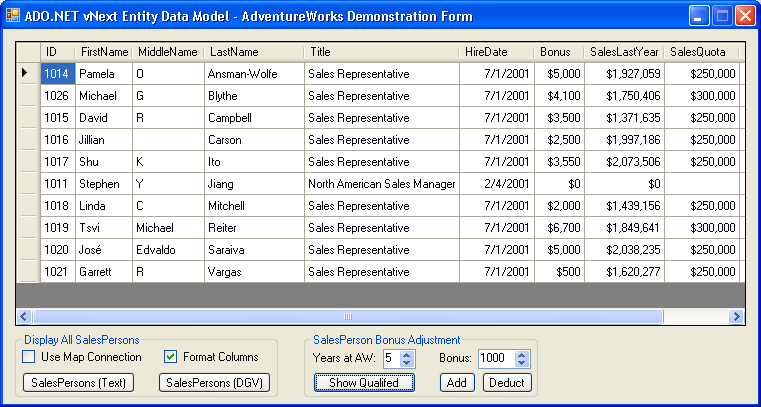
The "Objectify Data with ADO.NET vNext" article from the October 2006 issue of Visual Studio Magazine explains how the ADO.NET vNext August 2006 Community Technical Preview reincarnates ObjectSpaces’ object/relational mapping (O/RM) technology and OPath query language as the Entity Framework (EF), Entity Data Model (EDM), Entity SQL (eSQL), and LINQ to Entities for the Visual Studio “Orcas” release. Here's a screen capture of the article's VB 9.0 sample test harness: The article's AdventureWorks SalesPersons bonus project (AWv3TestApp.sln) invokes the AdventureWorksV3 EDM class library to populate a DataGridView with records for sales personnel who are eligible for bonuses—five years employment by AW for this example. Clicking the Add or Deduct buttons increcments or decrements bonuses, persists the changes, and refreshes the grid. If you're interested in learning more about the ADO.NET team's new approach to O/RM check out these previous OakLeaf posts:

Click here for a page of links to earlier posts about LINQ, LINQ to SQL (DLinq), and LINQ to XML (XLinq)

Technorati Tags: ADO.NET vNext, Entity Framework, Entity Data Model, LINQ, LINQ to Entities, LINQ to DataSets, LINQ to SQL, Entity SQL, eSQL, DLinq, XLinq, C# 3.0, VB 9.0, Orcas, ObjectSpaces, Domain-Specific Languages, DSL, DSL Tools

Tuesday, October 31, 2006

Microsoft Offers Free SQLX-Based Accounting App

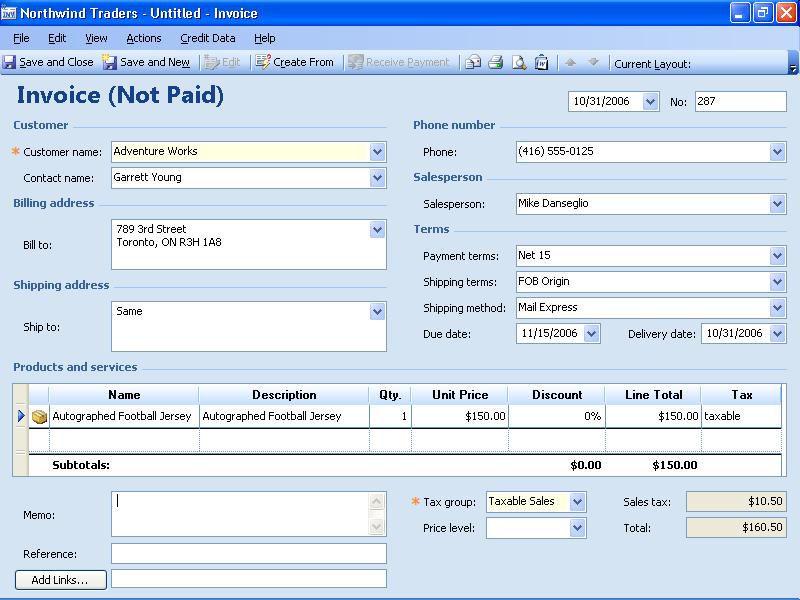
Microsoft Office Accounting Express (MOAX) 2007 is an entry-level accounting package targeted at small businesses whose proprietors use paper-and-pencil or Excel as their basic bookkeeping tools. What's unique about MOAX is it's license fee: US$0.00. Product activation requires registration with full company name and address plus contact details, but Microsoft doesn't require your Federal Employer ID (or Social Security) number. Microsoft RTM'd MOAX on October 29. You can download MOAX here (338 MB), read Mary Jo Foley's "Microsoft introduces a new freebie" blog post, and learn more about MOAX features from the Office Accounting home page. Here's an 800x600 capture of MOAX's invoice entry form. MOAX offers integration with Business Contact Manager (BCM) for Outlook, Excel for PivotTables and PivotCharts, and Access for reports. (The Access reporting feature didn't work for me with Access the 2007 Beta 2 Technical Refresh.) OfficeOnline provides secure file transfer to and from the firm's CPA. Third-party add-ins include:

  • Office Online Marketplace eBay auctions (80 free or $9.95 for 200 listings per month)
  • ADP payroll processing ($169/year)
  • Equifax credit reports ($39.95 each and up)
  • Chase Paymentech credit-card processing ($9.95/month)
  • PayPay payment processing ($9.95/month + bank processing $20/month)

Note: Pricing above is from Mary Jo Foley's blog post.

Wizards streamline importing data from Intuit QuickBooks or Microsoft Money to MOAX. MOAX's primary limitation is lack of inventory maintenance features.

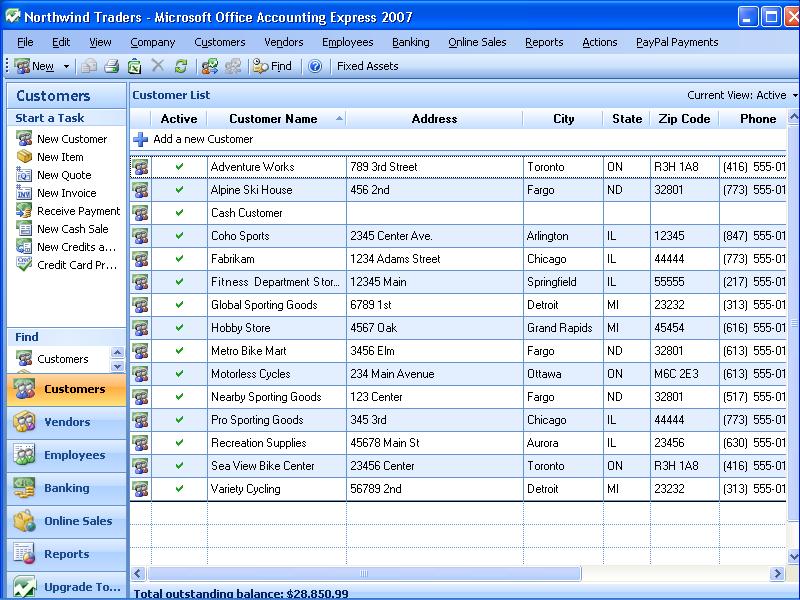
Here's one of the sample companies' customer list. Notice the similarity of the left pane to Outlook's Navigation Bar and Access 2007's Navigation Pane.

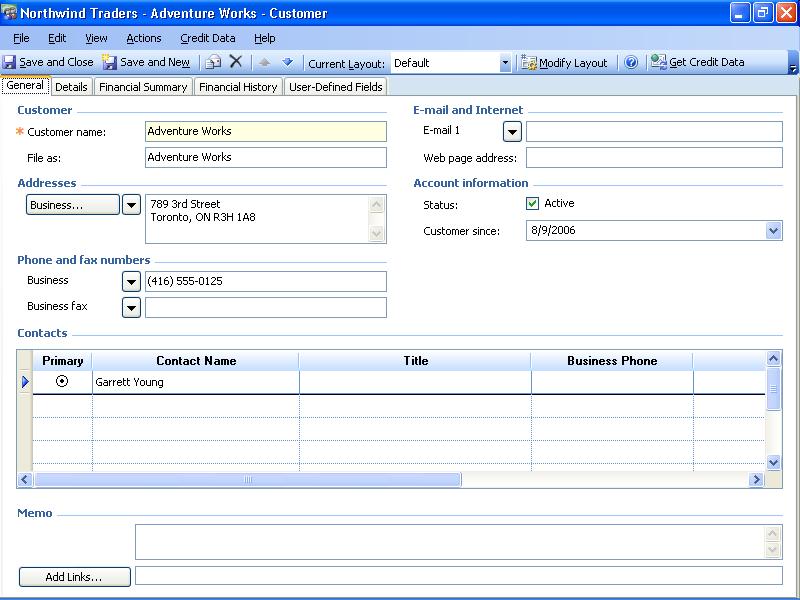
MOAX uses SQL Server 2005 Express edition (SQLX) as its back end, so the data store is robust and reliable. The 584 table names for a single company are plain English. The same is true for the 1,793 T-SQL stored procedures, 538 views, 260 T-SQL scalar functions, 56 T-SQL inline table-valued functions, 47 T-SQL table-valued functions, 825 T-SQL DML triggers, 643 foreign-key constraints, and 1,065 check constraints. Thus, it's no surprise that a a new company database I created (oakleafsystems.sbd) weighed in at 68.6 MB for starters. Notes: Exploring the sys.objects catalog view disclosed no .NET CLR aggregate functions, stored procedures, or scalar, table-valued or inline table-valued functions. If you've installed SQLX locally, you can opt to use your current instance instead of the \MSSMLBIZ instance included in the download. MOAX substitutes .sbd for .mdf and .sbl for .ldf extensions for data and log files, respectively. Microsoft's Office 2007 system requirements are a 500MHz+ CPU and 256 MB RAM (1 GHz+ CPU and 1 GB RAM for Outlook with BCM). Most users will find MOAX sluggish with CPUs slower than 2.5 GHz, and less than 1 GB RA. Microsoft encourages users to upgrade to the forthcoming $149 Microsoft Office Accounting Professional (MOAP) 2007, which replaces the underpowered Small Business Accounting 2006 product. PC Magazine offers a full review (10/2/2006) of a late MOAP beta, which concludes, in part: "Microsoft's Office Accounting 2007 beta is a vast improvement over last year's edition. It should prove an effective tool for small businesses that don't have large-scale inventory requirements." MOAP competes directly with QuickBooks Premier Edition 2007 ($325 - $350) and Peachtree Premium Accounting 2007 ($450 - $470). Here's a MOAX customer editing form: MOAP provides full multi-user access with Small Business Server, supports inventory maintenance, multiple currencies, and provides additional customizable reports. MOAX users must upgrade to MOAP to connect to a remote SQLX or SQL Server 2005 instance.

Technorati Tags: Microsoft Office Accounting Express 2007, Office Accounting Express 2007, Microsoft Office 2007, SQL Server 2005 Express, MOAX 2007, MOAX, SQLX

Wednesday, October 04, 2006

New Entity Data Model Graphic Designer Prototype

Microsoft's ADO.NET vNext team posted on MSDN the code for the first Entity Data Model (EDM) Designer Prototype CTP on September 27, 2006. Pablo Castro demoed this prototype in his September 1, 2006 "ADO.NET Entity Framework: What. How. Why." Channel 9 video. The video coincided with the release of the ADO.NET vNext August 2006 CTP, which is an EDM Designer prerequisite.

The accompanying Readme.htm and Overview.doc files make it clear that this EDM Designer release is indeed a prototype. The Designer has the capability to generate the initial storage schema (SSDL file), mapping layer (MSL file), conceptual layer schema (CSDL file), and C# or VB class code from an SQL Server database. The designer only manipulates the CSDL file. If you alter the data model at the CSDL level or change property values of Entity Types, Entity Sets, Associations, or Association Sets, you must manually edit the MSL file and, in some cases, the SSDL file.

Most EDM code examples use one or two entities from the AdventureWorks sample database and simple associations. Here's Visual Studio 2005 displaying a diagram of the complete Northwind sample database (Access version) with the Entity Container and Entity Type elements rearranged but before making changes to Entity Set/Type names:
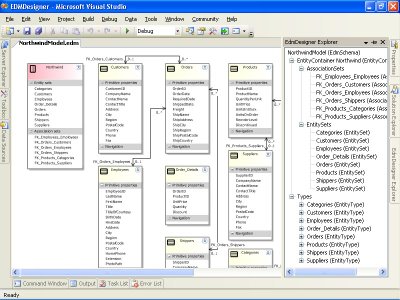
Click images to display in full size (800 x 600). Click here for a Web page with more images.

Here's the complete diagram exported by the Designer to a JPEG file:
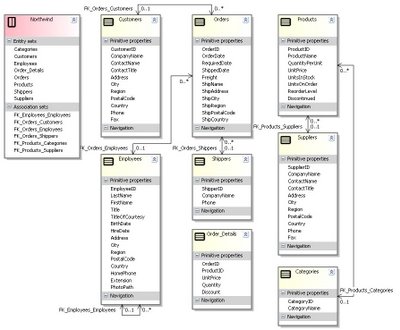
Notice that Associations replace Entity Type foreign key properties, such as Orders.CustomerID, Orders.EmployeeID, and Orders.ShipperID.

The Designer inherits limitations of the ADO.NET vNext August 2006 CTP: No support for SQL Server's text, ntext, or xml data types (Employees.Notes, Products.HomePage, and Categories.Description fields), or Associations for tables with composite primary keys (Line Items). Therefor, FK_Order_Details_Orders and FK_Order_Details_Products Association lines are missing in the preceding diagram and Order_Details entities aren't updatable.

Changing Entity Type, Entity Set, and Association Names

The prototype Designer doesn't offer an option to singularize plural table names as Entity Type names. Changing Entity Type, Entity Set, Association, and Association Set names in the designer is easy, but making the requisite edits to the MSL and SSDL files isn't a walk in the park. Search and replace works for most name changes, but the CSDL file often loses the 63 suffix that distinguishes the two Employees/Employee endpoints after editing other names. You'll also encounter issues with entity or property names that conflict with C# or VB reserved words, such as Order in VB.

Here's the JPEG diagram of the preceding diagram with Entity Type names singularized, the Orders Entity Set renamed to SalesOrders, and Order Details changed to LineItems.
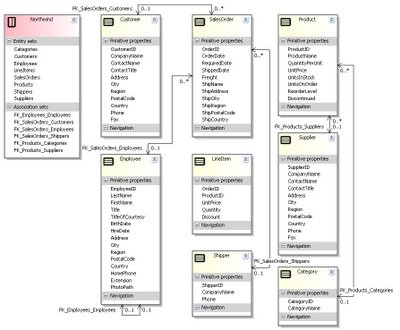
Notice that cardinality of the Employee.EmployeeID:Employee.ReportsTo Association in the preceding screen capture was mistakenly changed from 0..1:0..* (one-to-many) to 0..1:0..1 (one-to-one with nulls allowed) manually. The cardinality was later returned to that generated from the database, but the values in the diagram didn't change to conform the updated setting.

Testing Associations, Deferred Loading, and MARS

After changing Association names in the schema and mapping files, it's a good idea to verify that the renamed Associations continue to correspond to table relationships. This requires a more sophisticated test harness than the C# console demo projects favored by the ADO.NET vNext team. You need a grid to view properties of multiple entities and their associated foreign key values or counts of related entities.

Fortunately, you can populate a DataGridView control directly by setting its DataSource property value to a ageneric List generated by applying the ToList() method to the Entity Set returned from a LINQ to Entities query:

Dim Orders = From so In edmNwind.SalesOrders _
  Select so _
  Order By so.OrderID Descending
Dim lstOrders As List(Of SalesOrder) = _
  Orders.ToList
With dgvList
  .Columns.Clear()
  .DataSource = lstOrders
  .Columns.Add("CustomerID", "CustomerID")
  .Columns.Add("EmployeeID", "EmployeeID")
  .Columns.Add("ShipVia", "ShipVia")
End With

Additional code populates the added columns with the foreign key values. Unfortunately, the position sequence of all but the added columns have no relationship to their ordinal value in the table or their sequence in the Entity Type definition. The ADO.NET vNext team intends to improve databinding with, perhaps, a ToBindingList() method or wrapper.

Associations have the GetEntityTypeName() method to return a single related entity and the GetEntityTypeNameRef() method to return a reference to an entity. Like LINQ to SQL (DLinq), the Designer "lazyloads" related entities; that is, the entities aren't retrieved unless or until your code requests them. DLinq has the Including() operator to return related instances such as SalesOrder.Customer or Product.Category. The EDM requires you to load related entities explicitly with a procedure such as:

Public Sub GetCustomerIDForSalesOrder(ByVal so As SalesOrder, _
    ByVal intRow As Integer)
  If Not FK_SalesOrders_Customers.GetCustomerRef(so).IsLoaded Then
    FK_SalesOrders_Customers.GetCustomerRef(so).Load()
  End If
  Dim Cust As Customer
  Cust = FK_SalesOrders_Customers.GetCustomer(so)
  If Cust IsNot Nothing Then
    dgvList.Rows(intRow).Cells("CustomerID").Value = Cust.CustomerID
  End If
  Cust = Nothing
End Sub
If you execute the preceding code within a For...Next loop to retrieve the SalesOrder (so) entities, you must enable SQL Server 2005's Multiple Active Resultsets (MARS) feature to open a second DataReader on the same database connection:
'Retreive foreign key values on multiple connections
For Each so In Orders
  GetCustomerIDForSalesOrder(so, intRow)
  GetEmployeeIDForSalesOrder(so, intRow)
  GetShipperIDForSalesOrder(so, intRow)
  intRow += 1
Next
The alternative, which provides a very slight performance gain, is to iterate the List of SalesOrder instances three times to retrieve the foreign key values:
'Retreive foreign key values sequentially
For Each so In lstOrders
  GetCustomerIDForSalesOrder(so, intRow)
  intRow += 1
Next
intRow = 0
For Each so In lstOrders
  GetEmployeeIDForSalesOrder(so, intRow)
  intRow += 1
Next
intRow = 0
For Each so In lstOrders
  GetShipperIDForSalesOrder(so, intRow)
  intRow += 1
Next

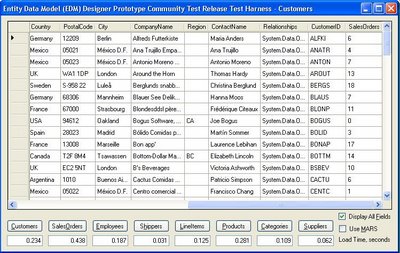
Here's the WinForm test harness's DataGridView displaying a few foreign key values in the last three columns:
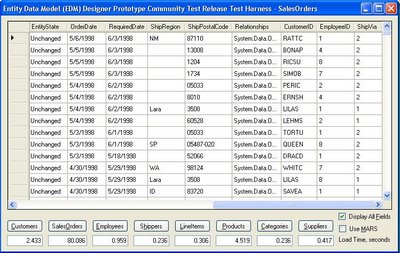
Notice the relatively long time (80 seconds) required for the almost 2,500 T-SQL queries required to retrieve the three foreign key values for 830 SalesOrder entities. Once the related entities are loaded in memory, execution time decreases dramatically, as shown here:
Note: The design of the Employees table implements the adjacency technique for representing a hierarchy in a table of a relational database. Path and nested sets are alternative—but less performant—approaches. Anthony Bloesch's February 15, 2006 "Hierarchies (trees) in SQL Server 2005" post compares the three techniques and their performance in a 20,000-node implementation.

Cache Uniqueing Issues and Lost Values

EDM employes uniquing, the process by which Object/Relational Mapping (O/RM) tools maintain a single copy of each unique entity instance, such as a Customer, Order, or Product, regardless of how many times a query retrieves an instance. The test harness's 91 Customers placed 830 Orders, thus the (830 - 91) or 739 Customer instances retrieved from the database to obtain foreign-key value are duplicates. Similarly, one of nine employees receive credit for orders so 821 retrieved Employee instances are duplicates. Finally, there are three shipping companies, so 827 Shipper instances are duplicates. Adding counters for the Load method of Customer, Employee, Shipper, Categorie, and Supplier entity instances confirms the retrieval of duplicates. (These counters aren't don't appear in the test harness screen captures.)

Uniquing is implemented by an Identity Map. Martin Fowler states in Patterns of Application Architecture that an Identity Map: "Ensures that each object gets loaded only once by keeping every loaded object in a map. Looks up objects using the map when referring to them." Most O/RMs implement Identity Maps in cache, often as a hashtable of values calculated from primary keys. The fact that the missing ReportsTo values are duplicates of the two values returned from the cache indicates a problem with the uniqueing algorithm.

Note: A counter on Employee entity instance retrievals indicates that Employee instances aren't cached. The first time cached Order instances are traversed, the Employee retrieval instance counter increments by 839; additional traversals increment by 830.

Frans Bouma, developer of the LLBGen O/RM for .NET and Microsoft MVP, contends in his "Why a cache in an O/R mapper doesn't make it fetch data faster" blog post that caching doesn't necessarily make data retrieval more efficient. The time to look up the newly retreived object's ID in an Indentity Map that contains a large number of hashes might contribute to the apparent poor performance when initially filling the Orders grid.

Composite Keys, Surrogate Keys, Natural Keys, and Ruby on Rails

Bouma also observes that "As ... compound [composite] PKs can complicate the calculation process, it's not that straight forward to get the lookup process of entities very efficient."

Ruby on Rails' lack of of composite PK support by its O/RM tool caused Martin Fowler to raise the spectre of substituting an autoincrementing (identity) integer column as a surrogate primary key. Jonathan Ellis' July 12, 2006 "Single column primary keys should be enough for anybody" post and Josh Berkus' three-part series on surrogate vs. "Primary Keyvil, Part I," "Part II (Reasons to Use an Autonumber Surrogate Key)," and "Part III (Reasons to Use an Autonumber Surrogate Key, Evaluated)" make the case for natural keys.

Note: Kevin Hoffman, TheDotNetAddict of .Net Developer's Journal, posted on October 6, 2006, "ASP.NET vs Ruby on Rails : Round 3 (Object-Relational Modeling)," which compares ASP.NET vNext's Entity Framework with Rails' ActiveRecord as an O/R Modeling approach. This page links to other Kevin Hoffman posts, many of which relate to LINQ, ASP.NET vNext, and ADOEF. Microsoft's Blinq tool, which has capabilities similar to Rails' scaffolding feature, handles composite keys with no problem. Blinq 1.0 uses LINQ to SQL (DLinq), not ADOEF.

Natural keys, which are values in the table, prevent entering duplicate data. The Northwind Order Details table has a composite natural primary key that consists of the OrderID and ProductID columns. In addition to uniquely identifying a row, the primary key prevents data entry operators from entering rows that duplicate a product line item in an order. Hopefully, support for composite primary keys will arrive in ADO.NET vNext shortly.

For general background on caching, read "Caching Architecture Guide for .NET Framework Applications," by Avi Ben-Menahem and Ronen Ashkenazi (patterns & practices).

Franz Brouma's "Essay: The Database Model is the Domain Model" offers an approachable view of the the major issues that O/RM seeks to address.

A related "Objectify Data With ADO.NET vNext" article in the October 2006 issue of Visual Studio Magazine provides more information about EF, EDM, and the EDM Designer.

Updated: 10/8/2006, 10/11/2006, 10/30/2006

Technorati Tags: ADO.NET vNext, Entity Framework, Entity Data Model, Entity Data Model Designer, EDM Designer, LINQ, LINQ to Entities, LINQ to SQL, Entity SQL, eSQL, DLinq, VB 9.0, Orcas

Saturday, September 16, 2006

Michael Arrington Badmouths Squidoo (Again)

Michael Arrington delivered a presentation to The Future of Web Apps conference held in San Francisco on September 13-14, 2006. According to Dan Farber, who covered the conference for ZD Net, Arrington included Squidoo in a "What were they thinking?" list of companies that he was "not proud that they exist."

The startups subject to Arrington's stigmata are Inform, Gather, PubSub, Browzor, Jigsaw, and Squidoo. Of that group, I'm only familiar with Squidoo and Gather; the preceding two links point to one of my Squidoo lenses and a Gather demonstration page.

Note: This post is an expansion of the "Subsequent Events [9/14-15/2006]" section of my August 6, 2006 "Hubpages' Attempt to Clone Squidoo is a Bust" post. This post was updated 9/18/2006.

Squidoo describes itself as "a new online platform and community that makes it easy for anyone to build a single page--called a lens--on a topic, idea, product or cause he is passionate about. These lenses in turn help finders get unique, human perspectives instead of computer-selected and often irrelevant search results."

Squidoo received favorable coverage in an April 10, 2006 New York Times article, "A Home Where Bloggers Can Plumb Those Obscure Passions." A Google search on "The Black Scholar" returns about 30,000 hits; my Squidoo lens on the topic is in second place—immediately after The Black Scholar's Web site.

Gather is a social sitebuilding startup that claims to be "a place to connect over common interests and passions, to engage in dialog or share different viewpoints." BusinessWeek's Liz Ryan named Gather one of the Top Ten Desktop Diversions of 2006 on March 27, 2006. I'm inclined to give a BusinessWeek columnist far more credence than a blog entrepreneur.

Arrington's Praise for Squidoo-Like Wiki Hosts

On June 18, 2006, Arrington favorably reviewed Wetpaint, an ad-supported Wiki hosting site, which received $5 million funding from Trinity Ventures and Frazier Technology Ventures. Arrington said that Wetpaint "is the best hosted wiki I’ve seen so far," comparing it to competitiors PBwiki, Wikia, and JotSpot.

Note: The "best hosted wiki I've seen so far" is StikiPad, based on my first tests of the preceding and a few other hosted wiki sites. StikiPad offers exceptional editing flexibility, doesn't clutter free accounts with AdSense adverts, and has a very intuitive and attractive UI. Here's a link to the default page for my first StikiPad wiki. Click here for a WikiMatrix comparison of JotSpot, PBWiki, Socialtext, StikiPad, and Wetpaint. StikiPad offers free as well as paid—$4.95, $9.95, and $14.95—accounts. (StikiPad is based on the Ruby-based Instiki wiki clone and the Ruby on Rails framework.)

My impression of these wiki sites is that they are simply free (ad-supported) or paid Web site hosts with multi-person editing, comments, or both enabled. For example, PBwiki offers free, $9.95, $24.95, and $34.95 per month options. JotSpot (requires free registration to read) has $9.95, $24.95, $69.95, and $199.95 per month plans. Wikia requires a wiki to "have a large potential audience and be likely to attract enough editors to maintain the wiki." The preceding links open simple test wikis; here's a link to a more complete Wetpaint wiki.

Note: No hosted wiki that I've seen so far, including Socialtext and wiki.com, has features that come close to matching the capabilities of Microsoft's Windows SharePoint Services (WSS) 2.0 or 3.0, which is a free add-in to Windows Server 2003 SP1. Stay tuned for a future post comparing WSS 3.0 and online wiki applications.

Wiki sites enable multi-person page editing, but most wiki sites offer far fewer editing widgets than Squidoo. I've seen nothing so far to convince me that any of these startups have much—if anything—more to offer than Squidoo, Google Pages, or Blogger. For example, Blogger lets you enable team blogging. If you're willing to take the risk, you can enable multi-person editing of Squidoo lenses by disclosing your username and password to trusted colleagues. Alternatively, you can set preferences to Share My Squidoo and enable anyone to edit your lens.

Rick Segal's Take on Arrington's Squidoo Castigation

Canadian venture capitalist Rick Segal takes on Arrington's castigation of Squidoo in a trilogy of posts—Mike Arrington - Sit Down, Michael Arrington Responds, and The Good of Web 2.0. Squidoo donates a portion of advertising revenue after operating expenses to charity, and Squidoo Lensmasters have the option of donating their Ad Sense earnings to charity.

One of Segal's issues is Arrington's insistence on an accounting of Squidoo's donations before considering a retraction of his miscategorization of Squidoo. According to Squidoo's Report page's Squidoo-wide Stats section, Total Money for Charity was $7,194.03 from 40,282 Total Lenses as of 9/19/2006.

Note: Here's how Squidoo distributes its income: "We divide up the money we receive in a very public way. First, we pay our bills. That's direct out of pocket expenses like rent and servers and salary and benefits expenses (our CEO doesn't take a salary, and neither does our board of directors). Then, with no other deductions, we pay 5% of our post-expense revenue directly to the charity pool, 50% directly to our lensmasters and retain the rest to pay off investors and employees." (From Everything about getting paid, "11. Does Squidoo Make a Profit?")

The fact that charities and Lensmasters are receiving payments—regardless of the amount—indicates that Squidoo is profitable and debunks Arrington's May 9, 2006 assertion that Squidoo is Seth Godin's "Purple Albatross." It's a good bet that Hubpages—a Squidoo rip-off and Arrington's favored topical Web page host—won't reach profitability before it burns through the $2 million funding it received earlier this year from Hummer-Winblad Venture Partners.

Arrington's Squidoo-related posts and comments demonstrate to me that he harbors personal enmity for Squidoo and/or Seth Godin. The question for TechCrunch readers is the extent to which this animus biases Arrington's "Web 2.0" reviews.

Technorati tags: , , , , , , , , ,

Monday, September 11, 2006

SQL Server 2005 Ordered View and Inline Function Problems

SQL Server 2000 introduced the TOP n [PERCENT] operator to enable restricting the number of rows in the resultset of a view or inline table-valued function (TVF). In SQL Server 2000, starting the SQL statement for a view or TVF with SELECT TOP n [PERCENT] ... enables adding an ORDER BY clause to order the query's internal rowset so as to return the correct resultset. As a byproduct of that operation, views and TVFs returned resultsets sorted in accordance with the ORDER BY clause. A SELECT TOP 100 PERCENT query with an ORDER BY clause in SQL Server 2000 or MSDE 2000 views and TVFs returns all rows sorted. SQL Server Management Studio [Express] and the Microsoft Access Upsizing Wizard expect—and the Wizard depends on—this behavior. SQL Server 2005 [Express] does not respect the SELECT TOP 100 PERCENT operator or it's SQL Server 2005-only functional equivalent—SELECT TOP (100) PERCENT—and ignores the ORDER BY clause in views and TVFs. Thus resultsets are not sorted. ANSI SQL specifies that ORDER BY clauses are valid only in the top-most (outer) SELECT block of a query. But no ANSI SQL version supports the TOP operator, so the ANSI rules don't apply to SELECT TOP queries. Most SQL Server DBAs don't permit use of ordered views or TVFs, preferring to apply the sort with an ORDER BY clause in the SELECT block that invokes the view or TVF. Visual Studio and Microsoft Access developers commonly use the shortcut. As mentioned earlier, SQL Server 2005's corresponding TOP (100) PERCENT function also enables adding an ORDER BY clause to a view or TVF. However, the SQL 2005 query optimizer ignores the TOP (100) PERCENT and ORDER BY clauses and does not return a result set with the specified custom sort. The query optimizer "optimizes out" the TOP (100) PERCENT function as redundant, which deactivates the ORDER BY clause without warning. Fortunately, there's a workaroud that I'll discuss shortly. SQL Server Books Online's ORDER BY Clause (Transact-SQL) topic has a note that states:

When ORDER BY is used in the definition of a view, inline function, derived table, or subquery, the clause is used only to determine the rows returned by the TOP clause. The ORDER BY clause does not guarantee ordered results when these constructs are queried, unless ORDER BY is also specified in the query itself.
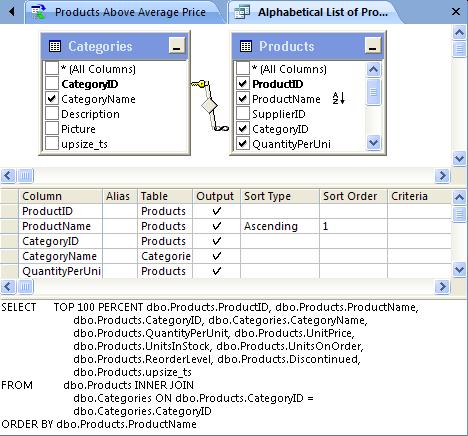
The upshot of this note is that there is no guarantee whatsoever that SELECT TOP ... ORDER BY ... query constructs will return rows in sequence specified by the ORDER BY clause. My experience—and that of most other commentators on this issue—is that SQL Server 2000 returns rows in the expected order for all valid TOP integer and TOP float PERCENT values, as does SQL Server 2005 for valid integer and all float values except 100. The da Vinci Toolset Obscures the Issue The Visual Data Tools (VDT)—more commonly called the da Vinci toolset—first appeared in the SQL Server 7.0 version of SQL Server Enterprise Manager (codenamed "Starfighter"). SQL Server 2005 Management Studio (SSMS), SQL Server Management Studio Express (SSMSX), Visual Studio 2005, and Access 2007 use the current da Vinci toolset version. The da Vinci toolset's query parser automatically adds a TOP (100) PERCENT operator when you save or execute an ALTER VIEW or ALTER FUNCTION definition that contains and ORDER BY clause in its SELECT block. Note: SQL Server Express (SSX) SP1 offers SSMSX as an individual download or bundled with SSX SP1 in SSX with Advanced Services SP1. Here's an example of a TOP (100) PERCENT query (Access's Alphabetical List of Products) in SSMSX's view design window:

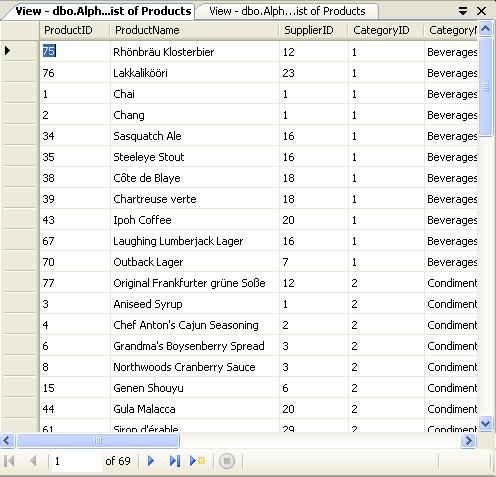
Notice that the resultset in the lower Results pane is ordered alphabetically by the ProductName column. However, when you right-click the Alphabetical List of Products item in Object Explorer and choose Open View, the resultset isn't ordered by ProductName (or any other set of column values), as seen here: The sorted display of the Results pane is undoubtedly due to the SELECT query in the SQL pane being the outermost query at this point. This ambiguous presentation for views is likely to lead unsuspecting developers down the primrose path.

Note: SSMX and a Microsoft Access query from upsized Northwind.accdb is used as the example, because many more data-intensive application developers use (or will use) SQL Server (2005) Express (SSX) with SSMSX and Visual Studio Express editions or Access than SSMS and SQL Server 2005 Standard or Enterprise editions. (Visual Studio Express editions don't include the VDT.) The da Vinci Tools in the Access 2007 Project Designer Microsoft Access 2000, 2002, 2003, and 2007 use the da Vinci toolset as the Project Designer for Access Data Projects (ADPs). However, the Access 2007 Beta 2 Technical Refresh version shown here appears to use a slightly different query parser. Adding a sort to a view or inline TVF adds the SQL Server 2000-style TOP 100 PERCENT operator (without the parenthesis for backward compatibility with the Microsoft Desktop Engine (MSDE) 2000.) Note: Access 2007 Beta 2 TR won't display the contents of the Diagram or Grid panes if you or SSMS[X] add parenthesis to the TOP operator. Addition of parenthesis by SSMS[X] prevents round-tripping of view or TVF designs to Access 2007 without loss of Diagram and Grid panes. Running the preceding query displays the unordered resultset in Access's Datasheet View, as shown here: Access substitutes it's Datasheet View for SSMS[X]'s Results pane. The preceding resultset obviously isn't ordered by ProductName, so developers will know immediately that the sort wasn't applied.

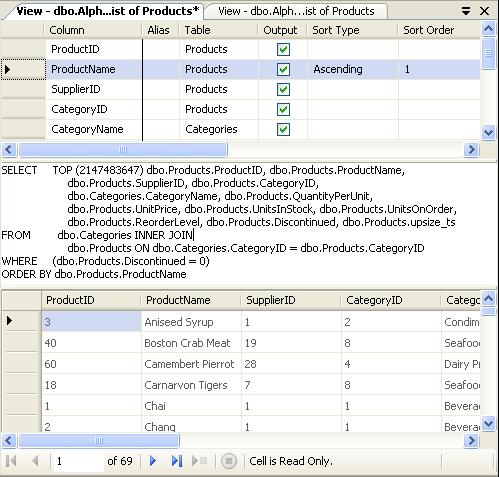
Note: In Access 2007 Beta 2, clicking the Tools group's Run (!) button of the Function & View Tools, Design ribbon doesn't update the row order of an open Datasheet View. You must close and reopen the Datasheet View to see the effect of a change to the view or inline TVF row order. A Simple Workaround for the TOP (100) PERCENT Problem If you must apply a custom sort order to views and TVFs, which is generally considered to be a hack, substitute TOP (VeryLargeInteger) for TOP (100) PERCENT. The largest integer that the query parser will accept is MAX(int) or 2147483647. This limitation appears to be for backward compatibility, because SQL Server 2005 converts TOP (n) values to the bigint data type. Here's the view's new query in SSMSX: In this case, the Results pane above reflects reality, as shown below: The TOP 2147483647 operator also behaves correctly in Access views and queries. However, Access developers have the option to set the Order By property of a view or inline TVF to Column1 [DESC][, Column2 [DESC] ... ] on the Data page of the ObjectName Properties dialog. This property specifies the ORDER BY clause of the outer query. Visual Studio developers and others might need to alter their TableAdapters or SELECT queries to apply an ex post facto sort order.

Note: SQL Server 2005 TOP (n) views are updatable if the view without the TOP (n) function is updatable. Conclusion It's surprising that the SQL Server tools group didn't alter the query parser to replace TOP (100) Percent with TOP (2147483647). The group also should have fixed—or warned users about—the ambiguous presentation in the Results pane for views.

The appropriate solution for SQL Server 2005 [Express] SP2 is to require SQL Server 2005's query processor to respect SELECT TOP (100) PERCENT ... ORDER BY views and TVFs by emulating SQL Server 2000 behavior, and change the party line by guaranteeing that SELECT TOP ... ORDER BY views and TVFs return a sorted resultset.

I haven't tested the workaround exhaustively, but it's likely to work in most or all cases. However, you're far better off from a performance and reusability standpoint to follow the ANSI SQL rules and apply the ORDER BY clause within the outermost query block, not in views or inline TVFs.

Note: For more information about the use of ORDER BY in SQL Server 2005, see the Ordering guarantees in SQL Server... item by Conor Cunningham, Query Optimizer Development Lead, in the SQL Engine Tips blog. See Books Online's TOP (Transact-SQL) topic for more detailed information on the TOP function.

Updates: Minor updates with clarifications on 9/27/2006 and 9/29/2006.

Technorati tags: , , , , , , , , , , , , , , ,

Monday, September 04, 2006

Generate RSS Feeds with ASP.NET and LINQ to XML

Jim Wooley has written a clever LINQ to XML procedure that generates RSS feeds from event logs. If you've installed the Microsoft Visual Studio Code Name “Orcas” Language-Integrated Query, May 2006 Community Technology Preview, you can download Jim's source code for the _Default partial class as Default.aspx.vb, and give it a test drive, preferably with IE 7.0 RC1 or later. Just create a new Visual Basic LINQ ASP.Net Web Site from the VB templates and substitute his Default.aspx.vb for the original empty version under the Default.aspx node, as shown here:

Tip: Clear at least the Application log and reboot before running the project. Otherwise, you'll find that Iexplore.exe will consume almost all available memory while it attempts to generate an RSS file with several thousand items.

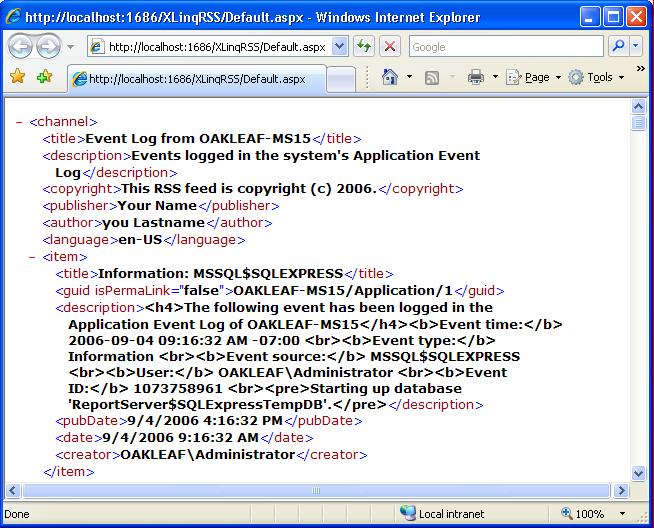
Press F5 to build and run the project. If you have IE 7.0 RC1 or a late beta, the page appears as shown here:

If you're familiar with Dave Winer's RSS 2.0 spec, you'll notice some missing items—such as the top-level <rss version="2.0"> element—and non-conforming <publisher> and <author> tags under the <channel> element. <item> elements also have non-conforming <date> and <creator> tags, and dates that don't conform to RSS's requirement for the RFC 822 date/time format.

Adapting the Page for Feed Readers

IE 7.0 ordinarily displays RSS and ATOM files with a style sheet. For example, here's the start of the IE 7.0 feed page for the OakLeaf Systems blog as of this post's date:

Note: IE 7.0's style sheet treats ATOM 0.3/1.0 feeds as RSS 2.0 feeds with elements qualified by ATOM namespaces.

I wanted to see how IE 7.0's style sheet would handle the feeds generated by Jim's project. The missing top-level <rss version="2.0"> element prevents IE 7.0 from applying its feed style sheet. I believe that other non-conforming elements might prevent some readers from displaying the data correctly. I also wanted to add hierarchical <category> tags to see if IE 7.0 would filter events by category correctly.

So I added the <?xml version='1.0' encoding='UTF-8'?> XML declaration and the <rss version="2.0"> element pair, then made other minor corrections and a few additions to bring the feed up to the RSS 2.0 standard. Here's the result before subscribing to the feed in IE 7.0:

Note: The five filter categories are EventLog, EventLog/Entries, EventLog/Entries/Application, EventLog/Entries/Information, EventLog/Entries/Application/Warning. Filtering works as expected.

And here's the transformed page after subscribing to the feed:

If you publish the Website to IIS, run Cassini on a fixed port, or just copy the current URL—http://localhost:1686/XLinqRSS/Default.aspx—for this example you can subscribe to the feed with any popular reader. For example, here's Dare Obasanjo's RSS Bandit open-source reader displaying the OAKLEAF-MS15 feed:

You can read an abbreviated version of the updated RSS 2.0 feed code here and see the modified Visual Basic 9.0 source code for the updated WriteRSS20 subprocedure here.

Syndicating event logs isn't a mainstream RSS application, but Jim Wooley's technique demonstrates the remarkable efficiency of programming with LINQ for XML and VB 9.0's XML inline literals with inserted element and attribute values.

Technorati Tags: LINQ to XML, XLinq, LINQ, Orcas, RSS 2.0, RSS, Event Logs, Jim Wooley