Thursday, November 17, 2005

Google Base and Atom 0.3 Bulk Uploads

Adding Web pages or blog posts as News or Articles or Reference Articles item types to Google Base is problematic for content owners. Google's draconian Terms of Service for the content you upload gives Google carte blanche to "reproduce, modify, adapt, publish, and otherwise use, with or without attribution such Content," as well as "to use your trademarks, service marks, trade names, proprietary logos, domain names and any other source or business identifiers."

I'm certainly not enthusiastic about the Google folks modifying or adapting and then publishing my content without attribution. ZDNet's Garrett Rogers discusses these and related issues in his November 16, 2005 post, "Google Base: Preparing for the worst?."

Note: If you're searching on "Google Base," you're likely to see references to "All your base are belong to us," an idiosyncratic Internet message (apparently in pidgin, akin to "him belong me") that's explained in this lengthy Wikipedia entry. It's an interesting sidelight that Al Queda is "the base" in Arabic. The Wiki entry also mentions common derivatives, such as "all your data are belong to us," which is more germane to the Terms of Service issue.

Despite my misgivings about Google's Terms of Service, I decided to invest a few hours of Visual Studio 2005 programming time to clean up Blogger's Atom 0.3 XML file for this site, add some optional tags and attributes, and publish it to Google Base. I'll provide details on the VB 2005 code I used to manipulated the Atom.xml XmlDomDocument object in a future post. As I mentioned in the "Initial Conclusions" section of my earlier "Google Base and Bulk Uploads with Microsoft Access" post:

Initial tests with an Atom 0.3 (Atom.xml) file generated by Blogger for the OakLeafBlog, saved as a local XML file with FireFox 1.5 RC2, and Bulk Uploaded as the Reference Articles item type showed several problems. The description attribute contains HTML markup and error messaages state that the value is limited to a maximum of 10,000 characters. Thus only the shorter OakLeafBlog articles publish to the list; HTML markup contributes substantially to description length. Help Center's "What do I include in 'Description'?" topic says "Please ensure that the description does not contain any HTML as we don't currently recognize or display HTML tags in your item." Help Center also says the maximum description length is 1,000 characters.
I was surprised by the inconsistencies between the help topics and the result of an initial test with a moderate-size Atom.xml document from a Google application (Blogger). So I temporarily increased the size of the main page to include all OakLeafBlog posts (50 as of this post), which would permit more complete tests and let me evaluate issues that relate to creating Google Base-enabled XML files.

Note: Atom 1.0 is the current version of the Atom specification, and Tim Bray says it's awaiting an IETF RFC number as of mid-November 2005. Blogger continues to use the outdated Atom 0.3 spec for syndication, as does the Google Base - Atom 0.3 Specification page. Venture capitalist Bill Burnham says in his "RSS and Google Base: Google Feeds Off The Web" post, "Google intends to build the world's largest RSS 'reader' which in turn will become the world's largest XML database." Alan Wood at Folknology refers to Adam Bosworth's MySQL presentation and provides an Atom-oriented analysis. Most readers treat RSS and Atom feeds similarly.

The ultimate objective of this exercise is to determine whether any benefits accrue to Web site publishers—or, for this example, bloggers—by publishing copies of linked content on Google Base. Much of the initial Googe Base content—such as real-estate listings—consists of links to existing Web pages. Presumably, Google will have spidered the source site's pages previously. Technorati's Niall Kennedy posits:
Why should you go to the trouble of submitting your information to Google Base? You will be completely sure that Google has all your latest content complete with the appropriate link back to your site. Feeding the content directly to Google may help your posts place better in Google search results.
Whether posts uploaded to Google Base gain precedence in Google search results remains to be seen. Mine haven't so far.

Update 11/22/2005: John Markoff and Michael Barbaro of the New York Times report that Google Base now has available the ability to provide a local version of Google's Froogle shopping service. There's no announcement of the new feature in the Google Blog; the Google Base Blog still wants a username and password for access. InfoWorld's Jon Udell posts "Dueling simplicities," which analyzes the potential relationships between Microsoft's proposed Simple Sharing Extensions for RSS and OPML (SSE) specification, Adam Bosworth's "Learning from the Web" presentation, and Google Base. This post follows "The two-way data web" article that was written before&mdash'but published after—the release of the SSE specification.

Update 11/30/2005: The "official" Google Base blog, http://googlebase.blogspot.com/, added an entry with tips on bulk-uploading items.

Completing Your Personal Profile
If you have or create a Google account, which you need for most Google applications, you'll probably find it worthwhile to add the additional default attribute values that apply to Google Base only. See this section in the preceding "Google Base and Bulk Uploads with Microsoft Access" post for details.

Creating the Raw XML Bulk Upload File
The http://oakleafblog.blogspot.com/atom.xml document contains data for 50 posts (<entry> groups) in a 498-KB file for an average of about 10,000 characters per <entry>. FireFox 1.5 RC2 displays the HTML tags in the <content> elements, as shown here, which transform to Google Base description attribute values:
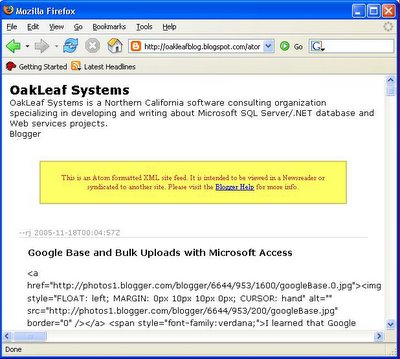
FireFox 1.5's View Page Source command displays the Atom 0.3 source code and enables saving the Atom 0.3 source code to a physical file, which is required for bulk XML file uploads:


The stylesheet employed by Internet Explorer 5+ strips the HTML markup from the XML document's content element but won't display or enable saving the unformatted <content> value locally, as shown here:


Thus, you'll need to substitute FireFox for IE to generate and save a file—OakLeafBlogAtom.xml for this example—for the Bulk Upload operation. (Only FireFox 1.5 RC2 and RC3 have been tested to date.)

Uploading the Atom 0.3 XML File as a Reference Articles Item Type
The Specify a Bulk Upload page's Choose an Existing Type list doesn't offer the News and Articles Item Type, which would be more appropriate for a list of blog posts. (News and Articles and Wanted Item Types appear in the Choose an Existing Item Type list on the Post an Item page for ad hoc items.) News and Articles supports the following standard attributes, in addition to title and description: author, expiration_date, label, news_source, pages, and publish_date. (It's unfortunate that Google didn't adopt standardized metadata terms, such as those of the Dublin Core Metadata Intiative—DMCI.)

Note: Niall Kennedy's "Google Base blog import instructions" post describes for Movable Type or TypePad Pro users how to output your last n blog posts to an Atom.xml file with his Movable Type Google Base template.

Thus, you're stuck with Reference Articles, which doesn't include several attributes that would be useful for qualifying searches. Reference Articles (presumably included in the "Research Studies and Publications - scholarly literature" Informatoin Type) appear to be limited to author, expiration_date, label, pages, publication_name, publication_volume, and publish_date. (Where is publication_number?) However, you can use the Google Base Provider Namespace to define your own custom attribute taxonomy in the Atom 0.3 document.

Update 11/25/2005: You're no longer stuck with Reference Articles as the Item Type for Blogger Atom 0.3 feeds. The Bulk Upload page's Choose an Existing Type list now includes News and Articles and Wanted Ads Item Types. Google also added Blogs, Coupons, Rentals, and Comic Books as standard search categories to the default home page. Rapid ad hoc changes like this demonstrate another advantage of Web-based services.

The process for uploading an Atom 0.3 XML file is similar to that for uploading a tab-separated value text file to create a list of the Products Item Type:

1. After logging in with your Google account, navigate to the Google Base home page and click the Post Multiple Items with a Bulk Upload File link to open the My Items page.

2. Click the Specify a Bulk Upload File link, type the FileNameAtom.xml file name in the text box, select Reference Articles in the Item Type list, and click Specify Bulk Upload File to open the My Items page.

3. Click Browse, navigate to and double-click the file you saved with FireFox to specify it as the source of the registered FileNameAtom.xml file, as shown here:


4. Click Upload and Processs This File. Wait a few minutes (or hours), and then press F5 to determine the publication status of the file. If you can't stand the wait, click the Active Items link after it displays a count of 1 or more to review unpublished items in the list:

5. Click one of the Edit links to display the item in the standard editing form for the Reference Articles Item Type:


Notice the HTML markup in the Description attribute textarea. This example has a substantially lower proportion of markup characters to content than most OakLeafBlog posts. It would be possible—but certainly tedious—to remove the tags manually and add Details attribute-value pairs and Labels keywords tags.

Viewing the Items as a Google Base User
To emulate a search by an ordinary Google Base user, follow this drill:

1. Sign out of your account, navigate to the Google Base home page, type a unique search term, such as xlinq for OakLeafBlog posts, and click Search Base to display the results. Alternatively, click here.
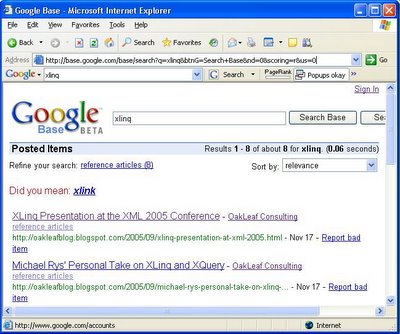

As expected, clicking the OakLeaf Consulting link or here displays all active items for authorid=1063521.

2. Click one of the titles to open the linked page whose URL appears in green, or click here.

Fixing Feed Errors
The inclusion of HTML markup in the description attribute isn't a problem for ordinary users, because they don't see the attribute value. However, large amounts of markup combined with lengthy content can result in failure to post overlength entry groups. In this case, the My Items page displays an error message:
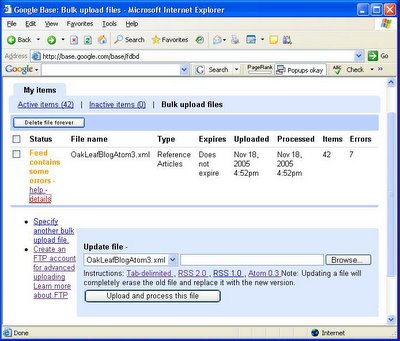

Note: It might take several hours for the preceding warning to appear. Bulk Updates don't occur in real time.

Clicking the Details link displays this page with error messages:


To overcome this problem, you must edit the content element of overlength entries, remove the HTML tags, test for content length, and then trim the string value if it's more than 10,000 characters.

Serious Bug in g:label Custom Attributes Documentation
Google has created its own taxonomy of Atom 0.3 extensions that's identified by an xmlns:g="http://base.google.com/ns/1.0" namespace attribute added to the the feed element. The Google Base - Atom 0.3 Specification page includes an example of use of this namespace to add several predefined elements—g:image_link, g:expiration_date, g:job_function, g:location; and g:label—to specify non-standard attributes for a specifc Item Type. The example for the <g:label> elements is incorrect. The label item of the Google Base - XML Attributes page has the same error.

Following is an abbreviated version of a Blogger Atom 0.3 test file with the Google Base extension namespace attribute and multiple g:label elements added in accordance with the preceding XML document example and attribute specification. Technorati tag names provide the values of the multiple g:label elements.

<?xml version="1.0" encoding="UTF-8"
standalone="yes"?>
<?xml-stylesheet
href="http://www.blogger.com/styles/atom.css"
type="text/css"?>
<feed xmlns="http://purl.org/atom/ns#"
version="0.3" xml:lang="en-US"
xmlns:g="http://base.google.com/ns/1.0">
<link href="https://www.blogger
  .com/atom/11646261"
rel="service.post" title="OakLeaf Systems"
type="application/atom+xml" />
<link href="https://www.blogger
  .com/atom/11646261"
rel="service.feed" title="OakLeaf Systems"
type="application/atom+xml" />
<title mode="escaped" type="text/html">
OakLeaf Systems
</title>
<tagline mode="escaped" type="text/html">
OakLeaf Systems is a Northern California
software consulting organization specializing
in developing and writing about Microsoft SQL
Server/.NET database and Web services projects.
</tagline>
<link href="http://oakleafblog.blogspot.com"
rel="alternate" title="OakLeaf Systems"
type="text/html" />
<id>tag:blogger.com,1999:blog-
11646261</id>
<modified>2005-11-19T14:32:23Z</modified>
<generator url="http://www.blogger.com/"
version="5.15">
Blogger
</generator>
<info mode="xml" type="text/html">
<div xmlns="http://www.w3.org/1999/xhtml">
  This is an Atom formatted XML site feed.
  It is intended to be viewed in a Newsreader
  or syndicated to another site. Please visit
  Blogger Help for more info.
</div>
</info>
<convertLineBreaks
xmlns="http://www.blogger.com/atom/ns#">
true
</convertLineBreaks>
<entry xmlns="http://purl.org/atom/ns#">
<link href=
  "https://www.blogger.com/atom/
    11646261/113227683042337068"
  rel="service.edit"
  title="Google Base and Atom 0.3 Bulk Uploads"
  type="application/atom+xml" />
<author>
  <name>--rj</name>
</author>
<issued>2005-11-17T16:34:00-08:00</issued>
<modified>2005-11-18T21:48:40Z</modified>
<created>2005-11-18T01:20:30Z</created>
<link
  href="http://oakleafblog.blogspot.com/2005/11/
  google-base-and-atom-03-bulk-uploads.html"
  rel="alternate"
  title="Google Base and Atom 0.3 Bulk Uploads"
  type="text/html" />
<id>tag:blogger.com,1999:blog-11646261.
  post-113227683042337068</id>
<title mode="escaped" type="text/html">
  Google Base and Atom 0.3 Bulk Uploads
</title>
<content mode="escaped" type="text/html"
  xml:base="http://oakleafblog.blogspot.com"
  xml:space="preserve">
  Content with HTML tags removed.
</content>
<draft xmlns="http://purl.org/atom-blog/ns#">
  false
</draft>
<g:label>Databases</g:label>
<g:label>Google Base</g:label>
<g:label>XML</g:label>
<g:label>Atom</g:label>
<g:label>RSS 2.0</g:label>
<g:label>Google</g:label>
</entry>
</feed>

Note: Some line-breaks have been inserted at illegal positions to prevent exceeding the left frame width limit.

Click here for a more readable version of the preceding sample file from Google Groups (in print format).

Uploading the complete 256-KB file as a Reference Article resulted in a Failure status report in the My Items page with a single instance of "Bad data" as the reason for the failure. The Upload page reported 0 Items Processed, 0 Items Succeeded, and 0 Active Items. However, after a few hours (overnight), the Active Items page reported all items had Published status. (The Upload page data didn't change.)

Fixing the g:label Attribute Specification Bug
Opening in the Edit page the few entries that had a single Technorati tag—and thus a single <g:label> element, typically LINQ—showed the tag name in the Label textarea. The text associated with the Label control suggests "Keywords or phrases that describe your item. Maximum of 10. Separate with commas." Based on this hint, I changed the <g:label> elements from:


<g:label>Databases</g:label>
<g:label>Google Base</g:label>
<g:label>XML</g:label>
<g:label>Atom</g:label>
<g:label>RSS 2.0</g:label>
<g:label>Google</g:label>

to:

<g:label>
Databases, GoogleBase, XML, Atom, RSS 2.0, Google
</g:label>
 
This change solved the Failure problems, reported Success as the status, and processed all 50 items, as shown here:
Note: The Google Base - XML Attributes page's image item states that a comma-separated list—such as <g:label> leater, power locks, sunroof, ABS </g:label>—is Not acceptable. (It's doubtful that the list isn't acceptable because of leading or trailing spaces or a missing "h" in "leater").

The fix to the g:label attribute format also fixed the missing Labels entries problem with multiple <g:label> elements, as shown here:
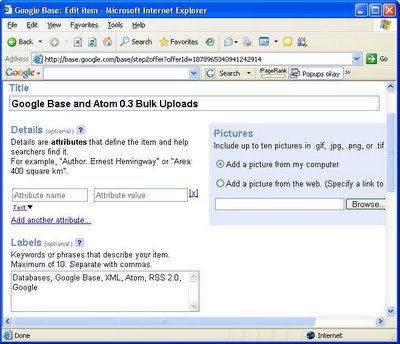

The Label tags appear on the edit page immediately after Google processes the upload, so you don't need to wait for Published status to test your editing application.

Use Labels to Refine Google Base User Searches
When you add Label tags to your entries, users can refine their searches by clicking links that return entries that match all tags for an entry as shown here:


Notice that comma-separated Names (tag) values appear under the Titles.
Click here to open the preceding interactive Google Base page, click the More... link to display all Names combinations, and try the various refinement choices. Click the publisher's moniker—Roger Jennings for this example—or click here to display a list of all items (not just Reference Articles) contributed by the publisher (authorid=1071203).

Conclusion
Google needs to clean up its Atom 0.3 documentation to minimize developers' wild-goose chases. The current (beta) UI undoubtedly will confuse potential users. For example, I would not have known the benefit of adding Name tags to search refinement, if I hadn't written a simple VB.NET 2005 project to clean up the description attribute (<context> element) value and add the Google Base namespace and a <g:name> element in the correct format.

Robert Niles, editor of the USC Annenberg Online Journalism Review, concludes: "Right now, the UI is geared more toward people upload information than those looking for it." BusinessWeek's Rob Hoff thinks folks are "Ganging Up on Google." The Solution Watch blog offers a postive review and links to other detailed Google Base reviews.

The World Resources Institute (WRI) claims to have submitted information to Google Base "on a 5 million-record database on sustainable development for 200 countries over a period of up to a century." However, a search of Google Base on "World Resources Institute" returns only 4,253 items that were entered between November 15, 2005 and November 28, 2005 as Research Studies and Publications Item Type. This Item Type appears to have been replaced by Reference Articles. The status of the remaining 4.996 million (purported) items isn't clear as of December 2, 2005.

Watch for updates to this post as other developers add their content to Google Base and keep an eye on the Google Base Help Discussion group to see what problems users encounter.

Technorati:

Wednesday, November 16, 2005

Google Base and Bulk Uploads with Microsoft Access

I learned that Google Base went live last night from a soundbyte on my local NBC TV affiliate's (KNTV) 5:00 am local news. So I checked Memeorandum for the details, read the Google Base announcement, created a Google account, read a few help files, looked over a few sample tables, and decided to try a simple Bulk Upload operation from a tab delimited *.txt file.

Access 11+ offers the simplest, rapid-application-development (RAD) approach to creating and exporting tables in a variety of formats, including tab-delimited text files. Creating a custom table requires running a make-table query that aliases field names to Google's required standard attribute names—such as title and id—optional standard attribute names, like currency and quantity, and custom attribute names. Click here for a list of standard and optional attribute names and value restrictions.

I found a few gotchas in the tab-separated file bulk upload process, which Google describes only for Excel worksheets, so here's a preview of a bulk-uploaded product list. An outline of the process for generating and uploading a NwindProducts.txt file that you create from a Make-Table query against the Northwind Categories, Products, and Suppliers tables follows the preview.

Update: Google Groups has a Google Base Help Discussion group with a few messages in Basics, Bulk Uploads, Individual Items, Search Results, and Miscellaneous categories. Bulk Upload Preview For a preview of the initial list of NwindProducts items in the Google Base UI, click here to search for the two Sir Rodney's products, which opens the following page:

Click the Sir Rodney's Marmalade link or click here to open the details page shown here:


Click the All Items by OakLeaf Systems link or click here to display a list of all the uploaded items, which has links to detail pages similar to the preceeding. OakLeaf's authorid attribute value is 1016205.

Beta Version Issue: The source of the 44 results count is a mystery—perhaps a Beta version problem related to publishing. Overnight, the number of results increased to 77 because Google Base doesn't delete items with 'id' values that aren't included in subsequent bulk updates.


Hopefully, problems shown above with high-order ANSI characters in manufacturer attribute values will be corrected in future versions.

Completing Your Personal Profile
If you have or create a Google account, which you need for most Google software-as-a-service (SaaS) applications, you'll probably find it worthwhile to add the additional default attribute values that apply to Google Base only. The following screen capture displays the fields common to most Google SaaS apps:


With the exception of the Web Site field, the Google Base-specific fields and their default values for the Products and related Item Types are shown here:


Notice the integration of Google Maps with the Item Location attribute value.

Creating the Tab-Delimited File with Access 11
1. Create a SELECT query with column aliases to corresponding standard attribute names, as shown here for three of the eight columns of the MakeNwindProducts query:


Notice that USD is a constant for all currency cells. Here's the Jet SQL statement for the Make-Table version of the SELECT query:


SELECT Products.ProductName AS title,
   Categories.CategoryName AS product_type,
   Products.QuantityPerUnit AS description,
   Products.ProductID AS id,
   Format(UnitPrice, "#0.00") AS price,
   "USD" AS [currency],
   Products.UnitsInStock AS quantity,
   Suppliers.CompanyName AS manufacturer
INTO NwindProducts
FROM Suppliers INNER JOIN (Categories
   INNER JOIN Products ON
     (Categories.CategoryID =
      Products.CategoryID) AND
     (Categories.CategoryID =
      Products.CategoryID)) ON
     (Suppliers.SupplierID =
      Products.SupplierID)
WHERE (((Products.Discontinued)=No))
ORDER BY Products.ProductID;

2. Execute the Make-Table query to create the NwindProducts table, which should appear as follows:

3. Open the NwindProducts table in Design mode, select the currency field, and set the Unicode Compression property value to Yes, as shown here:

Warning: If you don't make this change, the USD constant will appear in the exported text file as six Unicode bytes, and Google Base will reject your upload.

4. With the NwindProducts table selected, choose Export to open the Export 'NwindProducts' To ... dialog, select Text Files (*.txt; *.csv; *.tab; *.asc) in the Save as Type list, navigate to the appropriate folder in which to save the file —C:\GoogleBase for this example—and type NwindProducts.txt as the file name. Click Export to open the Export Text Wizard.

5. Accept the default Delimited option and, if you haven't created an Export Format previously, click Next, select the Tab option, mark the Include Field Names on First Row option, and select {None} as the Text Qualifier, as shown here:


Warning: If you don't make the preceding changes, your upload will fail.
Click Next.

6. Click Advanced to open the NwindProducts Export Specification dialog, and accept the previously set values for File Format, Field Delimiter, and Text Qualifier; and the the default Language (English) and Code Page (Western European - Windows). Set the Date Order to YMD, the Date Delimiter to - (hyphen), mark the Leading Zeros in Dates check box, and accept the remaining defaults, as shown here:


Caution: The Google help file states that bulk import accepts UTF-8, Latin1, or ASCII encoding. The Export Specification doesn't include a Latin1 option, but the default Western European (Windows) code page is the equivalent of Latin1. Selecting the UTF-8 code page causes incorrect display of characters with diacriticals in the Beta version; selecting US-ASCII omits diacriticals.

Note: The date settings create date values that comply with the XML Schema date datatype—such as 2005-09-05. The sample table doesn't include Jet DateTime fields.

7. Click Save As to open the Save Import/Export Specification input box, change the default Name to NwindProducts Export to Google Base and click OK twice to save the specification. Click Next, verify the path and file name for export, and click Finish to save the tab-delimited file.

8. Open the file in Notepad and verify that the currency field doesn't include a $ prefix and USD appears in the currency column, as shown here:


Uploading the Tab-Delimited File to Google Base

9. From Google Base's home page, click the Bulk Upload Files link

10. If want to set up an FTP account, follow the Google instructions for obtaining an account for the Google Base FTP server. An FTP account isn't required for the Direct Upload default .

11. If you haven't previously uploaded a file, open the Specify a Bulk Upload File page and type NwindProducts.txt as the file name, select Products as the item type, and accept the default English and US Dollar selections, as shown here:


Beta Version Limitation: You can only upload a single feed from a Google account.

12. Click the Specify Bulk Upload File button to specify the file to upload.

13. Click the Upload and Process This File link. If the tab-delimited file's data format and content is correct, the following status page opens:


14. Return to the Google Base home page and your uploaded items appear as shown here (after a few hours):


Hopefully a Beta Version Problem: It takes an inordinately long time to fully publish a compact list of 69 items (the 77 items appears to be an interim count). After about four hours, only six of the items gained 'Published' status. Overnight all 77 items became 'Published.' Is Google Base running on Sun Servers by any chance?

Definite Beta Version Problem: The "How do I delete my item?" help topic states: "If you're updating your items via bulk uploads, simply delete the item(s) from your bulk upload, then submit the bulk upload again." Deleting the 8 discontinued items from the tab-delimited file did not delete them from the list. Discontinued items&mdash;such as Alice Mutton or Perth Pasties—appear with a modified time of 12:23 p.m. All non-discontinued items—such as Sir Rodney's Scones—have 1:49 p.m. as the modified time.

15. To edit an entry, click the Edit link for an item that has 'Published' status to display the autogenerated editing form, as partially shown here:


16. To display the following list of [some] OakLeaf entries, clidk the All Items by OakLeaf Systems link:


Hopefully a Beta Version Problem: The source of the 44 search results count is a mystery.

Initial Conclusions
Google Base's beta incarnation doesn't appear to me to be a serious competitor to eBay, CraigsList, QuickBase, or other forms-based database applications offered as SaaS Web apps. The apparent lack of ability to create multiple named tables having identical item_type attributes is a serious limitation, as is the inability to make lists accessible only to specific Google or other user accounts, group roles, or the like.

Other Google Base watchers have posted entries with similar reservations about the immediate utility of the service other than for classified advertising listings. As time permits, I'll add additional links to comments regarding Google Base's initial commercial viability. In the meantime, check this later Memeorandum page snapshot. Stay tuned for the Google Base blog, which currently requires a login ID and password—as did Google Base itself just before the beta went public.

If Google lifts is ban against multiple Bulk Updates from a single account, I'll run a similar test with SQL Server 2005's Adventure Works product listings and SQL Server Integration Service's (SSIS) text export feature.

Initial tests with an Atom 0.3 (Atom.xml) file generated by Blogger for the OakLeafBlog, saved as a local XML file with FireFox 1.5 RC2, and Bulk Uploaded as the Reference Articles item type showed several problems. The description attribute contains HTML markup and error messaages state that the value is limited to a maximum of 10,000 characters. Thus only the shorter OakLeafBlog articles publish to the list; HTML markup contributes substantially to description length.

Help Center's "What do I include in 'Description'?" topic says "Please ensure that the description does not contain any HTML as we don't currently recognize or display HTML tags in your item." Help Center also says the maximum description length is 1,000 characters. Neither statement appears to be true.
I also plan to give XML files and RSS 2.0 feeds a try with bulk uploads. Click here for a detailed list of all Google Base XML attributes.

Technorati:

Tuesday, November 15, 2005

Ray Ozzie's "Internet Service Disruption" Memo and Microsoft Access

Dave Winer published copies of Bill Gates' October 30, 2005 internal e-mail message and Ray Ozzie's memo of October 28, 2005 on November 9, 2005. Bill Gates' "Internet Software Services" e-mail laid the historical foundation for Ray Ozzie's initial definition of "The Internet Services Disruption" to Microsoft's increasingly ossified weltanschauung. Ray Ozzie's memo attempts to instill leaders of Microsoft's three new divisions—Platform Products & Services, Business, and Entertainment & Devices—with a "'services-enhanced software' mindset." Internal distribution of the message and memo preceded the pair's November 1, 2005 announcement of Windows Live and Office Live at a San Francisco flackfest, and followed by a few days the brief exposure of Google Base on October 25, 2005. Update 11/21/2005: Mini-Microsoft analyzes Ray Ozzie's memo in "A Disruptive Defrag for Microsoft." The beta version of Google Base went live in the evening of November 15, 2005, and Ray Ozzie started version 3 of his blog at MSN Spaces on November 16. A November 20, 2005 post ("Really Simple Sharing") describes a proposed RSS extension for content synchronization specification called Simple Sharing Extensions (SSE). The SSE FAQ is here. Microsoft is releeasing the specification under the Creative Commons Attribution-ShareAlike license. View the Memeorandum 11/21/2005 page snapshot.

Update 12/7/2005: ComputerWorld's Robert L. Mitchell criticizes a pre-beta version of Office Live in his "Office Live: The demo" post. Microsoft responds in the comments.

Update 12/11/2005: The New York Times' Steve Lohr writes in "Can This Man Reprogram Microsoft?"—"The man whom Mr. Gates is counting on to make a difference is Ray Ozzie, a soft-spoken 50-year-old who joined the company just eight months ago. He has the daunting task of galvanizing the troops to address the Internet services challenge, shaking things up and quickening the corporate pulse." ZDNet's Dan Farber comments in "Reprogramming Microsoft and the GoogleNet PC"—"Steve Lohr's New York Times article 'Can this man reprogram Microsoft' doesn't offer much that hasn't already been endlessly reported about Ray Ozzie's background and mission to bring the services economy to Microsoft. He does bring up Google's discussions with thin-client system maker Wyse Technology: 'The discussions are focused on a $200 Google-branded machine that would likely be marketed in cooperation with telecommunications companies in markets like China and India, where home PC's are less common, said John Kish, chief executive of Wyse.'"

Update 4/19/2006: David Kirkpatrick's "Microsoft's new brain" article for Fortune (April 18, 2006) has this deck: "Brutal competition. A stock going nowhere. Microsoft is in crisis, so Bill Gates has unleashed his new hire, software genius Ray Ozzie, to remake the company - and conquer the Web." The article describes in depth a June 2005 meeting of the top 15 Microsoft executives run by recently hired Ray Ozzie. The article claims that "Put simply, Ozzie's assignment is to Webify everything: To intertwine Microsoft's entire product line - software for consumers, software for businesses, Xboxes, all of it - with the vast and ever-growing power of the Net. 'Everything we do should have a presence on the Web,' Ozzie says." Adam Green says here that "Everyone would have to admit that with Google Base turning out to be the world's biggest RSS database and Ray Ozzie announcing Microsoft's synchronization and replication protocol based on RSS, Dave Winer is having the best week ever!. ... Microsoft and Google are being maneuvered into a massive game of chicken. I'll show everyone my Office data if you'll show your search data, and Dave is instigating it." Google Base, Access, SharePoint and Office Live Apparently, Google Base got Ray Ozzie's attention directed to online databases. His memo mentions Access twice, first in the context of "lightweight development":

The rapid growth of application assembly using things such as REST, JavaScript and PHP suggests that many developers gravitate toward very rapid, lightweight ways to create and compose solutions. We have always appreciated the need for lightweight development by power users in the form of products such as Access and SharePoint. We should revisit whether we’re adequately serving the lightweight model of development and solution composition for all classes of development. [Emphasis added.]
And next in a paragraph labeled "rapid solutions":
How can we utilize our extant products and our knowledge of the broad historical adoption of forms-based applications to jump-start an effort that could dramatically surpass offerings from Quick[B]ase to Salesforce.com? How could we build it to scale to hundreds of millions of users at an unimaginably low cost that would change the game? How could we re-shape our client-side software offerings such as Access and Groove, and our server offerings such as SharePoint, to grow and thrive in the presence of such a service? Could these rapid solutions encourage a new ISV ecosystem and business model? [Emphasis and link added].
Notice the association of Access with SharePoint in both topics. Integration of Access tables with Windows SharePoint Services (WSS 3.0) lists appears to be one of Access 12's major "new" features. (Access 2003 already includes basic WSS 2.0 list import, export, and linking capabilities.) Microsoft Watch's Mary Jane Foley reported on September 29, 2005 that Kevin Johnson, co-president of the Platform Products & Services division, "... hinted there might be another managed service SKU around SharePoint Portal Server in the works." InformationWeek's Barbara Darrow speculated on October 26, 2005: "Within a year, the Redmond, Wash.-based company plans to offer hosted implementations of SharePoint as well as CRM and ERP applications, several sources said." Darrows quotes Bill Gates from a September 15, 2005 interview in Computer Reseller News:
"SharePoint today runs primarily on premises. We have some partners who are doing hosted SharePoint. We are looking at what our role is in helping people with SharePoint,” Gates said [at] Microsoft’s Professional Developers Conference in Los Angeles. “So technologically, the server equals service thing year by year is making good progress."

Update 11/29/2005: Microsoft Watcher Mary Jo Foley says in "Services Microsoft Should, Could (and Just Might) Develop"—"There's no way that Microsoft is going to leave the online classified market to Google & Co. There has to be a GoogleBase competitor in Microsoft's line-up. (Anyone out there heard a codename?)" Micro Persuasion's Steve Rubel claims "Google, Microsoft to Go Hard After Classifieds," and provides a link to Yardley.ca's "Microsoft’s ‘Fremont’ a Craigslist competitor" and TechCrunch's "Microsoft “Fremont” to Launch" items.

The obvious question is how Microsoft can scale and monetize a free (or very low-cost), multi-tenanted, Internet-based version of intranet-oriented WSS 3.0 or SharePoint Portal Server.

The QuickBase Model for Google Base

Ozzie's mention of Intuit's QuickBase in the second topic is significant when viewed in the light of Google's potential entry into the online database business. QuickBase began life as a consumer-oriented, forms-based application for sharing database content on the Internet. Lack of consumer interest in paying $14.95/month for up to 15 databases caused QuickBase to morph into a pricey WSS act-alike for corporate workgroups (US$249/month, minimum, for up to 10 users, 5 MB of data, and 100 MB of attachments.) New Access 12 database templates are likely to mimic packaged QuickBase project management, customer service, professional services, marketing, legal, real estate and IT management applications. WSS 3.0 includes new, lightweight project-management features. Project management is one of QuickBase's most popular pre-built applications, and 37signals offers Basecamp—a Web-based project management app—for US$12 - $99 per month. According to Microsoft's "A discussion of what's new in Access 12" blog, the Access 12 templates are "compatible with SharePoint, so users who want to build collaborative apps on SharePoint with them can do so easily."

Note: BusinessWeek's Rob Hof wrote a brief—but glowing—review of Basecamp ("Teamwork, Supercharged—We test one of the latest Web-based management tools: Basecamp") for the November 21, 2005 issue's cover story, "The Web Smart 50." The Richard Bird of R.BIRD & Company, Inc. mentioned in the review has an About Design blog. Basecamp was the first Ruby on Rails project from which 37signals extracted the Rails Web framework. You'll find Rob's interview of 37signals' founder—"37 Signals, 1 Clear Message—CEO Jason Fried's startup philosophy can be summed up in three short words: Keep it simple." (BusinessWeek links might require registration/subscription.") I'm betting that lightweight project management will become the first poster child for a surfeit of low-cost, ad-supported, or hybrid SaaS. Initial Google Base standard data entry and display forms cover course schedules, events and activities, housing, jobs, news and articles, people profiles, products, recipes, reference articles, reviews, services, travel, vehicles, and wanted ads. But Google claims to offer the ability to define your own table fields and design custom forms, much like Access projects, WSS custom lists, or QuickBase databases. Here's what Google says about Google Base content:

Post your items on Google. Google Base is Google’s database into which you can add all types of content. We’ll host your content and make it searchable online for free.

Examples of items you can find in Google Base: • Description of your party planning service • Articles on current events from your website • Listing of your used car for sale • Database of protein structures

You can describe any item you post with attributes, which will help people find it when they search Google Base. In fact, based on the relevance of your items, they may also be included in the main Google search index and other Google products like Froogle and Google Local.

There's no question that Google Base represents a serious competitive threat to QuickBase, CraigsList, eBay, newspaper classifieds, and—potentially—an online version of Access delivered as an Internet service, WSS reincarnated as an Internet "services platform," or both.
PBS—not InfoWorld—columnist Robert X. Cringely discusses Google Base in his November 17, 2005 piece, "Google-Mart: Sam Walton Taught Google More About How to Dominate the Internet Than Microsoft Ever Did":
With the advent of widespread GoogleBase (again a bit-schlepping app that can be used in a thousand ways -- most of them not even envisioned by Google) there's suddenly a new kind of marketplace for data with everything a transaction in the most literal sense as Google takes over the role of trusted third-party info-escrow agent for all world business. That's the goal. ... Microsoft can't compete. Yahoo probably can't compete. Sun and IBM are like remora, along for the ride. And what does it all cost, maybe $1 billion? That's less than Microsoft spends on legal settlements each year.
Salesforce.com and "Intelligent Reaction" Ozzie mentions Salesforce.com in the same sentence as QuickBase when he implores Microsoft executives to "... jump-start an effort that could dramatically surpass offerings from Quick[B]ase to Salesforce.com." It's an interesting coincidence that Adam Bosworth, who was responsible for designing and delivering Access 1.x, is Google's Engineering VP and, according to ZDNet's Dan Farber, a "long-time friend" of Salesforce.com. Farber's "Bosworth: Intelligent reaction, not intelligent design" blog entry summarizes Salesforce.com's (and Google's) approach to incremental application development and contrasts it with (by implication Microsoft's) ponderous "five-year plans" that reek of "state socialism" in application and API design. Bosworth mentioned in his recorded presentation to Salesforce.com's September 2005 Dreamforce developer's conference that only 20% of Microsoft's original use models for Access turned out to be correct. Bosworth implied that lack of early user input and reaction to use models was responsible for Access 1.0 taking two years to release. No matter what apps Microsoft offers in its initial Office Live beta, user input from frequent Community Technical Previews might prevent the generally poor marks assigned to the Windows Live beta by many initial users. Ray Ozzie would have done well to recommend—or demand—that all Microsoft "Executive Staff and direct reports" listen to Bosworth's "Intelligent Reaction" presentation. Conclusion Ozzie's omission of references to other, more popular Microsoft Office members—Outlook, Word, and Excel (PowerPoint gets a peripheral mention)—and his emphasis on Access and SharePoint indicates to me that an on-line database or list manager with an Access or SharePoint-like front end might be one of Office Live's first offerings. Let me know in the comments what apps you believe are in store for the Office Live beta. Questions of the day: Would you—or your organization—entrust Microsoft or Google with your business data? Would it be worth encrypting your confidential data to gain the benefits of software as a service (SaaS)? --rj

P.S. [Updated 11/13/2005] Read Chris Church's comment (1) for more insight on Ray Ozzie's reference to "forms-based applications" and the future of Office Live. Chris concludes:

I expect Microsoft will continue to beef up the InfoPath and SharePoint connection, and continue to add forms and form-like capabilities to SharePoint itself, while on another front begin providing problem/process specific mini-solutions in Access. By leveraging what customers already have they can continue corralling the market while they improve process management, workflow, and content management functionality. I think the amalgamation of much of this will debut in a very limited form in Office Live. Or, I could be wrong (grin).

Technorati: Other Links: PBS columnist Robert X. Cringely's "Its Deja Vu All Over Again: We've Seen Microsoft's New Live Strategy Before" article has an iteresting take on the press conference and "Paper War: Microsoft Is Leaking Internal Documents to Make Us Think They Have a Plan" lambastes the memo and message. Mini-Microsoft takes on the Live! demo fiasco and offers links to other "interesting blog posts" about the event. eWeek's John Pallato weighs in with an op-ed piece, "Microsoft Memos Reveal On-Demand Anxiety," David Coursey claims "Microsoft 'Live Era' Meets Dead Air" and asks "What Can Ray Ozzie Achieve in Redmond?", and Darryl K. Taft claims "Microsoft's Strategy Memos Don't Tell All," citing several well-respected industry analysts who agree. InfoWorld's Ephraim Schwarts says "Microsoft is Stuck on the C: Drive: Despite its new service offerings, Redmond will have a hard time transitioning from the desktop software model." Vnunet.com's Tom Sanders reports that "Google Base goes far beyond an Ebay competitor" and quotes Gartner VP, Whit Andrews: "If it were me, I would be creating an online database such that that online database could feed other online applications." Forrester's Charlene Li unexpectedly gives Microsoft's SaaS press conference the high-five and expects Google to tie Blogger and Google Groups into Google Base. You can read an official Intuit blog about new QuickBase features in the upcoming Fall Release.

Thursday, November 10, 2005

"Expert One-on-One Visual Basic 2005 Database Programming"

I've completed the final sample code review of Expert One-on-One Visual Basic 2005 Database Programming for WROX with the Visual Studio 2005 RTM bits (build 8.0.50727.42) and its companion SQL Server 2005 RTM (version 9.0.1399).

Update 12/19/2005: The book was published today.

Update 1/6/2006: I've added an Amazon Connect Author "Blog" to the book's detail page on Amazon.com. The posts will include notices of sample source code updates and errata. See my "A First Look at Amazon Connect Author 'Blogs'" post for some issues I encountered when posting to Amazon Connect.

Update: 1/17/2006: Added a review of Tom Rizzo's Pro SQL Server 2005 title by InfoWorld columnist Sean McCown (click the General Database link) and corrected Tom's current job description at Microsoft.

Following are the book's parts (bold) and chapters:

I. ADO.NET 2.0 Basics 1. Migrating from ADO to ADO.NET 2. Introducing New ADO.NET 2.0 Features 3. Adopting Best Practices for Data-Centric Projects II. Data Binding in Windows Forms and Controls 4. Programming TableAdapters, BindingSources, and DataGridViews 5. Adding Data Validation and Concurrency Management 6. Applying Advanced DataSet Techniques III. Data Binding in ASP.NET 2.0 7. Working with ASP.NET 2.0 DataSources and Bound Controls 8. Applying Advanced ASP.NET 2.0 Data Techniques 9. Publishing Data-Driven Web Services IV. SQL Server 2005 and ADO.NET 2.0 10. Upgrading from SQL Server 2000 to 2005 11. Creating SQL Server Projects 12. Exploring the xml Datatype

Tom Rizzo, Microsoft's former Director of Product Management for SQL Server, is the book's technical editor. Tom is one of several authors of Apress's recently published Pro SQL Server 2005. (Tom is now running product management for the SharePoint Portal Server team.)

--rj

Technorati:

Wednesday, November 09, 2005

Adam Bosworth: "Learning from the Web" and Google Base

Microsoft XML guru Dare Obasanjo summarizes Adam Bosworth's "Learning from the Web" article posted in the Association for Computing Machinery (ACM) Queue, and concludes:

The article ends by arguing that database vendors should add native support for the Atom Protocol and wire format. I find this interesting since based on conversations on the atom-protocol list, it is clear that Google is very interested in the Atom API. Perhaps they have already built this Atom store that Adam is arguing for and will expose the Atom API as a way to interact with it. Perhaps this Atom store accessible via Atom feeds and the Atom API is Google Base? Speculation is fun.
Note: The Google Base URL (base.google.com) now opens a login form. Click here for Business Week's initial Google Base article and here for early Google Base screen captures.

Update: 11/25/04: Google Base is now live and is accepting uploads in tab-separated-value (TSV), XML, Atom 0.3, and RSS 1.0/2.0 formats.

Craig Ogg's Software Voices blog offers similar speculation in a "Did Adam Bosworth Reveal the Real Google Base at the MySql Users Conference" post. Gordon Gould, Craig's business parter, also ruminates on Google's intentions for Base. The abstract of Adam's paper, "Database Requirements in the Age of Scalable Services," contains a link to an audio recording of his presentation. Adam distinguishes information stored in a database from content stored in Web pages, and suggests that databases with integrated query processors won't scale to Google's requirements—i.e., a billion or more queries per day. Note: Adam Bosworth is Google's Vice President of Engineering. He and Brad Silverberg were founders of Analytica, which Borland purchased to provide the foundation for its Quattro Pro spreadsheet. While at Microsoft, he was responsible for designing and delivering Microsoft Access 1.x and the HTML rendering engine for Internet Explorer 4.0. Subsequently, he, Tod Nielsen (Access's first and foremost marketing guru), and other Microsoft employees founded Crossgain, which BEA acquired. Borland recently appointed Tod Nielsen as CEO, after his brief stint as an Oracle VP. Bosworth's article makes the following two points about database scaling and caching:

3. Have databases enabled people to harness Moore’s law in parallel? This would mean that databases could scale more or less linearly to handle both the volume of the requests coming in and even the complexity. The answer is no. 4. Do databases optimize caching when it is OK to be stale? No.
Obviously, Google Base requires the capability to scale-out and cache slowly-changing or unchanging "catalog" data. SQL Server 2005 Enterprise Edition's partitioning and new Scalable Shared Databases feature addresses point 3. All except Express editions' capabilitity to invalidate ASP.NET 2.0 page caches with Query Notifications answers "Yes" to point 4. Two other points Bosworth raises have the potential to be solvable with SQL Server 2005's native XML data type and support for XQuery, full-text search, or both:
5. Do databases handle flexible graphs (or trees) well? No, they do not. 6. Have the databases learned from the Web and made their queries simple and flexible? No, just ask a database if it has anyone who, if they have an age, are older than 40; and if they have a city, live in New York; and if they have an income, earn more than $100,000. This is a nightmare because of all the tests for NULL.
The scalability of SQL Server 2005's XQuery implementations, even with XML indexes, remains to be seen. However, I wouldn't expect to be able to search Google Base with XQuery expressions. Bosworth concludes his article with this paean to Oracle on page 5:
Oracle has done a remarkable job of adding XML to its database in the various ways that customers might want. In so doing, it has added a lot of these capabilities. Its ROWID type allows some forms of flexible linkage. But none [of the database vendors] really show that they have learned from the Web.
I don't understand how a ROWID pseudocolumn can provide a better form of "flexible linkage" for XML documents than an auto-incrementing (int identity) primary key. It's my opinion that SQL Server 2005's XML data type will support RSS 2.0/Atom documents and do so more easily and efficiently than Oracle 10g. But accessing a production database with an RSS 2.0/Atom wire protocol appears to me to have serious security repercussions and performance problems. Finally, the jury's still out on the issue of whether SQL Server 2005's xml columns will partition and scale to Googlesque requirements. --rj Technorati:

Monday, November 07, 2005

New SQL Server 2005 Features Announced November 7

Microsoft announced two new SQL Server 2005 features in conjunction with the November 7, 2005 San Francisco SQL Server 2005/Visual Studio 2005/BizTalk Server 2006 release event: Scalable Shared Databases for SQL Server 2005 Enterprise Edition According to Knowledge Base article 910378:

The scalable shared database feature allows you to attach a read-only reporting database to multiple server instances over a storage area network (SAN). A reporting database is a read-only database that is built from one or more production databases that are used exclusively for reporting purposes. To be made into a scalable shared database, a reporting database must reside on one or more dedicated, read-only volumes whose primary purpose is to host the reporting database or a coordinated set of reporting databases. These volumes are known as reporting volumes.

SQL Server Management Studio Express (SSMSE) for SQL Server 2005 Express SSMSE is the November Community Technical Preview (CTP) for the promised SQL Server Express Manager replacement. According to the SSMSE Overview:
Microsoft SQL Server Management Studio Express (SSMSE) provides a graphical management tool for SQL Server 2005 Express Edition (SQL Server Express) instances. SSMSE can also manage relational engine Instances created by any edition of SQL Server 2005. SSMSE cannot manage Analysis Services, Integration Services, SQL Server 2005 Mobile Edition, Notification Services, Reporting Services, or SQL Server Agent.
Here's a capture of SSMSE after executing the Instnwnd.sql script to create the Northwind sample database from SQL Server 2000.

You can't run the SSMSE setup program if you've installed the full version of SSMS; the two products won't run side by side. Click here to view the SSMSE readme.

--rj

Technorati:

P.S. Steve Ballmer announced at the San Francisco release event that Visual Studio 2005 Express editions would be available for free download from the Microsoft Web site until November 7, 2006. More details, including download links and rewards for registering the downloads, are available on Dan Fernandez' blog.