Showing posts with label Access 2007. Show all posts

Tuesday, June 17, 2008

LINQ and Entity Framework Posts for 6/16/2008+

Note: This post is updated daily or more frequently, depending on the availability of new articles.

Frans Bouma Starts New Features in LINQ to LLBLGen Pro Series

Linq to LLBLGen Pro: feature highlights, part 1 of June 17, 2008 is the first of a series that Frans promises will “sum up some of the characteristic features of Linq to LLBLGen Pro, so you don't have to wade through the 15 articles I wrote about writing Linq to LLBLGen Pro.”

Frans emphasizes that “Linq to LLBLGen Pro is a full implementation of Linq” and delivers a set of questions about the specific LINQ operators and related features a LINQ-enabled O/RM tool should support. These question could well serve as the start of a criteria list for a .NET O/RM comparison table.

Wading through the 15 articles Frans wrote while writing the LINQ implementation is an exceptional opportunity to learn more about implementing LINQ in a .NET O/RM. Here they are:

Surprising Lack of Activity in SQL Server Data Services Forum

My All’s Quiet on the SQL Server Data Services Front post of June 17, 2008 starts with:

I'm surprised at the current lack of relevant threads in the SQL Server Data Services (SSDS) - Getting Started forum, which appears to have commenced operations on May 19, 2008 but garnered its first message on May 29.

And goes on to offer some potential reasons for the apparent lack of interest.

Update 6/17/2008 1530 PDT: SSDS evangelist David Robinson contests my conclusions and says in his Peace & Quiet? post of June 17, 2008:

[W]e are working with companies of all shapes and sizes, from some of the worlds largest banks to small start-ups, customers covering almost every industry imaginable.

He also added this comment to my post.

Added: 6/17/2008

ADO.NET Sync Services Team Posts How-To for Bi-Directional Synchronization

The Extending Visual Studio 2008 SP1 Sync Designer to Support Bi-Directional Synchronization post contains a link to recently-released documentation for enabling bi-directional sync between SQL Server Compact and SQL Server 20085+.

As you can see in this excerpt from the SP1 docs, the amount of code to enable bidi sync for a simple Northwind Customers table isn’t insignificant.

Added: 6/17/2008

LINQ and Related Sessions at CodeStock 2008 In Knoxville, TN

The CodeStock 2008 conference to be held August 9, 2008 at Pellissippi State Technical Community College in Knoxville, TN offer the following LINQ-Related sessions:

The one-day conference has six simultaneous sessions.

I’m surprised that no one’s covering Entity Framework and ADO.NET Data Services.

Thanks to Wally McClure for the heads-up on June 16, 2008.

CIO Magazine Posts Article on LINQ and TechFunk Copies It Verbatim

CIO Magazine’s Five Things the Boss Should Know About Microsoft's LINQ article of June 16, 2008 by John Paul Mueller is a semi-technical paean to the benefits of LINQ that emphasizes database queries.

What makes the story more interesting is the TechFunk blog’s word-for-word reproduction of the article in their Five Things the Boss Should Know About Microsoft's LINQ post of the same date. TechFunk provides no attribution whatsoever to CIO Magazine, for whatever that’s worth.

I’ve never seen a more flagrant case of plagiarism and copyright infringement by a technically-oriented blog.

Update 6/17/2008: Don’t get me wrong; I’m not a copyright bigot. This blog’s content is licensed under the Creative Commons Attribution 3.0 License.

AP is nuts for charging $12.50 for the fifth word quoted from their newsfeed and barring any excerpts if they find “Your use of the licensed Content to be offensive and/or damaging to Publisher’s reputation," as reported in TechDirt’s Associated Press: Fair Use Limits You To Four Words; Five Words Costs $12.50 post of June 17, 2008.

Steve Naughton Starts Database-Based Permissions Series for ASP.NET Dynamic Data

Immediately after finishing his seven-part A DynamicData Attribute Based Permission Solution using User Roles series, Steve has embarked on DynamicData: Database Based Permissions - Part 1, which moves the ASPNETDB users and roles tables on which the permissions were set. The next episode will be “Creating the user interface for setting the database based attributes.”

David Ebbo Explains ASP.NET Dynamic Data’s Associated MetaData Class and Its Future

Dynamic Data uses metadata attributes applied to entity classes or their properties to specify complex data types, format data, add validation rules, and other custom entity and property features. In his Dynamic Data and the Associated Metadata Class post of June 16, 2008, David explains how attribute-based metadata works today and how it might change in future versions.

Marcelo Lopez Ruiz Explains the Importance of ADO.NET Data Services’ InitializeService() Method

Marcelo notes in his So Special - InitializeService in ADO.NET Data Services post of June 16, 2008 that service initialization is a one-time process controlled by an internal static dictionary whose lifetime is that of the AppDomain. Marcelo recommends invoking the InitializeService() method explicitly to set the service’s configuration and error handling options.

Marcelo says his next post will “focus on the configuration object.”

Update 6/17/2008: Marcelo’s Why is my ADO.NET Data Service empty? post answers the question with:

The service configuration allows you to specify what access you want clients to have (by default) on entity sets. You may further restrict access through interceptors, but you can never grant more access than that specified on the configuration. …

By default, the service is completely locked down - all the entity sets have no access rights granted for them, and so the data service looks empty - you can't access any resource at all. That's why folks are sometimes baffled when "everything works", but nothing is accessible. You should implement the InitializeService method and start granting access on a per-entity-set basis, and then you're ready to go.

Craig Shoemaker Shows How to “create wildly different layouts and easily add third-party controls to your Dynamic Data websites”

His Rockstar Dynamic Data Customizations post of June 16, 2008 has links to the following five podcasts:

He also has an Introduction to Dynamic Data screencast and podcast that are subtitled “Get started with ASP.NET Dynamic Data with some practical advice.”

Craig is a “new-media evangelist” for Infragistics, so expect to see some third party controls in the preceding examples.

Serena Yeoh Updates Layered .NET Architecture Sample to .NET 3.5 and LINQ to SQL

Serena (a.k.a. Firedancer), who works for Microsoft Consulting Services, has updated her Layered Architecture Sample for .NET project on CodePlex by replacing the Data Access Application Block (DAAB) with LINQ to SQL, changing Business Entities to LINQ to SQL Entities, and implementing .NET 3.5 Workflow services. She says:

Layered Architecture Sample is created to demonstrate how we can apply some of these .NET technologies with the Layered Architecture design pattern. It is a simple example that illustrates the factoring of responsibilities and separation of concerns into multiple layers in an enterprise application. As the name implies, the main focus of the sample is "How to code the layers?" and not the actual functionality of the chosen Expense application. The Expense Business Process Flow was chosen simply because it is widely used and easiest to understand.

Serena provides additional insight to the project in her Layered.Architecture.Sample.for.NET.3.5 post of May 28, 2008. (Notice the emphasis on layered, not tiered.)

Thanks to Patrick Yong’s Layered Architecture Sample for .NET post of June 16, 2008 for the heads-up.

Off-Topic: Does Google Gears Deserve its Recent Notoriety?

MIX’s Joshua Allen tries to brake the Google Gears hype train stoked by Dare Obasanjo with his Google Gears as the Next Flash post and TechCrunch’s Nik Cubrilovic with Get Ready For A New Platform War. Google Gears Drives Straight At Microsoft’s Profits in his Gears a Profit-Killer? post of June 16, 2008.

Google Gears languished in obscurity until the “demo of a gears-enabled MySpace mail client prototype, shown at Google I/O” by two ex-Microsoft folks, one of whom was Mark Lucovsky, the architect of Hailstorm.

My Google Gears Piques New Interest in Data Synchronization post of June 1, 2007 covered the initial announcement of Google Gears at their 2007 Developer day. It also notes that Scott Hanselman almost swooned over Google Gears in his Google Gears - Maybe all Rich Internet Applications needed was Local Storage and an Offline Mode of May 30, 2008. Scott said, inter alia:

This is a huge move and is quite brilliant. In one seemingly innocuous move (and one tiny 700k (yes, 700K) download) Google is well positioned to get Google Docs, including Writely, Spreadsheet and Presentation, along with who knows what else, enabled for offline use. And the whole thing is Open Sourced via the New BSD License.

A year later, Google Gears implementations are few and far between.

Off-Topic: Migrating from Access/Jet to SQL Server Panel Discussion from Tech*Ed 2008

According to panelist Mary Chipman, “rumors of Access’s death have been greatly exaggerated.” The panel answers the question: Are we there yet? Successfully navigating the bumpy road from Access to SQL Server.

Of course the current Microsoft party line is to substitute SharePoint lists for Access/Jet databases.


Tuesday, February 12, 2008

Will Access 14 be a "Tool for the Web" or SharePoint Server Front End?

Julie Lerman turned me on to Dan Fernandez's Channel9 interview of Bill Gates at the Office Developer Conference (ODC) 2008. What caught my eye were Dan's comments about the next version of Microsoft Access gaining Web capabilities:

The other cool part is hearing Bill hint about how Access will now be a tool for the Web. Many a developer has cut his teeth building Access applications and seeing Access go beyond desktop applications is huge. [Italics added for emphasis.]

Microsoft made a previous attempt to make Access "a tool for the Web" with Data Access Pages (DAP). However very few DAP projects offered Internet connectivity because securing them was exceedingly complicated. Microsoft Office Access 2007 (a.k.a. Access 12) doesn't support creating or even editing DAP.

I cut my Windows database development teeth building Access applications, and writing Using Microsoft Access [1.0] for Windows and 10 successive editions got me into the computer book authoring business in earnest. I was surprised to hear that the next version of Access (14.0, there won't be an Office 13) would be Web-enabled because the preceding attempt failed. So I transcribed BillG's comments on Access, which start at about 06:00 into the 11:42 interview:

Access, of course, has been phenomenally successful, but you think of it as just client forms and client data. Now [with Access] 2007, they did a great job where you could replicate from SharePoint down to Access lists back and forth, but that still didn't let you run your logic up on the server. So the next step is to take that base of Access users and literally let them write things that connect directly up to SharePoint and so it's server-based. So it's a logical step for Access. There's a lot of smart people working on that, so in no sense are we leaving the Access people behind. The same way we moved Excel up to the server, now we're moving Access up there as well.

There's not a single mention of the Web in the Access segment. Bill's comments were all about SharePoint. What's more, Access already has a free server; it's called SQL Server 2005 [Express Edition] or its predecessors, MSDE 1.0 and 2.0. If Access has a server, what constitutes "moving Access up there as well?"

Mene Mene Tekel Upharsin: Excel Services Beget Access Services

Access 12 currently enables importing, exporting, and moving Access tables from traditional .mdb and new .accdb files to or from SharePoint lists. The .accdb format was created expressly to support SharePoint's multi-select lists. You can store Access front ends in SharePoint document libraries, but opening them requires a licensed copy of Access 12 on the desktop. SharePoint has an Access DataSheet ActiveX control that's only accessible if the user has a license for a recent Access version.

An abandoned Excel Blog entry describes Excel Services as follows (slightly paraphrased):

Excel Services is brand new server technology that will ship with Office 12. Excel Services supports loading, calculating, and rendering Excel spreadsheets on servers. There are two primary interfaces: a web-based UI that lets you view spreadsheets in the browser, and a web services interface for programmatic access.

So what happens, exactly, to get the spreadsheet in the browser?  Behind the scenes, Excel Services opens the file the sales analyst saved to SharePoint, refreshes any external data in the spreadsheet, calculates any formulas, and renders the results in the browser. Specifically, Excel services sends only DHTML to the browser (no ActiveX), so the sales manager can be using any modern browser. The result is a very high-fidelity version of the analysis that the sales manager can interact with in the browser or, if they have permissions to do so, open up back in Excel. Excel 12 is the authoring tool for spreadsheets that run on Excel Services.

Note: SharePoint Server 2007's Creating Custom Solutions with Excel Services topic offers more up-to-date and detailed information about Excel Services.

Access 14 might become a "tool for the Web" (or at least intranets) by abandoning any pretense of remaining a desktop relational database management system (RDBMS), and becoming a list management query and reporting tool for SharePoint. This implies a set of Access Services running on the next version of Microsoft Office SharePoint Server (MOSS).

The Access Services might parallel Excel Services:

Access Web Services based on the SharePoint Lists Web Service or, less likely, a dedicated SOAP API similar to Excel Web Services.

Access Web Access provided by a simple forms engine, perhaps derived from the existing InfoPath forms engine, which renders customized forms and a DHTML version of the Access DataSheet control in a browser. Excel Services doesn't support VBA so Access Web Access might embargo VBA, too.

Access Query Services based on LINQ to Access (or the like), corresponding to Excel Calculation Services and modeled on Bart De Smet's LINQ to SharePoint project. SharePoint isn't an RDBMS, so support for SQL is superfluous.

Access User-Defined Functions for queries, roughly corresponding to Excel User Defined Functions, provided by the long-awaited Access application add-in for Visual Studio Tools for Office (VSTO).

Update 2/13/2008: InfoWorld's James Niccolai writes in his "'Office 14' to be more Web-friendly, Gates says" article of February 11 from ODC 2008:

Microsoft envisions the next version of Office [will] have partial online functionality similar to how Outlook Web Access works. ... "As we look at all the modules [in Office 14], we have in mind the equivalent of Outlook Web Access," Gates said. ...

It will take another step in that direction with Office 14 by offering Outlook Web Access equivalents of other Office applications such as Excel. "If you look at spreadsheets, maybe you'll not be able to set up all the data models [online], but you'll be able to read documents, change a few assumptions, and try things out," Gates said. ...

Gates did say that SharePoint Server, which is becoming more closely aligned with Office, "will be able to render a greater set of Office documents in an HTML environment."

A Pricey Transition to Access as a "Web Tool"

Web (Internet) access would require a MOSS for Internet Sites license (estimated price $40,943 for MOSS 2007) in addition to a MOSS Server License (est. $4,424 plus $94/user CAL for MOSs 2007) for non-public content.

Bloomberg's "Microsoft's SharePoint Exceeds $800 Million in Sales (Update2)" article reported that SharePoint grew faster than any other piece of software in company history, according to former Business Division President Jeff Raikes at the Microsoft Financial Analysts meeting on July 26, 2007. Microsoft said it has sold more than 85 million licenses to 17,000 customers.

According to eWeek's "Ballmer Details Ways Yahoo Deal Would Challenge Google" article of Feburary 4, 2008 by Clint Boulton:

Ballmer assured analysts that Microsoft is a provider of hosted software plus services for the Internet age.

He said that while people associate online advertising with the cloud computing trend that Google, Salesforce.com and other smaller vendors are leveraging, Microsoft plans to make all of its products available in the cloud as a SAAS (software-as-a-service). That includes the Windows operating system and major money-making products such as Office, in addition to the ad-driven Windows Live suite. [Emphasis added.]

"Each and every one of these businesses on top of a consistent cloud platform transitions to have additional revenue and profit opportunities based on this transformation to the cloud," Ballmer said.

A $40,943 per server price for enabling Access to become a Web tool certainly qualifies as a "revenue and profit opportunit[y]" for Microsoft but doesn't bode well for a "developer [who] has cut his teeth building Access applications" and wants to continue doing the same. This is especially the case when you consider that the runtime version of Access 2007 is a free download.

Update 2/13/2008: Mary Jo Foley's Office 14 to add more online document sharing article of February 13, 2008 sheds additional light on Office 14's "webification."

Update 2/14/2008: CIO Magazine's SharePoint 2007 Demystified: How to Cash in on Collaboration Tools article offers a relatively unbiased review of MOSS for enterprise use. However Sahil Malik contests the article's "Beware Microsoft Baggage" section; see his CIO Magazine - Journalistic ethics? post of this date.

Thursday, June 14, 2007

Microsoft Issues Hotfix for SQL Server 2005 Ordered View and Inline Function Issue

My September 11, 2006 SQL Server 2005 Ordered View and Inline Function Problems post described a change of behavior between SQL Server 2000 and 2005 when displaying views created with a SELECT TOP 100 PERCENT ... ORDER BY Whatever query: SQL Server 2000 sorts the resultset and SQL Server 2005 [Express] doesn't.

The post received many comments, including several that objected to my claiming this behavior was an issue for SQL Server users because the behavior was by design. Unfortunately, comments posted before the change of the OakLeaf blog format were lost in the transition to the wider page.

Yesterday Microsoft issued a hotfix, FIX: When you query through a view that uses the ORDER BY clause in SQL Server 2005, the result is still returned in random order, which is only available from Microsoft Support, describes the following Symptoms:

You have a view in a database in SQL Server 2005. In the definition of the view, the SELECT statement meets the following requirements:

  • The SELECT statement uses the TOP (100) PERCENT expression.
  • The SELECT statement uses the ORDER BY clause.

When you query through the view, the result is returned in random order.
However, this behavior is different in Microsoft SQL Server 2000. In SQL Server 2000, the result is returned in the order that is specified in the ORDER BY clause.

The hotfix involves modifications to 11 files, including Sqlservr.exe and the workaround described in my post is simple, so Microsoft must have received many complaints about the problem.

Thanks to IDisposable (Marc Brooks) for the heads-up on the hotfix.

Technorati tags: , , , , , , , , , , , , , , ,

Tuesday, December 12, 2006

Microsoft's Data Access APIs: ODBC to LINQ

Mike Pizzo, an Architect on the Data Programmability team at Microsoft, has started a four part series that captures the history of Microsoft's alphabet soup of data access APIs and the layout of acronyms to come. Here are the topics, with a link to the first two:

I'll update this post as new episodes hit the blog.

Commentary

It's back to the "early years" for Access 2007. The Access team now recommends abandoning Access Data Projects (ADPs) with SQL Server tables connected by OLE DB to DocObject front ends and ADODB in favor of old-timey ODBC-linked tables and DAO.

Here's Mike's take on ODBC and DAO in Access:

And then something happened. Visual Basic became popular as a scriptable "automation language". ODBC, being a C-style interface, was not directly consumable from VB. However, some of you clever folks figured out that Microsoft Access supported executing queries against ODBC Datasources, and that Access did support scriptable automation through its Data Access Object (DAO) API. Voila! Now you could write applications against ODBC sources using VB.

However, DAO went through Access's internal "Jet" (Joint Engine Technology) database engine, which defaulted to building local keysets for each result in order to do advanced query processing and cursoring against the remote data. This was fine if you needed that functionality, but significant performance overhead and additional round trips when you didn't.

Déjà vu all over again! DAO is the only API that supports the new Access Attachment data type, multi-select lookup fields, and "rich-text" and append-only memo fields of SharePoint lists.

So the Access team now suggests that developers abandon SQL Server 2005 Express back ends in favor of links to non-relational Windows SharePoint Services (WSS) 3.0 or Microsoft Office SharePoint Services (MOSS) 2007 lists.

Updated: 12/14/2006 for Part II; 12/24/2006 for Part III; 1/24/2007 for Part IV

Monday, September 11, 2006

SQL Server 2005 Ordered View and Inline Function Problems

SQL Server 2000 introduced the TOP n [PERCENT] operator to enable restricting the number of rows in the resultset of a view or inline table-valued function (TVF). In SQL Server 2000, starting the SQL statement for a view or TVF with SELECT TOP n [PERCENT] ... enables adding an ORDER BY clause to order the query's internal rowset so as to return the correct resultset. As a byproduct of that operation, views and TVFs returned resultsets sorted in accordance with the ORDER BY clause. A SELECT TOP 100 PERCENT query with an ORDER BY clause in SQL Server 2000 or MSDE 2000 views and TVFs returns all rows sorted. SQL Server Management Studio [Express] and the Microsoft Access Upsizing Wizard expect—and the Wizard depends on—this behavior. SQL Server 2005 [Express] does not respect the SELECT TOP 100 PERCENT operator or it's SQL Server 2005-only functional equivalent—SELECT TOP (100) PERCENT—and ignores the ORDER BY clause in views and TVFs. Thus resultsets are not sorted. ANSI SQL specifies that ORDER BY clauses are valid only in the top-most (outer) SELECT block of a query. But no ANSI SQL version supports the TOP operator, so the ANSI rules don't apply to SELECT TOP queries. Most SQL Server DBAs don't permit use of ordered views or TVFs, preferring to apply the sort with an ORDER BY clause in the SELECT block that invokes the view or TVF. Visual Studio and Microsoft Access developers commonly use the shortcut. As mentioned earlier, SQL Server 2005's corresponding TOP (100) PERCENT function also enables adding an ORDER BY clause to a view or TVF. However, the SQL 2005 query optimizer ignores the TOP (100) PERCENT and ORDER BY clauses and does not return a result set with the specified custom sort. The query optimizer "optimizes out" the TOP (100) PERCENT function as redundant, which deactivates the ORDER BY clause without warning. Fortunately, there's a workaroud that I'll discuss shortly. SQL Server Books Online's ORDER BY Clause (Transact-SQL) topic has a note that states:

When ORDER BY is used in the definition of a view, inline function, derived table, or subquery, the clause is used only to determine the rows returned by the TOP clause. The ORDER BY clause does not guarantee ordered results when these constructs are queried, unless ORDER BY is also specified in the query itself.
The upshot of this note is that there is no guarantee whatsoever that SELECT TOP ... ORDER BY ... query constructs will return rows in sequence specified by the ORDER BY clause. My experience—and that of most other commentators on this issue—is that SQL Server 2000 returns rows in the expected order for all valid TOP integer and TOP float PERCENT values, as does SQL Server 2005 for valid integer and all float values except 100. The da Vinci Toolset Obscures the Issue The Visual Data Tools (VDT)—more commonly called the da Vinci toolset—first appeared in the SQL Server 7.0 version of SQL Server Enterprise Manager (codenamed "Starfighter"). SQL Server 2005 Management Studio (SSMS), SQL Server Management Studio Express (SSMSX), Visual Studio 2005, and Access 2007 use the current da Vinci toolset version. The da Vinci toolset's query parser automatically adds a TOP (100) PERCENT operator when you save or execute an ALTER VIEW or ALTER FUNCTION definition that contains and ORDER BY clause in its SELECT block. Note: SQL Server Express (SSX) SP1 offers SSMSX as an individual download or bundled with SSX SP1 in SSX with Advanced Services SP1. Here's an example of a TOP (100) PERCENT query (Access's Alphabetical List of Products) in SSMSX's view design window:

Notice that the resultset in the lower Results pane is ordered alphabetically by the ProductName column. However, when you right-click the Alphabetical List of Products item in Object Explorer and choose Open View, the resultset isn't ordered by ProductName (or any other set of column values), as seen here: The sorted display of the Results pane is undoubtedly due to the SELECT query in the SQL pane being the outermost query at this point. This ambiguous presentation for views is likely to lead unsuspecting developers down the primrose path.

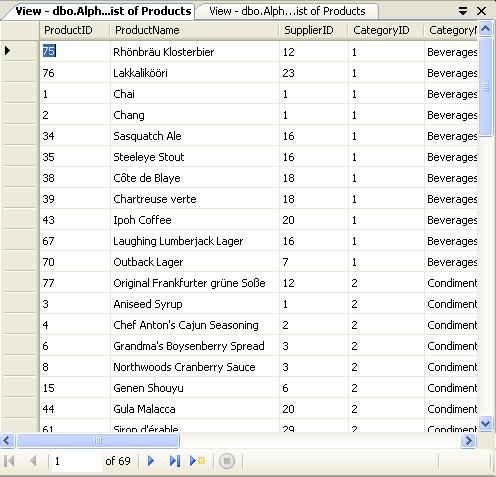
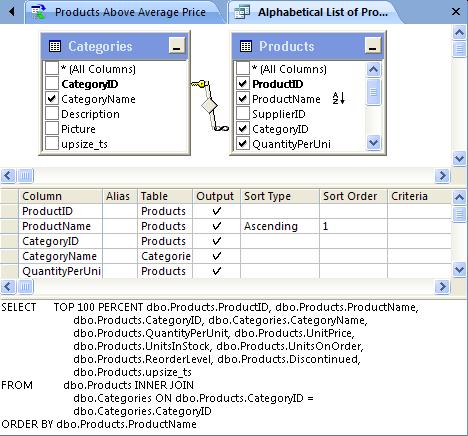
Note: SSMX and a Microsoft Access query from upsized Northwind.accdb is used as the example, because many more data-intensive application developers use (or will use) SQL Server (2005) Express (SSX) with SSMSX and Visual Studio Express editions or Access than SSMS and SQL Server 2005 Standard or Enterprise editions. (Visual Studio Express editions don't include the VDT.) The da Vinci Tools in the Access 2007 Project Designer Microsoft Access 2000, 2002, 2003, and 2007 use the da Vinci toolset as the Project Designer for Access Data Projects (ADPs). However, the Access 2007 Beta 2 Technical Refresh version shown here appears to use a slightly different query parser. Adding a sort to a view or inline TVF adds the SQL Server 2000-style TOP 100 PERCENT operator (without the parenthesis for backward compatibility with the Microsoft Desktop Engine (MSDE) 2000.) Note: Access 2007 Beta 2 TR won't display the contents of the Diagram or Grid panes if you or SSMS[X] add parenthesis to the TOP operator. Addition of parenthesis by SSMS[X] prevents round-tripping of view or TVF designs to Access 2007 without loss of Diagram and Grid panes. Running the preceding query displays the unordered resultset in Access's Datasheet View, as shown here: Access substitutes it's Datasheet View for SSMS[X]'s Results pane. The preceding resultset obviously isn't ordered by ProductName, so developers will know immediately that the sort wasn't applied.

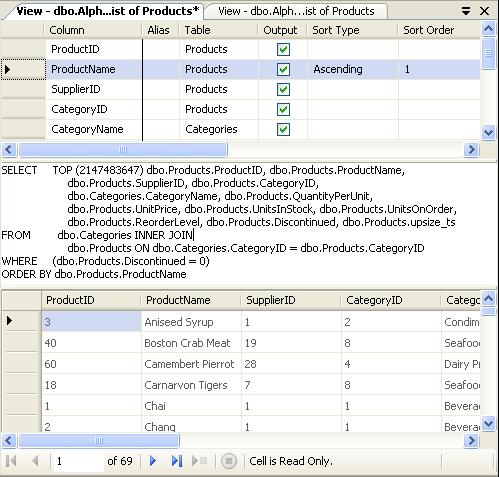
Note: In Access 2007 Beta 2, clicking the Tools group's Run (!) button of the Function & View Tools, Design ribbon doesn't update the row order of an open Datasheet View. You must close and reopen the Datasheet View to see the effect of a change to the view or inline TVF row order. A Simple Workaround for the TOP (100) PERCENT Problem If you must apply a custom sort order to views and TVFs, which is generally considered to be a hack, substitute TOP (VeryLargeInteger) for TOP (100) PERCENT. The largest integer that the query parser will accept is MAX(int) or 2147483647. This limitation appears to be for backward compatibility, because SQL Server 2005 converts TOP (n) values to the bigint data type. Here's the view's new query in SSMSX: In this case, the Results pane above reflects reality, as shown below: The TOP 2147483647 operator also behaves correctly in Access views and queries. However, Access developers have the option to set the Order By property of a view or inline TVF to Column1 [DESC][, Column2 [DESC] ... ] on the Data page of the ObjectName Properties dialog. This property specifies the ORDER BY clause of the outer query. Visual Studio developers and others might need to alter their TableAdapters or SELECT queries to apply an ex post facto sort order.

Note: SQL Server 2005 TOP (n) views are updatable if the view without the TOP (n) function is updatable. Conclusion It's surprising that the SQL Server tools group didn't alter the query parser to replace TOP (100) Percent with TOP (2147483647). The group also should have fixed—or warned users about—the ambiguous presentation in the Results pane for views.

The appropriate solution for SQL Server 2005 [Express] SP2 is to require SQL Server 2005's query processor to respect SELECT TOP (100) PERCENT ... ORDER BY views and TVFs by emulating SQL Server 2000 behavior, and change the party line by guaranteeing that SELECT TOP ... ORDER BY views and TVFs return a sorted resultset.

I haven't tested the workaround exhaustively, but it's likely to work in most or all cases. However, you're far better off from a performance and reusability standpoint to follow the ANSI SQL rules and apply the ORDER BY clause within the outermost query block, not in views or inline TVFs.

Note: For more information about the use of ORDER BY in SQL Server 2005, see the Ordering guarantees in SQL Server... item by Conor Cunningham, Query Optimizer Development Lead, in the SQL Engine Tips blog. See Books Online's TOP (Transact-SQL) topic for more detailed information on the TOP function.

Updates: Minor updates with clarifications on 9/27/2006 and 9/29/2006.

Technorati tags: , , , , , , , , , , , , , , ,

Sunday, July 23, 2006

Red vs. Blue JET Database API Confusion

It's undoubtedly safe to say that the majority of Microsoft Exchange administrators, developers, ISVs, and possibly even users are disappointed that the forthcoming Exchange Server 2007 didn't migrate its message store from the Blue JET Extensible Storage Engine (ESE) to SQL Server 2005. After all, SQL Server 2005 stole the show from Microsoft's rather dismal fourth quarter earnings report as the "Server and Tools [segment] delivered 18% revenue growth for the quarter, fueled by an increase of over 35% revenue growth for SQL Server."

One of the motivators for Exchange's adoption of SQL Server for its message store is the belief of many IT executives and even Exchange administrators that the ESE uses the same technology as Access's Jet database engine. For example, Peter Galli's July 20, 2006 eWeek article, "Exchange Data Store Change Still in the Cards," starts with a lead that refers to generic Jet:

While Exchange 2007, the upcoming e-mail, calendaring and messaging server from Microsoft, is still based on the Extensible Storage Engine, a derivative of the Jet database store, the company says it remains committed to unifying this with the SQL Server database store going forward.

They just don't know exactly when yet.

Officials such as Terry Myerson, the general manager of the Exchange Server product group, argue that there is ultimately more value for customers by staying on the Jet engine in Exchange 2007, the second, public beta of which is expected to ship as early as late July, with the final product likely in late 2006 or early 2007.

Wikipedia's entry for "Microsoft Jet Database Engine" merges the Red and Blue JET flavors (Purple JET?) into a single, generic Jet database:

JET stands for Joint Engine Technology, sometimes being referred to as Microsoft JET Engine or simply Jet. Microsoft Access, Microsoft Exchange Server and Visual Basic use or have used Jet as their underlying database engine. It has since been superseded, however, first by Microsoft Desktop Engine (MSDE), then later by SQL Server 2005 Express Edition and no longer exists as a component of Microsoft Data Access Components (MDAC).

Note: The Wikipedia entry correctly assigns Jet 4.0 as the version used by Access 2000, 2002, and 2003, but incorrectly says that Exchange 5.5 used it also. No wonder folks are confused. Remember Microsoft's convulsive architectural and product name-game of the early 21st century: Changes from Windows Distributed interNet Architecture (Windows DNA) and Digital Nervous System to the Next Generation Windows Services (NGWS), .NET Products and Services, Windows Server .NET, Visual Studio .NET, Visual Basic .NET and My Services .NET (Hailstorm), and finally to WhateverSKU 200x? The confusion between Red, Blue, and generic JET/Jet pales in comparison. JET Detectives It's not easy to find an authoritative history of Microsoft's Joint Engine Technology (JET) API. During the late 1990's, I was told by a Microsoft representative that JET (then being downsized to "Jet") was not an abbreviation or acryonym for anything. The "Notes" section of Microsoft's Extensible Storage Engine Reference, which is likely to be as close to authoritative as one can get, states:
ESE was formerly known as Joint Engine Technology (JET) Blue, and so frequently the term "JET Blue" or "JET" is used interchangeably with the term ESE outside this documentation. However, there are in fact two completely separate implementations of the JET API, called JET Blue and JET Red. The term "JET" is frequently also used to refer to JET Red, which is the database engine that is used with Microsoft Office Access. The two JET implementations are completely different, are separately maintained, have a vastly different feature set, and are not interchangeable. Within the ESE documentation, "JET" refers to the ESE or the JET API as ESE implements it. Any references to the JET Red will always explicitly be labeled "JET Red".
The ESE folks apparently didn't have the clout to establish "JET Red" as the brand for garden-variety Jet, the oft-maligned and oldest of Microsoft's freely-distributable datbase triumerverate—Jet 4.0, SQL Server 2005 Express Edition (SSX), and the forthcoming SQL Server 2005 Mobile Edition (SSM). It's clear that generic Jet is Red JET. Or is it JET Red? Confusion about JET API colors has abounded for years. Mary Jo Foley, who's well-known as a technical straight-shooter, got the Jet versions right and then wrong in this excerpt from her June 15, 2005 "Microsoft Shares More Clues About Longhorn Server" Windows Watcher article:
When asked by a participant whether Microsoft was planning to revisit Active Directory "resilience" by reworking Active Directory and other "server-intrinsic databases in Longhorn" so they don't require the Microsoft Jet database engine, Muglia noted that there are two versions of Jet: "Jet Red," which is what Microsoft Access uses, and "Jet Blue," which is "used widely within the Windows Server, including in Active Directory and Exchange Server. "The Jet Blue used by Access is transactional and in general, has had good robustness characteristics," Muglia told participants. "We will always look at where we should go with this and someday, we'll host it on SQL (Server). But that is a ways away — certainly not Longhorn."
It's not clear if Bob Muglia misspoke or Mary Jo simply transcribed his response incorrectly. Regardless, the last paragraph directly contradicts the first. Access 2007 Migrates to a New Red JET Erik Rucker's October 13, 2005 "Access 12's new data engine" post in MSDN's A discussion of what's new in Access 2007 (formerly "Access 12") blog made the first public disclosure that Microsoft Office Access 2007 (then 12) would use a special, Access-only version of Jet 4.0's .mdb file structure and database engine. The primary change to the new .accdb format was to accommodate SharePoint with Attachment and Multi-Valued Field data types. However, .accdb files don't support user-level security (with workgroup files), replication, and a few data import/export features of earlier Access versions. In a January 4, 2006 "JET History" comment to Erik's post, Microsoft's Ian Jose (ianjo) aimed to reduce readers' confusion about which JET API version was in play by providing more detail of the divergence of Red and Blue JET:

Everywhere this article refers to Jet, it is refering to JET Red. JET Red was an ISAM originally developed by Microsoft for BC7, compiled basic. JET Blue was originally developed by Microsoft as a prospective upgrade for Access, but it was never used in this role. JET Red and JET Blue began sharing the common JET moniker in the Spring of 1990 when a query technology, QJET, was developed that would host on both Red and Blue.

As others have noted, JET Blue went on to be used by Microsoft Exchange, Active Directory and many many other Windows services. JET Blue was a private API for many years, but became a published API in April of 2005 when three middle ware applications not covered by the Windows EULA chose it as their data store. Now anyone can use JET Blue.

JET Red is a file sharing techonlogy with page level locking and best effort crash recovery. JET Blue on the other hand is designed to be embedded in a server application, does not share files, has write ahead logging for guaranteed crash recovery and has record level locking. JET Blue does not ship with a query engine but instead relies on applications to write their own queries as C++ ISAM code.

Note: Red JET has had record-level locking since Access 2000's Jet 4.0 but is prone to crashes and file corruption.

In the early 1990s while busy writing Access user and developer books, I learned a bit more about Blue JET and then lost interest in the hierarchical version as Access 1.1+ and Visual Basic 3.0+ began to dominate the desktop relational database management system (RDBMS) space and book market.

Jet is Dead or Just Moribund?

Cries of "Jet is dead" accompanied the release of Access 2000, MSDE 1.0, and Access Data Projects, which abandoned the .mdb file format entirely. Access book sales fell off precipitously; migration from Access 97 to 2000 was at a trickle to be generous. Microsoft's Bill Demos wrote in a June 1999 whitepaper, "Microsoft SQL Server: Microsoft Access 2000 Data Engine Options":

MSDE is the new data engine for Microsoft and is our strategic direction. MSDE is completely compatible with the SQL Server version 7.0 code base, enabling customers to write one application that scales from a PC running the Windows 95 operating system to multiprocessor clusters running Windows NT Server, Enterprise Edition.

Obviously the rumors of Red JET's impending death in 1999 and 2000 were "greatly exaggerated." In fact, today the Access team is attempting to convince developers not only to migrate data storage from strategic SQL Server to Windows SharePoint Services (WSS) 3.0 as a data store or use non-strategic Access .accdb databases derived from Red JET. Plus (gasp!) they recommend moving from ActiveX Data Objects (ADO) and OLE DB to (double-gasp!) retro Data Access Objects (DAO) to enable programmatic access to the new data types and other Access 2007 enhancements. Not to be outdone by the storage engine group, Access 2007's programmability team is pushing formerly abandoned macros to replace VBA. Microsoft put Access macros out to pasture when they released Access 95 with "real" VBA instead of Access (or Embedded) Basic. The idea is that macros will run in secure environments where unsigned VBA code won't. I bet almost all Office 2007 users will end up with entire drives designated as trusted locations (a.k.a "safe for scripting.") Maybe I'm getting too old for this foolishness or—as my Montenegran friend Drago Vely would call it—crazinesses. It looks to me as if the next version of Visual Studio (codenamed "Orcas") alone will introduce many more cool data-related features than all Microsoft Office 2007 members together. Technorati tags: , , , , , , , , , , , , , , , ,

Sunday, July 09, 2006

Wufoo Challenges InfoPath for Form-Based Web Data Entry

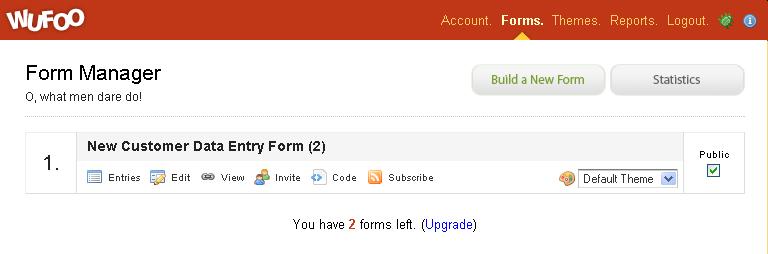
Wufoo is a new form-based data-entry application for collecting and tracking data via the Web. A unique feature of the application is the ease with which the forms you design can be embedded in an IFrame of a Web page or blog entry by copying the IFrame's HTML from a window that opens when you click the Code link (below) to your page. (Click the image to display the full-size version.)

You also can invite individuals to fill out the form by creating a list of email recipients:

As an example, the following simple form collects new customer information in fields similar to those for the Northwind sample database's Customers table. The form validates fields marked with a red asterisk as required. Controls with missing required values turn red when the user tries to submit the form. (The extra space at the bottom of the form accommodates the depth added by error messages.)

Note: While writing this post, the Wufoo server died temporarily; however, the site appears to have been reliable for the past few days. TechCrunch's Marshall Kirkpatrick had a similar 404 experience but gave Wufoo high marks for usability.

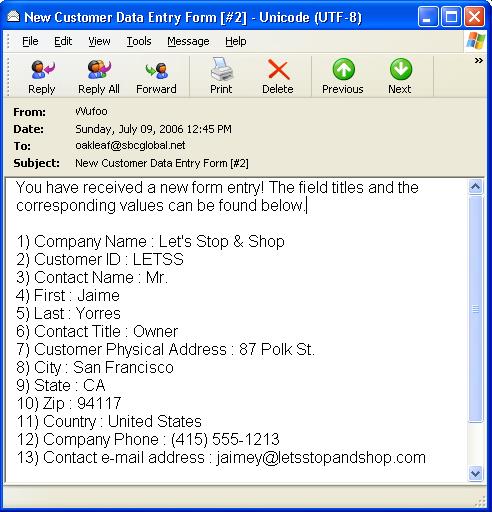
When the user complete the entries and clicks Submit, Wufoo acknowledges the submission with a message box. If you're using a free account, which limits you to three forms, you're then hit with barrage of Wufoo advertising pages. If you mark the E-Mail New Entries checkbox and supply an e-mail address, you recieve a UTF-8 e-mail message similar to that below for each entry.

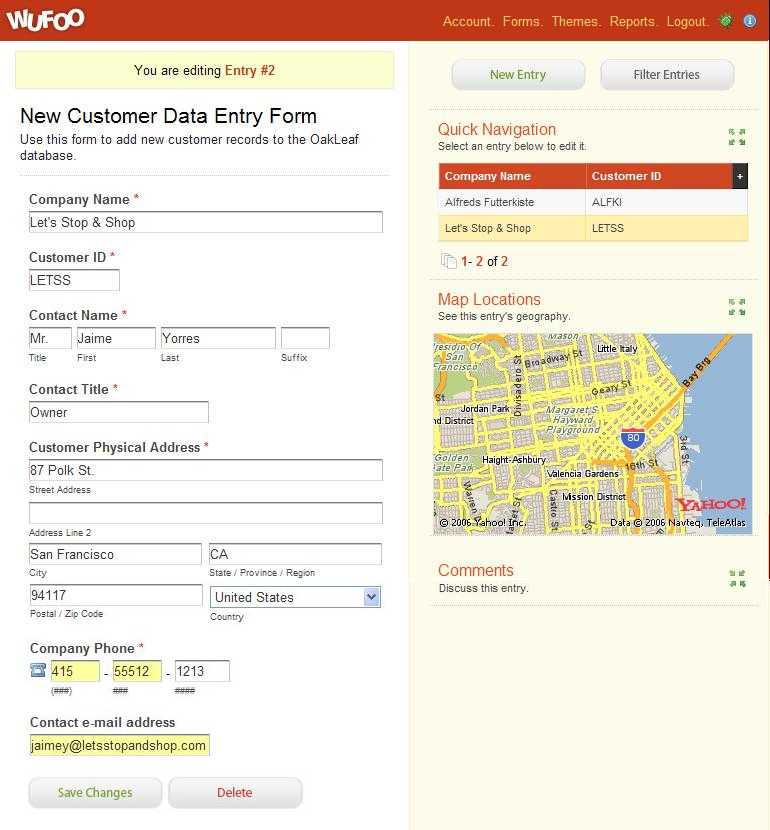
Users can enter and edit data at the Wufoo site with a form similar to that shown here, which includes a Yahoo! map mashup for the location specified in the Address control. If you want to restrict data entry to designated users, you must have a paid Wufoo account. The free account enables everyone or just the administrative user to enter or edit form data.

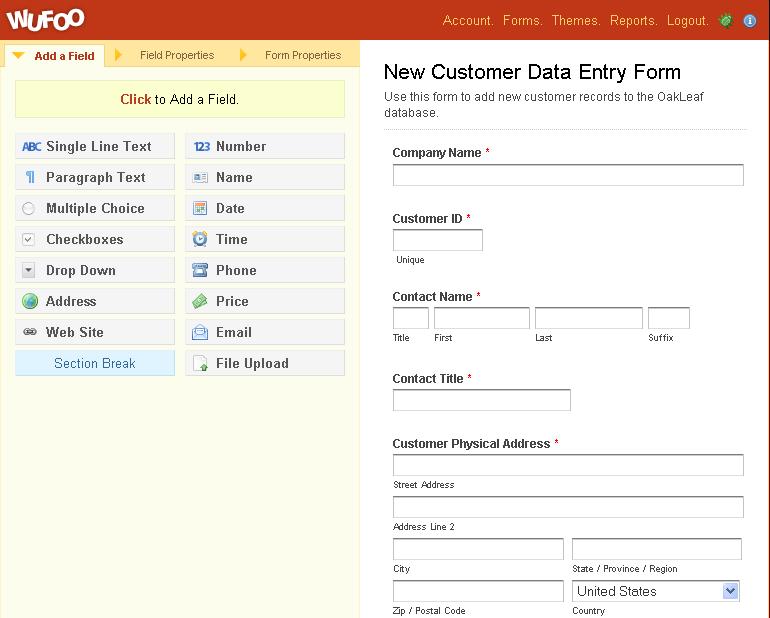
The Wufoo design canvas lets you choose from a variety of controls, as shown here for the New Customer form. Special-purpose controls—such as Date, Time, Phone, Address, and Website—appear to be unique to Wufoo and a few competitors' forms. You can rearrange the vertical sequence of controls by dragging, but a control occupies the entire width of the form, regardless of the width of its text box or other widget.

You also can create a basic report based on the "dataset" for form entries. Reports that involve numeric values can display basic bar and pie charts. The Report Manager lets you export reports to local files in Excel or CSV format.

Wufoo has four levels of paid services ranging from US$9 for 500 entries to US$199 for unlimited entries per month. Paid plans also provide access to customer support, the capability to upload files together with form data, an option to redirect to a designated URL after submission, and password protection of forms and reports.

Caution: Wufoo invokes a severe penalty—more akin to a fine—if you don't pay upfront for a sufficient number of form entries per month. Wufoo charges a fee of $0.05 per entry ($50.00/M) for exceeding the number of entries allowed by the plan. The ordinary cost per thousand entries (CPM) ranges from $4.60 for the $69/month to $18.00 for the $9/month plan.

Competiton from InfoPath 2007 and Access 2007

InfoPath provides very sophisticated data validation and verification features but isn't easily or cheaply adapted to hosted systems for extranets or the Internet. You can add InfoPath 2007 form rendering capability to Web pages by the techniques described in MSDN's "Hosting the InfoPath 2007 Form Editing Environment in a Custom Web Form" technical paper. However, you'll need InfoPath Forms Services running on the Web server, which requires a license for either Microsoft Office SharePoint Server (MOSS) 2007 or Office Forms Server (MOFS) 2007. (MOSS and MOFS provide InfoPath Forms Services to render the form in a browser with the XmlFormView control.) You also need to program the XmlFormView control to handle data transfer, which isn't a walk in the park. The InfoPath 2007 client is integrated into the Outlook 2007 e-mail environment. Wufoo doesn't require software licenses but submission costs can become substantial for a large organization unless you opt for the unlimited $199.00/month option.

Note: InfoJetSoft offers InfoJet Service—a .NET class library that enables publishing InfoPath 2003 SP1 forms to Web sites for user data entry in IE 6.0 or Firefox. InfoJet Server is an ASP.NET Web application that delivers InfoPath forms to users for data entry, local storage, or e-mail transmission. InfoJet EditPart is a set of Web Parts for SharePoint data entry. The license fees for InfoJet Service is $500 for 10 forms (XSNs), $1,500 for 50 forms, and $5,000 for an unlimited number of forms. There's no charge for submissions.

Microsoft Access 2007 offers an Outlook 2007-based e-mail data-entry system that uses HTML or InfoPath 2007 forms to automatically add to or edit tables of an Access 2007 (.accdb) or SQL Server 2005 [Express] database, or a SharePoint list. Users can complete HTML forms in any forms-enabled e-mail application but HTML e-mail must be enabled, which some organizations prohibit. Filling out InfoPath forms requires the InfoPath 2007 client application to be installed on the user's computer. You must send update or insert forms to specific users for completion. Outlook 2007 is required to export the returned form's data to Access 2007, so Microsoft Office 2007 Professional Edition will be required for HTML forms and Professional Plus Edition for InfoPath forms.

AJAXian and Other Web Competitors

The online forms business—if this crowded category can truly be called a business—got a lift in early 2006 from AJAX technologies. Recent AJAXian entrants include:

  • Formspring offers substantially lower pricing ($50.00/month for unlimited responses) but fewer features than Wufoo.
  • Form Assembly's Formbuilder has a $9.00 per month charge for unlimited responses. Formbuilder has posted a preview of a new version that offers predefined fields, more than one control per line, and table layout.
  • JotForm, a script.aculo.us-based free (at least for now) form generator that lets you edit the form's HTML and CSS, as well as paste it to a Web page.
  • Theblueform is a combinaton Web form and workflow (approval) designer.
  • Sidewalk delivers a basic form-generation and response-storage service for $3.00 per month.
  • Wyanet's WyaCracker offers free processing and features similar to JotForm, plus reports in RSS, XML, or HTML format, but the site's garish UI is likely to put off most users.
  • Starterbase is a forms-based startup that offers a $49.99 per year unlimited forms and users account with CSV data import and export, Excel import, and XML export. Free accounts allow five applications and public access or three designated users.

Note: My March, 2006 "Dabble DB: The New Look in Web Databases" post describes many of the Web-based data-entry services that compete with Wufoo: DabbleDB, QuickBase, eUnify DB, Caspio Express DB, eCriteria, HTML DB, Google Base, Lazybase and Zoho Creator. The June 27, 2006 "Generate Data-Based Web Sites With Blinq" post describes a preview version of a forthcoming ASP.NET 3.0 tool for Visual Studio "Orcas" that generates in less than a minute a complete data-entry and reporting Web site for multiple relational tables in SQL Server 2005 [Express] databases.

Please leave a comment if I've missed any recently-released AJAXian form builders.

Conclusion

I agree with Marshall Kirkpatrick, Derek Punsalan, Jason Bagley, and others that Wufoo does Web data-entry forms right. Users can create and test their own custom form much more quickly than a corresponding InfoPath form, and the data is far more accessible to most information workers as an Excel or CSV file than an XML document or Access 2007 table. However, the Wufoo folks should rethink the draconian monthly fine for users who exceed their payment plan's maximum entries.

Wufoo might consider a more enterprise-scale name for their service ... but who anticipated that a company named Google would end up with a greater market cap than General Motors?

[Updated 7/11/2006 and 7/12/2006]

Technorati Tags: , , , , , , , , , , , , , , , , , , , , , , , , , ,