Showing posts with label Test Harnesses. Show all posts

Wednesday, November 17, 2010

Azure Storage Services Test Harness: Table Services 1 – Introduction and Overview

Update 11/17/2010: The source code is now available for download as SampleWebCloudService.zip from my Windows Live Skydrive account. See Updated Source Code for OakLeaf Systems’ Azure Table Services Sample Project Available to Download of 11/17/2010 for more details.

Update 11/16/2010: The project’s two-year-old source code has been updated to the Windows Azure SDK v1.2 (May 2010) from the CTP in effect in November 2008. Windows Azure Development and Production Fabrics no longer support code that uses the early Sample.StorageClient library. The new code uses the current Microsoft.WindowsAzure.* libraries.

Here’s a capture of the current CRUD (create, retrieve, update, delete) page at http://oakleaf.cloudapp.net (the create/insert feature is disabled in the public version):

image

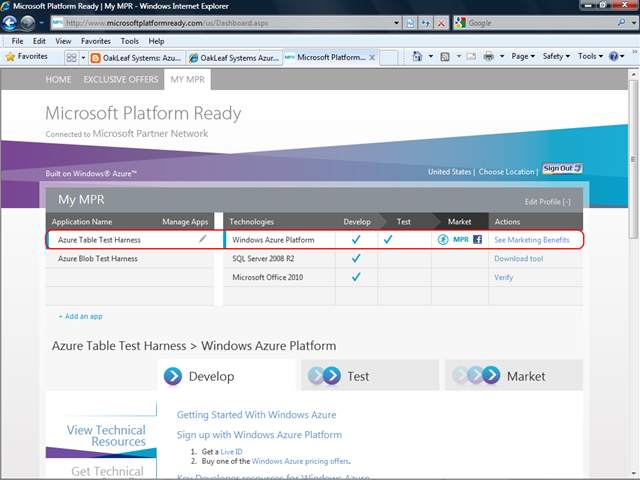
Notice the “Powered by Windows Azure” logo at the top right of the capture. This application went through the “Microsoft Platform Ready” (MPR) test process, as indicated by the capture below:
image

Source code will be available shortly from my Windows Live Skydrive account. I’ll update this post when the code is available.

When time permits, I’ll update this and the six other parts of the series to reflect the changes required to accommodate the new Microsoft.WindowsAzure.* libraries.


This is the first of a series of articles about a ASP.NET 3.5 C# test harness for Azure Storage Services that is will be available for download from my “Retire Your Data Center” cover story for Visual Studio Magazine’s February 2009 issue (click the Get Code Download link) in the near future.

Here are links to the later episodes in this series:

Azure Storage Services are a component of the Azure Services Platform, which runs under the Windows Azure operating system. According to Microsoft’s Windows Azure page:

Windows® Azure is a cloud services operating system that serves as the development, service hosting and service management environment for the Azure Services Platform. Windows Azure provides developers with on-demand compute and storage to host, scale, and manage Web applications on the Internet through Microsoft® data centers.

Table Services are one of the three Azure Storage Services, each of which has a Representational State Transfer (REST) API. The following diagram shows how Storage Services fit into the Azure Services Platform (click the images to open a full-size screen capture):

Microsoft describes Azure Table Services as follows:

Windows Azure Tables provide scalable, available and durable structured storage in the form of tables. The tables contain entities, and the entities contain properties. The tables are scalable to billions of entities and terabytes of data, and may be partitioned across thousands of servers. The tables support ACID transactions over single entities and rich queries over the entire table. Simple and familiar .NET and REST programming interfaces are provided via ADO .NET Data Services [client library].

Azure Tables provide authenticated access and are replicated three times for data security. The Windows Azure Tables whitepaper and the following video sessions from the Microsoft Professional Developer Conference (PDC) 2008 provide additional technical details about table services:

Note: Azure Table Services have some features in common with SQL Data Services (SDS) but don’t offer SDS’s current and promised non-relational database management services, such as LINQ to REST Skip(), OrderBy() and Join() methods, and promised features such as aggregates, schemas, fan-out queries, and full-text search. SDS are expected to take on additional relational features in future versions, as described in the PDC 2008 session by Patrick McElroy: SQL Services: Futures. Although Microsoft hasn’t revealed pricing for Azure and SDS, you can expect to pay a premium for use of the SDS layer.

Prerequisites for the Test Harness Walkthrough

This walkthrough doesn’t depend on having access to the cloud-based Azure Services Platform because the Windows Azure SDK (October 2008 SDK) includes the Windows Azure Development Fabric and Azure Development Storage. You’ll need 32-bit or 64-bit version of the Windows Azure SDK and the Windows Azure Tools for Microsoft Visual Studio 1.0, as well as Visual Web Developer 2008 Express or Visual Studio 2008 Standard or higher.

For additional information on setting up for Windows Azure development see:

from the MSDN Library.

Setting Up an Azure Services Platform Storage Account and Hosted Services Project

If you’ve received your Microsoft Connect Invitation for the Azure Services Platform message and an Invitation Code to Windows Azure message from azinvite@microsoft.com with a GUID token to create an Azure Developer Portal Account for a project at http://lx.azure.microsoft.com, you’re ready to join the Windows Azure CTP.

The following illustrated topics in the Setting Up the Windows Azure Services Platform: An Illustrated Walkthrough post of 11/13/2008 take the mystery out of the CTP sign-up process:

  • Accepting the Microsoft Connect Invitation for the Azure Services Platform
  • Creating a Storage Account in the Azure Developer Portal
  • Creating a Hosted Services Project in the Azure Developer Portal

The SampleWebCloudService.sln Test Harness

The SampleWebCloudService.sln project is a single-page ASP.NET C# test harness for Azure Table Services that’s based on Jim Nakashima’s Windows Azure Walkthrough: Simple Table Storage post of 10/28/2008.

The following screen capture shows the page displaying entities with their RowKey property value set to the source table’s primary key (click image to display full-size capture):

Note: Calibri is the default font family and provides the best visual experience at 1024x768 resolution. If you don’t have Office 2007 installed and would like to use Calibri, which supports ClearType, download the PowerPoint Viewer 2007.

The Paging hyperlinks populate the DataView by capturing and sending a continuation token (ct) with NextPartitionKey/NextRowKey header values in the GET query string, as shown for on-premises deployment in the Address toolbar.

The buttons and check box at the bottom of the harness’s page let you:

  1. Count the number of Customer entities (nominally 91) by over a LINQ query entity set
  2. Delete all Customer entities by iteration or, with a code change, by deleting the table
  3. Recreate Customer entities from object initializers
  4. Select the primary key or a GUID as the RowKey
  5. Update the CompanyName value by adding “(Update)” (button not shown)

All operations are timed so you can evaluate the effect of deployment type on performance.

Here’s a screen capture of a modified page that assigns a default PartitionKey and automatically generates random GUID RowKey values:

The test harness lets you test Table Services’ performance in three deployment modes:

  1. On-premises with Visual Studio 2008 from the Development Fabric with Development Storage.
  2. On-premises but using Azure Table Storage services.
  3. In the cloud from the Azure Fabric with Azure Table Storage services.

Development Storage uses an SQL Server 2005 or 2008 Express instance to emulate Azure Storage and offers this simple UI to specify the name of the database that provides persistent storage of schemas and entities:

Deploying the test harness to my Windows Azure test harness and performing initial tests took less than 15 minutes.

The buttons at the bottom of the harness’s page let you:

  1. Count the number of Customer entities (nominally 91) by over a LINQ query entity set
  2. Delete all Customer entities by iteration or, with a code change, by deleting the table
  3. Recreate Customer entities from object initializers
  4. Select the primary key or a GUID as the RowKey
  5. Update the CompanyName value by adding “(Update)” (button not shown)

All operations are timed so you can evaluate the effect of deployment type on performance.

Following are some approximate times in seconds for iterative CRUD operations on 91 Customer entities averaged over 5 tries:

Deployment Mode Count (Query) Delete Insert Update
Developer Storage/Developer Fabric 1.277 3.393 3.191 4.003
Azure Storage/Developer Fabric 2.729 10.801 14.456 15.793
Azure Storage/Azure Fabric 1.423 5.085 5.204 5.775

The performance hit incurred by migrating the test harness from local execution and storage to Azure Hosted Services is surprisingly small, as indicated by the preceding timing data. I attribute the comparatively poor performance of the Azure Storage/Developer Fabric to a substantially greater amount of data on the wire (especially upload).

Note: My AT&T (PacBell) commercial DSL connection to the Windows Azure instance tests at 2,574 kbps download and 436 kbps upload.

Azure Tables, Entities, and Attributes (Properties)

The Azure Services Platform provides persistent storage for data in non-relational, semi-structed tables or unstructured blobs. Azure Tables, which are the subject of this series of articles, are similar to SQL [Server] Data Services (S[S]DS) in that they implement the Entity-Attribute-Value (EAV) model.

Azure tables have the following three required attributes, which Microsoft calls system properties and up to 252 additional attributes, which Microsoft calls flexible properties or a property bag. The three required attributes are:

System Property Description and Usage
PartitionKey A string up to 32 KB in size that defines the set of entities that are load balanced across storage nodes. (Similar to a SDS Container.)
RowKey A string up to 32 KB in size which, together with the PartitionKey, forms a composite primary key attribute (field) of the table and orders the sequence of entities
Timestamp A DateTime value that specifies the last date and time that an entity was modified, which the service adds and updates automatically to enable optimistic concurrency conflict management

Note: SDS system properties are called metadata properties: Id (primary key), Version (an integer value that increments for each modification), and Kind (user-defined entity type name)

Flexible properties must be one of the following data types:

Data Type Description
Binary Array of bytes up to 64 KB in size
Bool Boolean value
DateTime 64-bit value expressed as UTC time ranging from 1/1/1600 to 12/31/9999
Double

64-bit floating point value

GUID

128-bit globally unique identifier

Int

32-bit integer

Long 64-bit integer
String UTF-16-encoded value up to 64 KB in size

The maximum size of an entity is 2 MB.

Note: The current version of SDS supports a Decimal data type and GUIDs as strings, but not Double, INT, or Long. It’s likely that future versions of SDS and Table Services will converge to a single set of data types. For more details about SDS tables and data types, see SDS Data Model Overview (Authorities, Containers, Entities and Flexible Entities).

This series continues with Azure Storage Services Test Harness: Table Services 2 – the Table Services API of 11/14/2008.

Updated 11/17/2008 and 11/18/2008: Added paging features.

Updated 11/24/2008: Added links to later episodes, as well as “Prerequisites for the Test Harness Walkthrough” and “Setting Up an Azure Services Platform Storage Account and Hosted Services Project” sections.

Sunday, July 05, 2009

Windows Azure Blob Test Harness Project is Live!

My Azure Blob Test Harness currently is live at http://oakleaf2.cloudapp.net/default.aspx. This project complements the Azure Table Test Harness that’s been at http://oakleaf.cloudapp.net/default.aspx since 12/9/2008. The new test harness lets you create blobs from bitmaps and *.zip files stored in my Windows Live SkyDrive account. The files range in size from 73 kB to 36.9 MB. Alternatively, you can generate blobs from files stored in your PC’s file system. See the later “Source Code” section for download details.

Update 7/4 and 7/5/2009: Five of the seven blob files became inaccessible overnight due to URL changes. The AzureBlob2048.bmp file’s URL didn’t change (yet). A new folder with the same set of files is being tested now for stability. The IDs for the new files have 10 more characters than the last version in their URLs. The same five files became inaccessible overnight; the IDs for the new files have 10 fewer characters than their predecessors.

The Blob source datastore has been moved from SkyDrive to DropBox (see my Direct Access to Windows Live SkyDrive Files Has Weird Inconsistencies post of 7/5/2009.)

Update 7/3/2009: Six of the seven blob files became inaccessible again because because Windows Live SkyDrive changed the ID this time by altering GUID characters. For example: <asp:ListItem Value=http://fjhpug.bay.livefilestore.com/y1pV6_PqKqBZvm_ohhfxNT7ffl0n8S0udQvP_f4Lj4PXFpJXEMnduOEUNy3z5ZthO7U1a-P7ItHCjne4x3F05GtDA/AzureBlob2048.bmp>
AzureBlob2048.bmp, Bitmap from SkyDrive, 2048 px, BMP, 9.2 MB</asp:ListItem>

Became: <asp:ListItem Value="http://fjhpug.bay.livefilestore.com/y1pPi2jUgioJlt7KDVLTtraZRf3dhByvzhulr22a_Enyl9OIB30ft8cfjU8PHS5W8QywMiGIjivbvEk9wypmDyCyA/AzureBlob2048.bmp">
AzureBlob2048.bmp, Bitmap from SkyDrive, 2048 px, BMP, 9.2 MB</asp:ListItem>

I also added a “Help” hyperlink control with this post as it’s NavigateURL target.

Update 5/6/2009: Six of the seven blob files became inaccessible to the project this week because Windows Live SkyDrive changed the ID by adding characters. (Not nice.) I fixed and updated the project today for inclusion as the sample project in my “Targeting Azure Storage” “Master Azure’s Cloud Storage for Blobs” feature article for the June or July issue of Visual Studio Magazine. The article will include a link to download the source code.

My “Retire Your Data Center” Article about Azure’s Table Storage is VSM’s February 2009 Cover Story. For more details about that sample project and how to use Azure Table Data Services, see my Windows Azure Test Harness Is Live! post of 12/9/2008 and Azure Storage Services Test Harness: Table Services 1 – Introduction and Overview of 11/18/2009.

Source Code: The Get Code Download Link includes listings that are missing from the article’s online version and print edition but currently doesn’t include the article’s source code. I’ve temporarily made the source code, AzureBlobTestHarness.zip, available from my SkyDrive account until the article’s link is updated. Click here to download the current source code.

Credits: The local file upload feature is based on Jim Nakashima's DownloadSite code that’s described in his Windows Azure Walkthrough: Simple Blob Storage Sample post of 10/29/2008. GZip and Deflate code is based on Rick Strahl's HttpWebRequest and GZip Http Responses post of 6/29/2007.

Uploading from a File Stored on Windows Live SkyDrive

The default operating mode is to upload one of three AzureBlob####.bmp or four AzureBlob ####.zip files from Windows Live SkyDrive. (#### is the horizontal size of the image in pixels.)

Accept the default 1024 (x 768) pixel bitmap and click the Create Blob button (once) to add the blob to the list in ISO-8601 UTC DateTime order.

Select the SkyDrive file from which to create the blob in the dropdown list, which adds the file alias to the Link Name text box, and then click the Create Blob button (once) to create the blob. Please be patient when creating very large blobs. The process can take more than two minutes for a 37-MB blob.

Note: The 8192-px bitmap exceeds SkyDrive’s 50-MB maximum file size limit, so it isn’t included in the preceding list.

Click the appropriate cell of the Link column to open bitmaps in a new browser window (see below) or .zip files in a File Download dialog.

Deletion is prevented when the GridView contains three rows or fewer.

Blob additions and deletions generate log entries as described in my Fighting the Azure Blob Storage Blues post of 1/2/2009. Exceptions generate entries with the x-ms-request-id response header value to aid the Azure team when troubleshooting issues.

Uploading from the Client’s File System to a Blob

Alternatively, you can upload files of most MIME types from your local machine to Azure blobs. Clear the SkyDrive check box and click the FileUploadControl’s Browse button to open the Choose File to Upload dialog. Select a file and click Open to add its well-formed path to the File Path\Name text box.

Type a file alias in the Link Name text box and click Create Blob.

Here’s a screen capture of an entry for a blob containing a small .png file.

Please post questions or suggestions for improvements as comments.

If you’re interested in the sample StorageClient class library’s support for creating, modifying, and deleting blobs with .NET code instead of RESTful HTTP Request and Response messages, check out my Azure Storage Services - StorageClient Library: Blob Storage API Class Reference post of 1/6/2009.

Final source code will be available from a future the June 2009 issue of Visual Studio Magazine.

Monday, May 04, 2009

Initial Azure Blob Generation Time vs. File Size Graph

Following is Upload, Create and Total time data plotted for a set of *.bmp and *.zip files ranging in size from ~70 kB to 37.75 MB stored by my Windows Live SkyDrive account and imported to the my Azure Blob Test Harness, which is live at http://oakleaf2.cloudapp.net/default.aspx.

Updated 5/4/2009: Minor additions and clarifications.

The upload time for the 21.75 MB AzureBlob8192.zip file appears to be an anomaly but all times appear reasonably repeatable. Following is the source data for the graph taken from the WebRole’s logs:


Note: Upload times are much shorter for blobs running in Azure Storage Services rather than Developer Storage because Azure has a higher speed network connection to SkyDrive than most users’ upstream data rate.

Ultimately, average values obtained from processing a large number of blobs will provide a more accurate picture of file size versus. In the meantime, here’s a screen capture of the source of the preceding data set.

For more information about the live test harness, see my Windows Azure Blob Test Harness Project is Live! post of 1/4/2009.

Friday, January 02, 2009

Fighting the Azure Blob Storage Blues

I’m in the process of finalizing my Azure Blob Test Harness project, which is a sequel to the earlier Azure Table Services Test Harness project. The project is an extension of Jim Nakashima’s early Windows Azure Walkthrough: Simple Blob Storage Sample of 10/29/2008.

Updated 1/4/2009: Firefox 3 solves unrendered GridView cells and overlapping table rows but doesn’t display the FileUpload control correctly; error logs now include RequestId values.

In addition to enabling uploading of local files to Azure blogs, it also demonstrates file transfers of multiple sizes of bitmap (.bmp) and .zip files from my Windows Live SkyDrive account. You select the bitmap or .zip file from a dropdown list. The upscaled project adds display of content-type, content-encoding and content-length header data plus blob metadata values, such as UploadTime and CreateTime. The project uses the the RoleManager.WriteToLog() method to implement logging of successful uploads and exceptions.

Clicking a Link opens the .bmp in a separate window or displays a File Download dialog for .zip files.

Tests with the ASP.NET page running under IIS 7 showed that creating and opening blobs created by opening large (up to 37 MB) .bmp and .zip files from in my Windows Vista Ultimate SP1’s file system or Windows Live SkyDrive usually worked as expected with both Development Storage and Azure (Cloud) Storage for blobs.

Unexpected Behavior in the Azure (Cloud) Fabric

I experienced a number of strange problems and periodic failures that don’t occur when the application is running in the Development Fabric. The following screen capture illustrates a missing Link cell value after adding a blob; in some cases, multiple Link cell values and/or Delete command links in the GridView control fail to render after adding a blob:

A malformed blob causes the error message at the bottom of the page. The blob, which should have been an instance of a 4096 x 3072 px bitmap in BMP format, has no properties other than a GUID and no content. It was created in the midst of a series of successful uploads of .bmp files ranging in size from 2.4 to 38 MB.

Here’s Chris Hay’s Blob Browser displaying the defective blob’s properties (or lack thereof):

Notice the 1/1/1601 Last Modified date. I have no idea why the application would create an empty blob in Azure storage. It didn’t create any empty blobs during extensive testing in the Development Fabric with Development Storage.

Note: The Upload and Create times identified as for the Development Fabric are in mixed mode (using Azure Blob Storage rather than Development Storage). In this case, upload time is for a .bmp file download from my SkyDrive account to the local machine and create time is for upload of the .bmp file to Azure blob storage over a DSL line having a speed of 2582 kbps down and 440 kbps up.

The Upload times identified as for the Azure (Cloud) Fabric upload the .bmp files from SkyDrive over Azure’s faster internet connection; Create times are for moving the byte array from memory to Azure blob storage.

Files with Upload times of less than 10 ms are for local files uploaded to the project running in the Development Fabric with Development Storage.

Cloud storage also distorts the location of table rows by overlapping them, as shown here after adding a new bitmap blob:

The inexplicable (503) Server Unavailable error occurs periodically (perhaps 20% of the time) when uploading the 4096 x 3072 px (38 MB) bitmap with the project running in the Azure Fabric but not in the Development Fabric.

Update 1/4/2009: The unrendered GridView cells and overlapping table rows appear to be a side-effect of IE 8.0 Beta 2 because these problems don’t exist when using Firefox 3 as the browser. However FF 3 doesn’t respect the Width property of the FileUpload control and doesn’t recognize the traditional Size property workaround.

Logging Issues

Logging has its own set of problems, as reported in my How to Resolve Mystery Error Message in Service Tuning Operation? thread of 1/1/2009 in the Windows Azure forum.

The first is this spurious error message:

e55106:Two or more parameters specified are not compatible with each other.
Reference #: 90dfaa5c-9789-4c17-a16f-a5d8d8cac1aa / 08
Reference Time:1/1/2009 10:50:58 AM

It appears if you save a configuration file without making a change to it. There appears to be no question that this is a bug.

Second, there’s no means to save a custom log file name you assign in the Service Tuning Event Logs section’s Container Name text box. If you don’t use the default name <AppID>-staging or <AppId>-production, you must type the custom name each time you copy the log.

Note: Saving the configuration file doesn’t save the custom event log name because event logs aren’t normally part of the configuration file. However, I added a LogContainerName setting to the projects configuration files.

Third, saving the event log to a blob is a one-shot, manual process that creates a new blob with log content since the last copy and then truncates the log. I don’t believe cloud admins will go for the manual copy method but would expect continuous logging behavior similar to that of Windows logs.

Here’s a screen capture of the log blob for a session with a single upload sandwiched between two malformed blob errors:

The semicolon-separated values format for blob metadata is optimized for export by LINQ to XML and import to Excel for analysis. However, I might in the future change the SCSV format to well-formed XML with elements that use metadata names.

Update 1/4/2009: At the request of the Azure development team, I’ve added the value of the x-ms-request-id response header to error messages. The added data aids their issue tracking efforts.

I’ll update this post as solutions or workarounds, if any, with the current CTP, are found for the problems reported here.

Sunday, December 14, 2008

Test Harnesses Compare Amazon EC2 with SQL Server and SimpleDB Performance

Amazon Web Services’ Elastic Computing Cloud (EC2) with Windows Server 2003 offers a choice of the following database management systems for cloud-based data-intensive Web applications:

  1. SQL Server 2005 Express Edition (default, $0.125/instance-hour, no surcharge)
  2. SQL Server 2005 Standard Edition (optional, US$0.60/instance-hour surcharge*)
  3. Amazon SimpleDB (optional, US$0.14/processor-hour) with optional S3 blob storage

* SQL Server 2005 Standard Edition requires a Standard Large instance type, which carries a surcharge of US$0.375/hour over the default Standard Small instance. (The surcharge is US$0.50/hour for Authentication Services.) Full EC2 with Windows pricing details are available here.

Most Windows developers probably will prefer use of a relational database to SimpleDB’s Entity-Attribute-Value (EAV) approach that’s limited to the string data type. SQL Server 2005 Express is limited to 1 CPU, 4 GB RAM and 4 GB database size, so it’s best suited to use with the default US$0.125/hour instance: 1.7 GB of memory, 1 EC2 Compute Unit (1 virtual core with 1 EC2 Compute Unit), 160 GB of instance storage, and 32-bit platform. EC2 instance type specifications are available here.

Scaling up from SQL Server 2005 Express probably would involve migrating to at least a Large Instance: 7.5 GB of memory, 4 EC2 Compute Units (2 virtual cores with 2 EC2 Compute Units each), 850 GB of instance storage, and 64-bit platform. In this configuration, users would choose Elastic Block Store for data storage at a cost of $0.10 per allocated GB per month plus $0.10 per 1 million I/O requests to the volume.

The US$0.60/instance-hour surcharge results in a average cost of 30 * 24 * $0.60 = $432/instance-month or $5,184/instance-year for SQL Server surcharges. This substantial incremental cost for SQL Server 2005 Standard Edition warrants investigation of whether SimpleDB could substitute for SQL Server and provide a cost saving. Data transfer between SimpleDB and other Amazon Web Services is free, but storage is $0.25/GB-month (down from $1.50/GB-month previously.) See Amazon SimpleDB for more details. S3 blob storage is $0.15/GB-month with no charge for data transfer to and from EC2.

Amazon’s Simple Monthly Calculator lets you analyze costs if you know the amount of data and in/out traffic with EC2.

The SQL Server Express Test Harness

Before deciding whether to consider substituting SimpleDB for SQL Server, it’s a good idea to compare its performance with SimpleDB for tasks similar to those to be used in production. The following test harness uses a LINQ to SQL data source, and a GridView bound to a LinqDataSource with built-in server-based paging:

An Elastic Block Store folder holds the NORTHWND.MDF and NORTHWND.LDF files. The Customers table is a copy of the original Northwind Customers table without the relationship to the Orders table, which would prevent deleting rows. Insert with the FormView control is enabled for these tests but disabled when the page is publicly accessible.

Following is the average time in seconds to perform five sets of a paged SELECT of 12 rows, iterative COUNT, single INSERT, as well as DELETE, INSERT and UPDATE operations on 91 Customers records five times (except single INSERT):

Action: Page Count Insert Delete Create Update
SQL Express 0.005 0.002 0.019 0.380 0.112 0.374

The multiple executions result in a substantial reduction of execution time due to caching (estimated to be about 50%.) An iterative (rather than an aggregate) count emulates the SimpleDB count method, because SimpleDB doesn’t provide aggregate values.

Both test harnesses time only the duration of server operations and don’t include HTTP transport time to and from the browser.

All services are beta versions. Therefore, the timing comparisons might not reflect results when providers release the services.

The SimpleDB Test Harness

The SimpleDB test harness uses the Amazon SimpleDB C# library which supports token-based paging with the GridView bound to an ObjectDataSource control for SELECT and INSERT operations. This harness’s data source architecture most closely resembles Azure Table Services because it uses a cloud-based Entity-Attribute-Value SimpleDB table and, optionally, S3 blob storage that’s not linked directly to entities.

Average time in seconds and SimpleDB usage cost to perform five sets of a paged SELECT of 12 rows, iterative COUNT, and single INSERT, as well as multiple DELETE, INSERT and UPDATE operations on 91 Customers records:

Action: Page Count Insert Delete Create Update
SimpleDB 0.048 0.094 0.048 10.094 22.142 10.855
SDB Box Usage $0.00016 $0.00028 $0.00011 $0.00184 $0.00186 $0.00231

Box usage cost is based on the current AWS price of $0.14/processor-hour. Colin Percival’s Dissecting SimpleDB BoxUsage post of 6/25/2008 provides a detailed analysis of the vicissitudes of BoxUsage calculations. Travis Reeder’s How Much Would it Cost to run Twitter on Amazon's SimpleDB? post of 7/1/2008 calculates query costs but omits Web front-end instance and bandwidth charges.

Comparison of Execution Speed of EC2 with SQL Express or SimpleDB and Azure Table Services

Following is a comparison of EC2 execution times with those of the original OakLeaf Systems Azure Table Services Sample Project that’s described at Azure Storage Services Test Harness: Table Services 1 – Introduction and Overview, et seq.

Action: Page Count Insert Delete Create Update
EC2 with SQL Express 0.005 0.002 0.019 0.380 0.112 0.374
EC2 with SimpleDB 0.048 0.094 0.048 10.094 22.142 10.855
Azure Table Services 0.215 0.188 0.155 5.820 5.310 6.561

I was surprised to find Azure Table Services’ execution to be substantially slower than EC2 with SimpleDB for single-page SELECTS, iterative counts, and single INSERT operations.

With the exception of the Insert operation, you can verify the Azure Table Services timing data because the harness is available whenever Azure Data Services is up. EC2 services will be made available on request for brief periods (contact roger_jennings[at]compuserve[dot]com).

I plan to create a similar test harness for SQL Data Services to complete the “OakLeaf Test Harness Quartet” (with apologies to Lawrence Durrell.) The initial version will allow comparison of Plain Old XML (POX) and REST wire formats (see SQL Data Services (SDS) Test Harness Updated to the Windows Azure Services Platform of 11/1/2008). When the ADO.NET Data Services AtomPub front end for SQL Data Services is available, it will be added as another test option.

Performance Issues with EAV Databases and RESTful Wire Formats

Update 12/14/2008: An anonymous commenter observes:

A major piece of work [by] OakLeaf … has confirmed my suspicions about how inappropriate all the cloud name/value entity store technologies are for serious SaaS developers.

The Google AppEngine Datastore, Amazon’s SimpleDB and Windows Azure have chronic performance problems relative to conventional database throughput. Ultimately the inherent inefficiencies of these storage options will hit hourly cloud renters in the pocket.

It’s probably a bit early to apply the term “chronic” to Azure Table Services (ATS), which has only been available in limited CTP form for less than two months, but SQL [Server] Data Services has been available to a limited number of testers since early March 2008. Although the S[S]DS team has promised to add schemas and other relational features so as to distinguish its deliverable from ATS, SDS remains an EAV database with free-form “flex[ible] properties.” Although Microsoft has produced much qualitative hype about the elasticity, scalability, reliability, and availability of SDS and ATS, quantitative data for these services is almost impossible to obtain. In particular, the SDS team has offered no information on what performance penalties developers should expect in return for the other perceived benefits of cloud-based databases.

EAV Databases for Clinical Trials

There appears to be only a small set of papers that compare create-retrieve-update-delete (CRUD) performance of EAV and relational databases with similar data. Most published comparisons are for medical databases that store clinical data, such as Yale’s ACT/DB for managing clinical trials data. Following are a few references to EAV performance:

Dynamic Tables: An Architecture for Managing Evolving, Heterogeneous Biomedical Data in Relational Database Management Systems (Journal of the American Medical Informatics Association, 2007) proposes a sparse, column-based storage, which the authors call dynamic tables. This paper is useful because it provides graphical performance comparisons of relational, EAV/CR, and dynamic table queries returning 1 to 5 attributes, with and without indexes (Figures 6, 7, 9 and 10).

Exploring Performance Issues for a Clinical Database Organized Using an Entity-Attribute-Value Representation (Journal of the American Medical Informatics Association, 2000) examines the EAV representation with classes and relationships (EAV/CR) model and concludes:

Although attribute-centered queries were less efficient in the EAV/CR model, these inefficiencies may be addressable, at least in part, by the use of more powerful hardware or more memory, or both.

Throwing more resources at a database management systems doesn’t reduce inefficiency of the data model, but it might make query execution time tolerable.

Generic Design of Web-Based Clinical Databases (Journal of Medical Internet Research, 2003) discusses the performance of EAV databases for clinical research use:

From a performance point of view, the strength of the EAV design lies in effective entity-centered queries since no joins are necessary to retrieve all facts about entities (eg, patients or medical events) as would be the case in a conventional design with facts spread over hundreds of tables. The drawback lies in inefficient attribute-centered queries, since a (self) join is necessary for each attribute that is requested.

Performance of EAV tables may not be an issue for small databases, but for large clinical repositories with hundreds of concurrent users, query time may be a critical factor. Also, the need for complex attribute-centered data retrieval differs greatly between applications. An electronic patient-record system, for example, is usually aimed at displaying patient-centered (ie, entity-centered) facts, while a research database usually must have some means of aggregating data across a large number of patients. In the latter, however, query efficiency may not be a problem, since data summaries are retrieved only intermittently and may be stored on separate hardware.

Data Extraction and Ad Hoc Query of an Entity—Attribute—Value Database (Journal of the Medical Informatics Association, 1998) describes the difficulty of creating and executing attribute-based queries:

Complex Boolean queries of a conventional table (for example, “identify all patients where sex is female AND age >=35 AND city = `New York”') can be created easily by database neophytes through graphic front ends such as GQL and Microsoft's MS Query. The EAV equivalent is significantly more complicated, because each attribute-value pair for a patient is stored as a separate row in a table. When performing a similar complex Boolean query on a single EAV table, the conceptual AND, OR, and NOT operations must be translated into the row-based operations of set union, set intersection, and set difference, respectively.

The preceding papers indicate that EAV isn’t likely to come close to matching the performance of popular RDBMS any day soon.

SimpleDB Performance Analyses

Comparative performance data for SimpleDB and RDBMSs isn’t easy to come by either. Todd Hoff writes in his The Search for the Source of Data - How SimpleDB Differs from a RDBMS post of 4/22/2008:

Alex [Tolley of MyMeemz.com] tested retrieving 10 record ids from 3 different database sizes. Using a 1K record database it took an average of 141 msecs to retrieve the 10 record ids. For a 100K record database it took 266 msecs on average. For a 1000K record database it took an average of 433 msecs to retrieve the 10 record ids. It's not fast, but it is relatively consistent. [Italic emphasis added.]

This observation might lead to paraphrases like “Relative consistency is the hobgoblin of performant queries.”

Todd’s earlier The Current Pros and Cons List for SimpleDB of 12/15/2007 makes interesting reading, although Amazon has corrected some “cons.”

If you know of any other performance data, especially comparisons, please leave a comment.

SDS Performance Hit from REST vs. POX Wire Format

I’ve bothered several members of the Astoria team, including Pablo Castro, as well as the S[S]DS folks about the performance hit I see when comparing execution speed of my SDS Test Harness (see SQL Data Services (SDS) Test Harness Updated to the Windows Azure Services Platform of 11/1/2008). Uploading Northwind data to my SDS instance takes more than twice as long with the current REST protocol than Plain Old XML (POX), but I haven’t received any reaction to my tests.

I expect moving to an AtomPub front end for SDS and an ADO.NET Data Services-style client layer will increase the REST performance differential further. Despite the major move by Microsoft to RESTful AtomPub data APIs, I’ve heard no discussion of the effect of AtomPub wire overhead on CRUD operations, especially for queries that return associated entities.

Tuesday, December 09, 2008

Windows Azure Test Harness Is Live!

The OakLeaf Systems Azure Table Services Test Harness page is now accessible at http://oakleaf.cloudapp.net/Default.aspx.

Update 5/11/2009: Sample code is available here from my “Retire Your Data Center” cover article for the February 2009 issue of Visual Studio Magazine.

Update 12/10/2008: The public Windows Azure Test Harness has been updated to enable deleting and re-creating all customers, as well as updating the CompanyName entity.

Here’s a updated preview of the first page with 12 rows per page open in Mozilla Firefox 3 at 1024x768 resolution (click image for full-size screen capture; The FireFox 3 formatting problem has been corrected):

Inserting Editing has been disabled to prevent vandalism and the page might be removed temporarily or permanently without prior notice.

Paging is enabled and you can execute a LINQ to REST query that enumerates the EntitySet and counts the number of customers. (LINQ to REST doesn’t support Count() or other aggregate functions.)

Here’s a list of episodes of the illustrated Azure Storage Services Test Harness tutorial, which includes sample code and HTTP GET, POST, PUT, and DELETE requests and responses:

Enjoy!

Saturday, February 09, 2008

LINQ and Entity Framework Posts for 2/4/2008+

Note: This post is updated daily or more often, depending on the availability of new articles.

Mike Tulty Defines Update Functions in SSDL, a QueryView in CSDL, and Maps the QueryView and Update Functions in MSL

Once you review the schema additions that Mike makes to define functions to return, insert, update, or delete QueryView entities, the inline functions appear straightforward. His ADO.NET Entity Framework - QueryViews, Inline Functions post of February 8, 2008 shows the modifications to the SSDL, CSDL and MSL files required to create a custom QueryView as the UkCustomers EntitySet and provides InsUkCustomers, DelUkCustomers, and UpdUkCustomers functions to update the EntitySet.

Mike points to Julie Lerman's EDM QueryViews vs Defining Queries (and read-only views)treatise of November 2, 2007 about the difference between QueryViews and DefiningViews.

Added: February 9, 2008  Clarified: February 10, 2008

Eden Ridgway Updates Emile Bosch's LINQ to WMI Provider to .NET 3.5 RTM

In his An Updated LINQ to WMI Implementation post of January 2, 2008 (which I missed in the first linkblog of the new year, Eden describes his update to Emile Bosch's 2005 implementation (Query your WMI with ease using WMILinq! of December 12, 2005) which was based on the May 2005 CTP running in VS 2005.

Added: February 9, 2008

SQL Server Compact Edition Team Posts SSCE 3.5 Build and Availability List

Laxmi Narsimha Rao Oruganti's SQL Server Compact Release Versions post of February 8, 2008 lists the product name, release vehicle, and version numbers for each release of SQL Server 2005 Mobile 3.0 and Compact 3.0 and 3.5 Editions.

SQL Server Compact 3.5 SP1 Beta for ADO.NET Entity Framework Provider Beta (v.3.5.5626) is of particular interest to Entity Framework pilgrims, which Laxmi's post says available from the Download Center. The latest version I can find that's available for download is Microsoft SQL Server Compact 3.5 and Microsoft Synchronization Services for ADO.Net v1.0 for Windows Desktop (v.3.5.5386.0).

A question about availability of v.3.5.5626 is pending as a comment.

Added: February 8, 2008 

Bart De Smet Updates LINQ to SharePoint Alpha for VS 2008 RTM

Bart's LINQ to SharePoint 0.2.4 alpha release for .NET Framework 3.5 and WSS 3.0 CodePlex release offers these features

  • LINQ query provider for runtime translation of LINQ queries to CAML queries
  • Support for both C# 3.0 and VB 9.0
  • Debugger visualizer for LINQ to SharePoint queries
  • Entity creation wizard for Visual Studio 2008
  • SpMetal tool for SharePoint list entity creation
  • MSI setup

updated to Visual Studio 2008 RTM bits.

Important: Read the Release Note for instructions to load the four LINQ to SharePoint libraries into the GAC, which is required for this drop.

Added: February 7, 2008 

Dramatically Poorer Performance of VB Than C# LINQ to SQL Queries

Stefan Sedich's Different SQL between C# and vb.net using LINQ to SQL causes performance issues post of January 7, 2008 demonstrates a major difference between the T-SQL generated by VB & C# versions of the same (somewhat complex) LINQ to SQL query.

Subtree cost for the C# version was 0.1; the VB version's subtree cost was 7.3.

Similarly, the execution plan reports that the C# query's cost was 2% of the batch, which the VB query was 98% of the batch.

Frans Bouma's comment suggests reasons for overall poor query performance as well as the cause of the VB query's problem (the WHERE(COALESCE(CASE ... )) clauses.

Added: February 7, 2008 

Update February 12, 2008: Stefan's Different SQL between VB.NET and C# LINQ to SQL SOLVED!! post of February 12, 2008 describes the cause of VB's added (COALESCE(CASE ... )) clauses: VB treats database fields that allow nulls differently from C#. Note that Northwind tables allow nulls in foreign-key fields that would throw referential integrity exceptions if set to null.

Beth Massi Demonstrates Populating Combo Boxes with LINQ to SQL

Beth's Related Data Binding and ComboBoxes with LINQ to SQL post of February 6, 2008 describes how to substitute a combo box bound to an Object Data Source to serve as the master navigation tool to populate a DataGridView with related (child) records. The example she uses assigns Regions to the combo box and Territories to the DataGridView. Making a selection from the combo box's list is similar to doing the same with a BindingNavigator or a master DataGridView.

Added: February 6, 2008 

Open Source Profiler for SQL Server 2005 Express

Stefan Cruysberghs' .NET - ADO.NET Entity Framework & LINQ to Entities - part 2 post of February 6, 2008 covers the following topics:

  • SQL profiling tools
    • Microsoft SQL Server Profiler
    • AnfiniL's SQL Express Profiler
  • ToTraceString method
    • Entity SQL : EntityCommand.ToTraceString()
    • Entity SQL : ObjectQuery.ToTraceString()
    • LINQ to Entities : (query as ObjectQuery).ToTraceString()
  • eSqlBlast
  • LINQPad

I'd never heard of AnfiniL's SQL Express Profiler so decided to give it a try. It's relatively Spartan, as indicated by the following screen capture of a LINQ to REST query, but it does the trick for LINQ implementations that don't offer LINQ to SQL's Log property or where you want a quick way to display autogenerated T-SQL.

David Hayden Demonstrates LINQ to SQL and Repository Pattern with ASP.NET MVC

David's ASP.NET MVC Framework and AJAX Using jQuery, JavaScriptSerializer and LINQ post of February 6, 2008 is based on a presentation he gave at the South Florida Code Camp.

The presentation included a "sample ASP.NET MVC Application in question helps developers manage and promote their developer events." David says:

As part of the application's functionality, you can view the attendees for a given event by clicking on the Attendees Link in the Event List. As we will discuss, the Attendees Link makes a javascript call to the server using jQuery. The call is picked up by the Attendees Controller and List Action, which uses LINQ To SQL ( wrapped using the Repository Pattern ) and returns JSON back to the web client.

He also includes the code for the AttendeesController and List action.

Added: February 6, 2008

Scott Walker Implements the Specification Pattern for Validation and Object Selection with LINQ

Scott's Specifications, LINQ, and Lambdas post of February 5, 2008, traces his evolution "to a more DDD oriented model than a CSLA oriented one" and "the main challenges [in finding] the right way to do validation." Scott says,

This got me to thinking about the specification pattern as this type of validation is just one of the cases that pattern can be used for. The other great use of this pattern is for selecting a subset of objects from a master list, which ties in very well with the repository pattern for object retrieval. This line of thinking eventually lead me to the idea of somehow creating an implementation of the specification pattern that could be used for both validation and entity selection (using LINQ) types of scenarios. It seemed like a reasonable goal and one that could be very beneficial if done correctly.

Scott has posted the source code here.

Added: February 6, 2008

Rick Strahl Updates His LINQ to SQL Business Object Wrapper

Rick posted an Update to LINQ to SQL Business Object Wrapper Sample for .NET 3.5 RTM on February 5, 2008. The lightweight wrapper and a simple TimerTracker demo progect originally appeared in his A simple Business Object Wrapper for LINQ to SQL post of September 27, 2007. You can download the updated code here.

Added: February 6, 2008

Julie Lerman: Instructions for Precompiling Entity Framework Views for Faster Startup

Brian Dawson (see "Brian Dawson Begins Series to Analyze Entity Framework's Performance Problems" below) and Julie Lerman (see Entity Framework Performance of February 5, 2008) observe that precompiling the view reduces Entity Framework's start up query time. This feature is new in Entity Framework Beta 3.

Jaroslav Kowalski provided the step-by-step instructions and the XML precompile piece of XML in an answer to Julie's EF: Best way to compare apples to apples when comparing perf of materialized objects vs datareader? December 13, 2007 question in the ADO.NET (Prerelease) forum.

Danny Simmons concluded:

[Julie's] timings are pretty reasonable.  The exact numbers and ratios between the various techniques will depend a lot on the complexity of the model and other factors, but view generation is typically very time consuming (which is why we made it possible to do it at compile time) while executing queries through object services has improved dramatically to the point where for some scenarios it is the same speed or better than using the DataReader on EntityClient (as you observed).

Added: February 6, 2008

Jim Wooley's Extension Method Creates LINQ to DataReader

Chalk up another LINQ to Whatever implementation: LINQ to DataReader. Jim provides the details and a sample C# extension method with a VB test harness in his Consuming a DataReader with LINQ post of February 5, 2008.

Neither Jim nor I made comparative timings, but I'd bet the process is several times slower than reading the DataReader directly.

Added: February 6, 2008

Charlie Calvert's LINQ Farm Seed 1 and 2: The Aggregate Operator

Charlie continues his series with LINQ Farm Seed I: Aggregate Operator Part I of February 5, 2008 and LINQ Farm Seed 02: Aggregate Operator Part II of February 6. Source code for both episodes is available from CodePlex.

Added and Updated: February 6, 2008

Rick Strahl Tackles LINQ to SQL DataContext Persistence Issues

Rick's Linq to SQL DataContext Lifetime Management post of February 5, 2008 discusses trade-offs with LINQ to SQL's top-level DataContext object. He analyzes the following options for persisting the DataContext for multiple operations (or not):

  • Create a new Context for each atomic operation (Application level management)
  • Create a global DataContext and handle all operations against this single DataContext object
  • Create a thread specific DataContext
  • Create a per business object DataContext

and provides source code for the last two approaches. Here's Rick's conclusion:

In the end the key for DataContext change management is to ensure that the DataContext is always accessible and doesn't need to be recreated. As long as you can find some way to hang on to a single data context it can be used and be expected to correctly deal with change management.

Unfortunately as I pointed here and here , once you disconnect from the DataContext, the story with LINQ to SQL reconnecting and synching with another DataContext is bleak at best. So the best strategy is to keep hanging on to to the DataContext if you at all can <shrug>. Not always possible when you really need to cross machine boundaries with Web Services, but at least in that scenario you do get a fresh de-serialized instance of an object that can potentially be resynched by using Table.Attach().

For anything else it'll be better to implement something like one of the strategies above to hang on to your DataContext.

Entity Framework's ObjectContext has characteristics that are similar to LINQ to SQL's DataContext object. Therefore, Rick's conclusion probably applies equally to EF implementations.

Any .NET developer who has adopted or is considering implementing either LINQ to SQL or Entity Framework should read this well-researched post (and its comments) carefully.

Brian Dawson Begins Series to Analyze Entity Framework's Performance Problems

The ADO.NET Team's Exploring the Performance of the ADO.NET Entity Framework - Part 1 post of February 4, 2008 by Brian Dawson, an ADO.NET program manager, starts by analyzing what occurs in the 4.241 seconds required to run an initial ObjectQuery. View generation (creating data store views) is the primary performance culprit, consuming 56% of initial query time or 2.375 seconds.

My tests confirm Brian's 4+ second initial query times for simple LINQ to REST queries against basic ADO.NET Data Services with Entity Framework back ends, as well as WCF Web Services that use EntityBag objects. (See my "Notice the 4-second delay between completion of the request and response messages." at the end of my Logging EntityBag's SOAP Request and Response Messages post of January 29, 2008).

Update 2/5/2008: Added WCF Web service quote to the above.

Brian says, "The good news is there is a way of making view generation part of the build process so that this step can be avoided at run time." If the step were eliminated, the query time would be 1.866 seconds.

However, he goes on to say:

When I run the EDM generator (EdmGen.exe) command line tool with the view generation command parameter (/mode:ViewGeneration), the output is a code file (either C# or Visual Basic) that I can include in my project. Having the view pre-generated reduces the startup time down to 2933 milliseconds or about a 28% decrease.

2.933 seconds for an initial query doesn't mesh with the 1.866-second result calculated with the step eliminated. This issue needs further investigation.

The problem is that even 1.866 seconds is too long an initial spin up time for conventional WebForm apps.

Successive queries execute, for the most part, in 13 or 14 ms. However, one query took 24 ms. to execute. I add timers to all my WinForm Entity Framework clients and find the same anomalies in my tests.

Brian promises to "show some of the performance improvements that can be made on the query itself and how Entity SQL and LINQ to Entities perform" in his next post.

Mike Flasko Explains "Why ADO.NET Data Services?"

Mike's Why ADO.NET Data Services Framework (aka Astoria)? is a compilation of his replies to questions in the ADO.NET (Pre-Release) forum about the ADO.NET Team's "motivations for ... building Astoria."

My take is that the Entity Framework folks needed a quick and easy demo of a practical use of the Entity Data Model, just as LINQ to SQL began as a demonstration of the capabilities of LINQ as a whole. The problem, of course, is the four-second delay in delivery of the initial query result that's described in the preceding topic.

Charlie Calvert Starts "LINQ Farm Seeds" Series by Showing How to Enumerate LINQ Standard Query Operators

Charlie's LINQ Farm Seed 0: Operators in LINQ to Objects post of February 4, 2008 demonstrates the use of "LINQ to Reflection" to enumerate LINQ to Objects' Standard Query Operators. Source code is available from CodePlex.

I believe the first use of the term "LINQ to Reflection" to refer to LINQ queries that use reflection occurred in the book Introducing Microsoft® LINQ by Paolo Pialorsi and Marco Russo, which is now available as a free download from Microsoft Press. A "LINQ to Reflection" Google search receives only 6 legitimate hits, so the term isn't in widespread use.

Pablo Castro Delivers Entity Framework and ADO.NET Data Services Podcast

SQL Server MVP Greg Low, who runs the SQL Down Under podcast site, offers Pablo Castro in a 1-hour podcast described as follows:

SQL Server Product Group member Pablo Castro discusses LINQ, Entity Framework and ADO.NET Data Services for the DBA and database developer.

Listen to an MP3 or WMA version.

Off-Topic: Jacob Profitt Contests Conclusions of Canadian Test-Drive Development Paper and Its Analysis by Phil Haack

Test-driven development (TDD) is ingrained in most professional .NET programmers' approach to enterprise development. TDD implies a test-first, code-later approach, which was the subject of a Canadian research report, "On the Effectiveness of Test-first Approach to Programming." Microsoft senior program manager Phil Haack based his Research Supports The Effectiveness of TDD post of January 22, 2008 on the conclusions of the report.

However, developer Jacob Profitt more closely analyzed the study's findings and found that they lacked support for Phil's post. In fact, Jacob concluded that the study actually found:

  • The control group (non-TDD or "Test Last") had higher quality in every dimension—they had higher floor, ceiling, mean, and median quality.
  • The control group produced higher quality with consistently fewer tests.
  • Quality was better correlated to number of tests for the TDD group (an interesting point of differentiation that I'm not sure the authors caught).
  • The control group's productivity was highly predictable as a function of number of tests and had a stronger correlation than the TDD group.

So TDD's relationship to quality is problematic at best. Its relationship to productivity is more interesting. I hope there's a follow-up study because the productivity numbers simply don't add up very well to me. There is an undeniable correlation between productivity and the number of tests, but that correlation is actually stronger in the non-TDD group (which had a single outlier compared to roughly half of the TDD group being outside the 95% band).

Jacob then goes on with a detailed interpretation of the report.

I tend to code first and test later because it allows me to refine the tests to more precisely suit the project's objectives and implementation.

Sunday, December 30, 2007

JSON vs. XML DataContract Serialization: Download Test Harness

Rick Strahl's DataContractJsonSerializer in .NET 3.5 post of December 29, 2007 describes the .NET Framework 3.5's new DataContractJsonSerializer (DCJS) class from the System.Runtime.Serialization.Json.DataContractJsonSerializer namespace, which contains the serializer and related objects for the lightweight JavaScript Object Notation (JSON) transport (RFC 4627). JSON is one of ADO.NET Data Service's two wire formats, as noted in the "Julie Lerman: Astoria to Become ADO.NET Data Services" topic of Link and Entity Framework Posts for 12/10/2007+. (The Astoria Team intends to add plain old XML (POX) format to v1.0 by RTW.)

Quick Summary: JSON serialization with DCJS requires about 25% to about 40% fewer bytes than the XML DataContractSerializer (DCS) class to represent moderately complex objects, such as Northwind Order and their their associated Order_Detail objects, and takes about 25% longer than the DCS class to serialize and deserialize.

However, Windows Communication Foundation (WCF) serializes JSON streams to an internal XML Infoset wire format that requires about 50% more bytes than DCS to hydrate an object across a process boundary. Adding type="JSONDataType" attributes to each member's element contributes the additional bytes.

The added time to serialize a moderate-sized object collection and the dramatic increase in the size of WCF messages indicates that JSON serialization isn't as lightweight as one would expect from its simple syntax.

You can download the VB 9.0 code for the JsonSerializationWinVB.sln test harness project  here. The project requires Visual Basic 2008 Express or Visual Studio 2008 Standard or higher but doesn't need a database connection. (Mock generic data objects are provided.)

The Test Harness

Rick's sample code uses simple, lightweight objects and I wanted to verify whether the DCJS class actually was lighter in weight and as performant or better than the .NET Fx 3.0's DataContractSerializer (DCS) class with more complex classes containing a variety of data types, including Nullable<T>, and generic collections. So I created the following two classes with the LINQ In-Memory Object Generation (LIMOG) utility that's described in my Serializing Object Graphs Without and With References post of November 21, 2007.

Here are C# versions of the class definitions for the Order and Order_Detail objects used in the tests:

[DataContract(Name = "Order", Namespace = "")] 
public class Order { 
    [DataMember(Name = "OrderID", Order = 1)] 
    public int OrderID { get; set; } 
    [DataMember(Name = "CustomerID", Order = 2)] 
    public string CustomerID { get; set; } 
    [DataMember(Name = "EmployeeID", Order = 3)] 
    public int? EmployeeID { get; set; } 
    [DataMember(Name = "OrderDate", Order = 4)] 
    public DateTime? OrderDate { get; set; } 
    [DataMember(Name = "RequiredDate", Order = 5)] 
    public DateTime? RequiredDate { get; set; } 
    [DataMember(Name = "ShippedDate", Order = 6)] 
    public DateTime? ShippedDate { get; set; } 
    [DataMember(Name = "ShipVia", Order = 7)] 
    public int? ShipVia { get; set; } 
    [DataMember(Name = "Freight", Order = 8)] 
    public decimal? Freight { get; set; } 
    [DataMember(Name = "ShipName", Order = 9)] 
    public string ShipName { get; set; } 
    [DataMember(Name = "ShipAddress", Order = 10)] 
    public string ShipAddress { get; set; } 
    [DataMember(Name = "ShipCity", Order = 11)] 
    public string ShipCity { get; set; } 
    [DataMember(Name = "ShipRegion", Order = 12)] 
    public string ShipRegion { get; set; } 
    [DataMember(Name = "ShipPostalCode", Order = 13)] 
    public string ShipPostalCode { get; set; } 
    [DataMember(Name = "ShipCountry", Order = 14)] 
    public string ShipCountry { get; set; } 
    [DataMember(Name = "Order_Details", Order = 15)] 
    public List<Order_Detail> Order_Details { get; set; } 
} 
[DataContract(Name = "Order_Detail", Namespace = "")]
public class Order_Detail {
    [DataMember(Name = "OrderID", Order = 1)]
    public int OrderID { get; set; }
    [DataMember(Name = "ProductID", Order = 2)]
    public int ProductID { get; set; }
    [DataMember(Name = "UnitPrice", Order = 3)]
    public decimal UnitPrice { get; set; }
    [DataMember(Name = "Quantity", Order = 4)]
    public short Quantity { get; set; }
    [DataMember(Name = "Discount", Order = 5)]
    public float Discount { get; set; }
}

LIMOG adds the Name, Namespace, and Order attribute/value pairs; DCJS processes Name and Order attribute values and ignores Namespace values. I wrote custom SQL commands to generate object initializers for Northwind's last 20 Orders rows with their associated Order Details and Customer rows. A few of the orders are missing Nullable<DateTime> ShippedDate values.

Following are the test harness's four operating modes. Click the image for a full-size capture.

1. JSON (DCJS) Serialization with Parent (Order) Objects Only 

Representative deserialized values appear below the column headers.

2. JSON (DCJS) Serialization with Parent and Child  (Order_Detail) Objects

LINQ queries populate the 1:many Order_Details associations.

DateTime values serialize as "/Date(MillsecondsSince1970-01-01T00:00:00.000 +/- HHMM)/" strings, where HHMM is the offset from GMT in hours and minutes. (RFC 4627 doesn't specify a serialization format for date/time values, which has resulted in free-form encoding by various implementers. Stand-Alone JSON Serialization covers the current .NET implementation for ASP.NET AJAX services created in WCF.)

3. XML (DCS) Serialization with Parent (Order) Objects Only

4. XML (DCS) Serialization with Parent and Child (Order_Detail) Objects

XML Infoset Wire Format for WCF Implementations: Parent (Order) Objects

WCF implementations serialize JSON streams to a "internal" XML Infoset format defined by the Mapping Between JSON and XML white paper. The test harness uses the JsonReaderWriterFactory's CreateJsonReader method to instantiate an XmlDictionaryReader object whose ReadOuterXml method delivers the wire format as a string.

The semi-formatted text of the Infoset follows the report of its length below the deserialized data:

Note: I could find no documentation for the JsonReaderWriterFactory's CreateJsonReader method or creating the required XmlDictionaryReader object; I believe that this project contains the only publicly available example. (Search Google for CreateJsonReader.) Here's an excerpt from the test harness code that's based in part on Rick Strahl's example:

Dim ser As DataContractJsonSerializer = _ 
   New DataContractJsonSerializer(GetType(List(Of Order))) 
Dim ms1 As MemoryStream = New MemoryStream() 
ser.WriteObject(ms1, lstOrders) 
Dim json As String = Encoding.UTF8.GetString(ms1.ToArray()) 
txtBytes.Text = json.Length().ToString() 
ms1.Close() 
Dim ms2 As MemoryStream = New MemoryStream(Encoding.UTF8.GetBytes(json)) 
' Deserialize into generic List 
ser = New DataContractJsonSerializer(GetType(List(Of Order))) 
Dim jsonOrders As List(Of Order) = _ 
    TryCast(ser.ReadObject(ms2), List(Of Order)) 
' Serialize JSON MemoryStream to WCS XML wire format 
Dim xdrJson As XmlDictionaryReader = _ 
    JsonReaderWriterFactory.CreateJsonReader(ms2, _ 
    XmlDictionaryReaderQuotas.Max) 
xdrJson.Read() 
Dim xml As String = xdrJson.ReadOuterXml() 
xdrJson.Close() 
ms2.Close() 

XML Infoset Wire Format for WCF Implementations: Parent and Child (Order_Detail) Objects

As Rick mentioned in a comment to his post:

@Roger - awesome work checking out the perf considerations. I suppose it's to be expected that JSON is slower since the parsing of the JSON objects is necessarily a bit more complex than parsing the more XML so I'm not terribly surprised that it's slower than XML.

OTOH, you're not likely to use this on two way WCF communications, but only for AJAX/REST scenarios coming from a browser most likely and in that scenario there's not much choice since JSON is so much easier to use on the client than XML.

Atom10FeedFormatter<TSyndicationFeed> and Atom10ItemFormatter<TSyndicationItem> generic objects (for classes derived from SyndicationFeed) are likely to be used for two-way WCF communications with ADO.NET data services. Magnus Mårtensson shows you in his Create your own Syndication Feeds with .NET Framework 3.5 post of November 22, 2007 how to use these two objects (and their RSS 2.0 equivalents) to create and serialize SyndicationFeeds. Guy Burstein offers a similar demonstration in his How To: Create a RSS Syndication Service with WCF post of December 3, 2007.

Added: 1/1/2008

Size of Serialized Messages and Serialize/Deserialize Execution Times

Following is a summary table of the data collected for the four operating modes. Message sizes don't include whitespace. Execution times are the average of five tests conducted by reopening the form for each execution (to eliminate the effects of data caching.)

    Parent     Child  
Serializer Time, s. Size, Bytes XML, Bytes Time, s. Size, Bytes XML, Bytes
JDCS 0.416 7,559 14,942 0.467 13,253 31,253
DCS 0.352 9,955 N/A 0.412 21,444 N/A

The preceding data was for a Gateway S-5200D with a dual-core Pentium 2.6 GHz processor running Windows Vista Premium as a virtual client with 1GB RAM assigned under a Window 2005 R2 Virtual Server.

Download the VB 9.0 source code for the JsonSerializationWinVB.sln test harness project  here and give it a try on your development machine.

Updated 12/31/2007: Minor edits and additions