Tuesday, April 25, 2006

Client-Server Application Development Using Microsoft Access 2.0

The oldest article that I've been able to find that's related to my early Access client/server development projects is the "Client-Server Application Development Using Microsoft Access 2.0" presentation from Tech•Ed 95 by Microsoft's Christopher Payne. (Chris Payne is now Corporate Vice President, MSN Search.)

The article—last modified on February 26, 1995—had been available as a Web page from http://www.microsoft.com/Accessdev/ARTICLES/AC302.HTM. Details are preserved here because the Web version is no longer available from the Microsoft site, and it appears to have disappeared from the Google cache. Figures were missing from the cached source copy. Microsoft Knowledge Base article Q129613 has a link to a downloadable Microsoft Word version of the article.

My Access 2.0 applications that inspired this article were NSC_ASK.mdb and MSA_OLTP.mdb. NSC_ASK.mdb was a client/server decision-support application for National Semiconductor Corp., which is described in my "An (Almost) Lifetime of BASIC" archive post. I wrote MSA_OLTP.mdb as a contract project for Greg Nelson, an early Access marketer.

National Semiconductor's Margaret Lam and Greg Nelson demonstrated the two applications at Tech•Ed 1995's AC302 session—about a year and a half after Microsoft released Access 1.0 in November 1993. Special Edition Using Access 95 and subsequent editions have used MSA_OLTP.mdb to test backward compatibility and compare client/server data retrieval and update performance with unbound controls.

Remarkably, much of the content of this article still applies to client/server projects with current Access versions. MSA_OLTP.mdb was designed for heads-down telephone order entry by customer service representatives. All order lookup, new order entry, and new customer addition operations use keyboard shortcuts; a mouse isn't required.

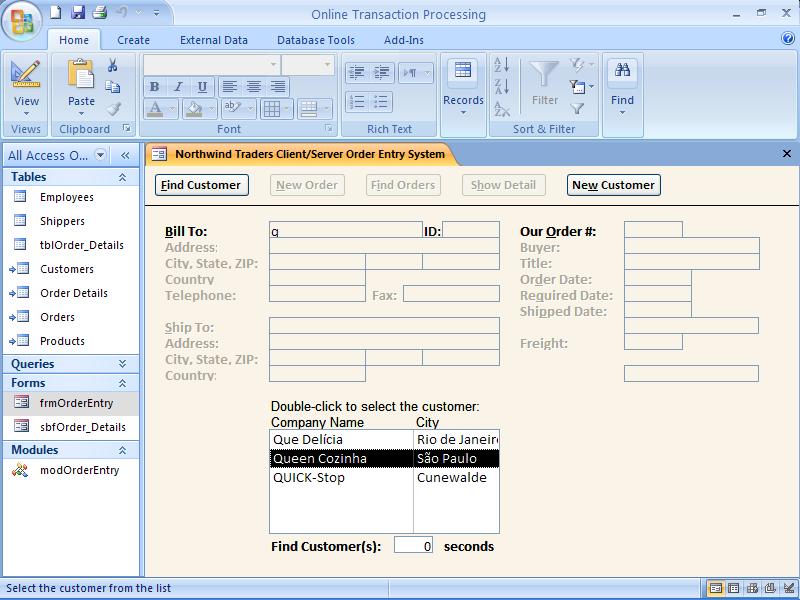
The following screen captures of MSA_OLTP.mdb—running in Access 2007 Beta 2—illustrate basic customer and order search, and new order-entry operations. Click the images to display full-size versions in a new window.
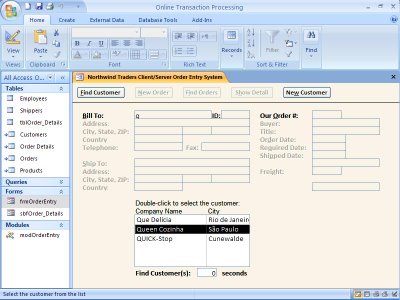
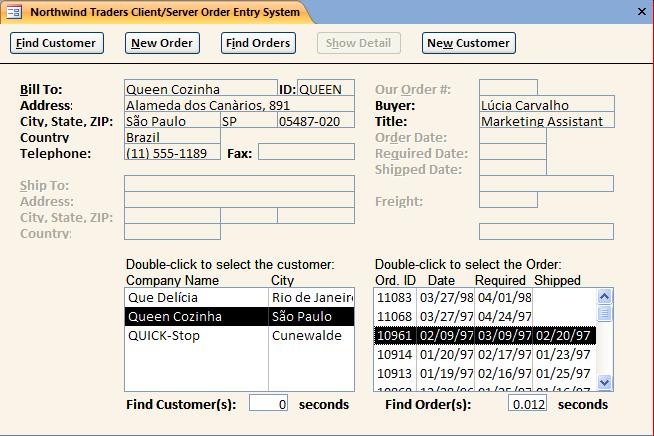
Customer lookup (above) starts by typing the first character or two of the company name into the textbox and pressing Enter to open a list box of matching company names if more than one customer meets the search criterion. Selecting the customer in the listbox and pressing Enter opens another listbox of the customer's orders in reverse date sequence. Selecting the order to review and pressing enter displays the line items for the order in another Access list box. Pressing Alt+N or clicking the New Order button activates the order entry phase. Marking the Same as Bill To check box populates the shipping address fields with data from billing address. The capability to select products by numeric ID or the first one or two characters of the product name expedites line item entries.

The following description of the AC302 presentation is excerpted from the introduction to "Client-Server Application Development Using Microsoft Access 2.0."


Client-Server Application Development Using Microsoft Access 2.0 Presented by: Christopher Payne Christopher Payne has been with Microsoft for 4 1/2 years and has been focusing on research and planning future versions of Microsoft Access for the past 2 1/2 years. In addition to working on Microsoft Access, Chris was the project lead of the Microsoft Access Upsizing Tools released in October of 1994.

This presentation was originally created by Greg Nelson and Roger Jennings. Greg Nelson is a Senior Access Product Marketing Manager for Microsoft. Before coming to Access Marketing, Greg spent eight years as a developer and technical manager in Microsoft’s MIS department. He has 12 years’ experience in the software industry. Roger Jennings is the author of two books about Microsoft Access and is a consultant in the field of Windows database applications.

Session Goal The goal of this session is to provide Microsoft® Access developers with an understanding of the issues involved in developing efficient, optimized Microsoft Access version 2.0 applications for the client/server environment.

What You Will Learn

1. How Microsoft Access architecture operates and how it implements client/server computing.

2. How to optimize Microsoft Access to take advantage of its client/server capabilities.

3. How to use transaction processing system design issues as references for structural ideas and actual code segments optimizing client/server applications.

Overview

This course breaks down into two distinct sections:

1. The first section is an architectural overview of client/server application development technologies using Microsoft Access. This section provides essential background on each component, explains how the components are used, and how to optimize your application for your environment.

2. The next section is an overview of a transaction processing system. This application is the Northwind Traders sample database that ships with Access version 2.0.

For the purpose of this class, it has been migrated to a client/server environment giving us an opportunity to discuss the issues and solutions involved in migrating a transaction-processing file server application to client/server with a database many of us are familiar with. The applications will be available on your Tech*Ed compact disk. The application is for your personal use to learn from and reuse code segments. They cannot be redistributed for production use.

The reader is assumed to be familiar with the design of Microsoft Access version 2.0 applications and conversant with Access Basic programming techniques. No prior experience with using the Structured Query Language (SQL) database data sources is assumed for this session. This session is about optimizing database server usage in Microsoft Access.


Technorati Tags: , , , , , , , , ,

An (Almost) Lifetime of BASIC

From Roger Jennings: "An (Almost) Lifetime of BASIC", an entry in Apress's 2001 VB @ 10 Years Project as previously cached by Google.com.

The five-year-old content is preserved here because the original verion is no longer available from the Apress site or from the Google cache. Visual Basic celebrates it's 15th anniversary on May 20, 2006.

The "Happy 15th to Visual Basic" post from Paul Vick's web site contains the text of Microsoft's May 20, 1991 press release, "Microsoft Announces Visual Basic at Windows World '91: General-Purpose, High-Productivity Programming System for Microsoft Windows."


My introduction to BASIC arrived in the mid '70s with the delivery of one of the first Wang 2200 "desktop" computers. My company at the time—Fluidyne Instrumentation—had been producing data acquisition and control (DAC) systems based on the earlier Wang 720 calculators which stored assembly-level programs on cassette tapes. The advent of interpreted BASIC reduced programming cost by a factor of twenty or more and led to a worldwide market for the product line.

We ultimately replaced the Wang 2200s with lower-cost Commodore CBMs that had BASIC in 20 KB of ROM, 32 KB of RAM, and an IEEE-488 interface for 5-1/4-inch floppy drives, our DAC boxes, and, ultimately, 5-MB+ fixed disk drives. One of our highest-volume products of the early 1980s was an IEEE-488-to-Centronics converter to drive a variety of impact printers.

Ten years and a couple of companies later, I decided to give up traveling sixty percent of my life and started writing commercial database programs in dBASE III+ and Clipper. I got hooked on relational databases—a strange addiction for someone who spent the late '50s at U.C. Berkeley—and have never been able to get the database monkey off my back.

Windows 3.0 arrived while I was consulting for the Sixth International Conference on AIDS in San Francisco, and Word for Windows 1.0 introduced me to WordBASIC. I finally gave in and bought a mouse. My first venture into serious WordBASIC programming was an imperfect Word Perfect to Word for Windows macro converter for my wife, Alix.

The macro converter led to my first book for Que, Using Visual Basic. My theory was that knowing nothing whatsoever about VB was a plus when it came to writing for beginning Windows programmers. I joined the "Rawhide" beta program for the Professional Extensions to VB 1.0 and became acquainted with Michael Risse and Nevet Basker. (The last time I checked, Mike was general manager of .NET Enterprise Services and Nevet was business development manager for ISA Server 2000.)

For better or worse, the VB title got lost in an organizational reshuffle and never appeared in print, but I ended up with a contract from Que to write Using Access for Windows. The Access 1.0 title was successful; between it and its eight subsequent editions, the title has close to a million English copies in print. Access 1.1 Developer's Guide and the 2.0 edition for SAMS, which emphasized Access Basic (originally Embedded Basic) programming, also sold well.

Access's conquest of the Windows desktop database market is in no small part the result of Tod Neilsen's efforts. Charles Cooper called Tod "one of the most likeable suits at Microsoft," and I agree wholeheartedly.

[Update 4/25/2005: The latest (10th) edition of Using Access for Windows is Using Microsoft Office Access 2003 and Tod Neilsen is now president and CEO of Borland.]

Between books, I developed commercial Access apps, including an Access 1.0/1.1/2.0 client/server app for National Semiconductor Corp. that Microsoft's Greg Nelson and National's Margaret Lam demonstrated at Tech*Ed '95. Early versions of the app used a pass-through query DLL and Information Builders' EDA ODBC middleware to connect to DB2 running on a Hitachi mainframe. The 1.0/1.1 versions were a kludge, but they ran like a champ on hundreds of networked desktops and modem-connected laptops.

It wasn't until VB3 arrived with support for the Jet database engine that VB became a viable contender to Access for database front-end development. I climbed on the bandwagon, added VB consulting to OakLeaf Systems' bag of tricks, and began writing "Database Design" columns for Jim Fawcette's Visual Basic Programmer's Journal. (Jim's insistence that VBPJ emphasize code, not abstract technology overviews, is undoubtedly responsible for much of the magazine's success.) My first large VB3 project was a semiconductor cycle-time reporting app that connected via TCP/IP to Sybase running on an IBM AIX box.

Database Developer's Guide with Visual Basic 3.0 was late to market because it took me a few months to convince SAMS management that a VB database book would sell in what was a generally over-published market for general VB titles. It did. VB4's adoption of VBA, the addition of the Remote Data Object (RDO), and the capability to produce 16- and 32-bit OLE 2.1 mini-servers and 32-bit OLE DLLs were interesting features, but none of my clients showed any interest at all in upgrading their VB3 apps or in using VB4 for new projects.

The same proved true for Access 95; Access 2.0 was fast, robust, and ran under Windows 3.1x - which was critical for laptop users. From my standpoint, both upgrades were non-events, but I wrote DDG with VB4 anyway. VB5 and 6 extended the language's reach to enterprise-scale systems, and I've yet to find a data-intensive project that VB6 can't handle with aplomb.

Despite the trend to browser-based front ends, conventional VB forms remain today's best choice for heads-down data entry and, in many cases, decision-support apps. Thus I'm glad—and somewhat surprised—that VB.NET accommodates both WebForms and WinForms. I expect migrating to VB.NET and gaining an XML-centric Weltanschauung to be a traumatic experience for many VB developers (including me). XML is here to stay, but my take is that XML Web services will be ready for prime time when 50% or more of U.S. households have broadband Internet connections. Sending and receiving SOAP messages via HTTPS through an analog modem isn't my idea of fun.

I'm an old dog, so I've seen plenty of new tricks follow the WebVan route to oblivion. (Does anyone remember VB for DOS, a.k.a Escher?) I'm waiting for Microsoft to supply a better definition of Office.NET and, especially, Access.NET before I make a total commitment to the .NET Framework. If Microsoft is willing to bet its Office revenue stream on .NET, I'll join the parade. In the meantime, VB6, MSXML3+, and SQL Server 2000 handle my data-related XML requirements quite nicely, albeit at a more leisurely pace than "legacy" ADO. Happy 10th Anniversary, VB. Here's hoping you're around ten years from now (and still recognizable to the pioneers).

--rj

July 15, 2001 Oakland, California

Roger Jennings, a principal of OakLeaf Systems, is a book author and contributing editor for Visual Studio Magazine (formerly Visual Basic Programmer's Journal). His primary programming interests are client/server and XML/XSLT database applications, and ADSI-database integration. Roger's latest books include Special Edition Using Access 2002 (Que), Special Edition Using Windows 2000 Server (Que), Admin911: Windows 2000 Group Policy (Osborne-McGraw Hill), and Database Developer's Guide with Visual Basic 6 (SAMS). His books for Que and SAMS have sold more than one million copies in English and have been translated into 20+ languages.


Technorati Tags: , , , , , , , , ,

Monday, April 24, 2006

Microsoft Belatedly Releases Books Online (April 2006) for SQL Server 2005 SP1

Although the April CTP release of SQL Server 2005 SP1 included an updated SQL Server 2005 Books Online (March 2005 CTP) version, a final SP1 BOL for was missing from the SP1 releases on April 18, 2006. Microsoft posted the missing file on Saturday, April 22, 2006. You can download SQL Server 2005 Books Online (April 2006) from here.

Technorati:

Wednesday, April 19, 2006

Microsoft Releases SQL Server 2005 SP-1

As Microsoft Senior Vice President of Server Applications Paul Flessner promised in his April 6, 2006 SQL Server 2005 Update, SQL Server 2005 SP-1 became available for download from MSDN on April 18, 2006. Following are links to new SQL Server 2005 SP-1 download pages on MSDN: SQL Server 2005 SP-1 for Developer, Workgroup, Standard and Enterprise Editions running on x86, x64, or ia64 platforms SQL Express with SP-1 for x86, x64, or EMT64 systems SQL Server Management Studio Express (SSMSE) for x86, x64, or EMT64 systems Microsoft Core XML Services (MSXML) 6.0 for SSMSE SQL Server 2005 Express Edition with Advanced Services (includes SSMSE, MSXML 6.0, Reporting Services (SSRS), and full-text search) SQL Server 2005 Express Edition Toolkit (includes SSMSE and Business Intelligence Development Studio (BIDS) for Reporting Services projects) Download SQL Server 2005 Books Online (December 2005) for SQL Server Express • Read the Managing SQL Server Express with SQL Server 2005 Management Studio Express Edition white paper Installer dialogs are very similar to those for SQL Server 2005 SP-1 March CTP, as described in my "SQL Server 2005 SP1 CTP Available for Download" post of March 16, 2006. Technorati:

Tuesday, April 11, 2006

Running the Query Notifications Sample Project

QueryNotifications.sln is a Visual Studio 2005 project that demonstrates Visual Basic 2005 and SQL Server 2005 T-SQL Windows Form code to implement Query Notifications in standard (SqlDependency) or custom (SqlQueryNotification) mode. It also provides an example of programming Database Mail or SMTP messages in response to Query Notifications. This project is one of three Service Broker examples for my "Program SQL Server 2005's Service Broker" article for Visual Studio Magazine's June 2006 issue. Expert One-on-One Visual Basic 2005 Database Programming's Chapter 10, "Upgrading from SQL Server 2000 to 2005" includes an earilier version of the project and brief instructions on how to use the app's features. The project's VSM version installs in C:\ServiceBrokerQueryNotifications and the book's version installs in C:\VB2005DB\Chapter10\QueryNotifications. Note: The downloadable code from the online version of tne VSM article will be available shortly. This post will be updated when the article goes live. Prerequisites: These instruction assume that you're at least familiar with SQL Server 2005's Service Broker feature as the result of reading the VSM article, the Service Broker content of the book's Chapter 10, or SQL Server Books Online's Service Broker topics. Familiarity with Visual Studio 2005's Query Notifications help topics is also helpful.

Following are the requirements to run the QueryNotifications.sln Visual Basci 2005 project:

  • Visual Studio 2005 Standard Edition or Visual Basic Express
  • SQL Server 2005 Express or higher (SQL Server 2005 Developer Edition or higher is recommended to enable viewing Service Broker database objects with SQL Server Management Studio's Object Explorer)
  • SQL Server 2005 Service Pack 1 (SP 1) Community Technical Preview (CTP) or release version is recommended for SQL Server 2005 and SQL Express
  • Northwind sample database installed
  • Northiwind database compatibility level = 90 and Service Broker enabled (see below)
  • A login with sysadmin privileges (preferably the owner of the Northwind database)
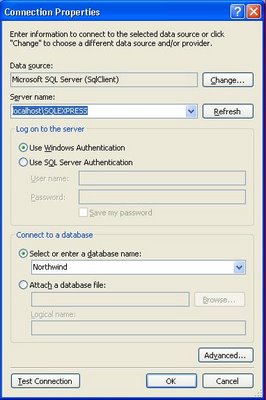
Enable Service Broker and Query Notifications for Northwind: Run the following T-SQL script (EnableQueryNotifications.sql in the project folder): USE Northwind; -- Set compatibility level to SQL Server 2005 EXECUTE sp_dbcmptlevel 'Northwind',90; -- Enable Service Broker and set TRUSTWORTHY IF NOT EXISTS (SELECT * FROM sys.databases WHERE name = 'Northwind' AND is_broker_enabled = 1) BEGIN ALTER DATABASE Northwind SET ENABLE_BROKER WITH ROLLBACK AFTER 5 SECONDS; ALTER DATABASE Northwind SET TRUSTWORTHY ON; END; GO -- Add Database Master Key for Service Broker IF NOT EXISTS (SELECT * FROM sys.symmetric_keys WHERE symmetric_key_id = 101) CREATE MASTER KEY ENCRYPTION BY PASSWORD = N'23987hxJ#KL95234nl0zBe'; GO -- Settings required for indexed views SET ANSI_NULLS ON; SET ANSI_PADDING ON; SET ANSI_WARNINGS ON; SET CONCAT_NULL_YIELDS_NULL ON; SET QUOTED_IDENTIFIER ON; SET NUMERIC_ROUNDABORT OFF; SET ARITHABORT ON; GO Change the Connection String to suit your SQL Server 2005 instance: The default connection string, stored in My.Settings, is: Data Source=localhost;Initial Catalog=Northwind;Integrated Security=True If you need to change the connection string, open QueryNotifications.sln in Visual Studio, right-click the QueryNotifications project node, choose Properties to open the property pages, click the Settings link, select the Value column of the NorthwindConnection row, and click the builder (...) button to open the Connection Properties dialog. Set the new connection properties, as shown here to substitute an SQL Server Express with the Northwind database installed: Click Test to verify Northwind database connectivity, and click OK to save the new connection string. Execute the project: Open QueryNotifications.sln in Visual Studio and press F5 to complile and run the project. Alternatively, run QueryNotifications.exe from the ...\QueryNotifications\bin\Debug folder. The main form opens with data imported from a local XML data store, as shown here:

Test Service Broker and SqlDependency Operation

Mark the Enable Query Notifications check box and click the QN Subscriptions button to verify that the subscription was created with this message box:

Click No to dismiss the message.

Select the Invalid Query Test option to verify that the client receives and dequeues SqlDependency messages by opening the following message box:

Click OK to dismiss the message and select the All Products Updates option.

Note: The test query has two elements that conflict with the requiremets for indexed view queries: A TOP 10 option and a missing SCHEMA (dbo) prefix for the Products table. If this message box doesn't appear, messages aren't being received by the client. Check Event Viewer's Applicaton log for SQL Server errors, such as insufficient privileges. You can usually solve these problems by detaching and reattaching the Northwind database with your Windows administrative login as the owner.

Verify an SqlDependency Query Notification

With the All Products Updates option selected, choose a product in the DataGridView, change a UnitsInStock, or UnitsOnOrder value, and click Save Changes to open a message box similar to the following:

Click OK to dismiss the message box, and click Refresh Data. If the change you made results in UnitsInStock + UnitsOnOrder <= ReorderLevel, clicking Refresh Data moves the current row to the selected product, and highlights the ProductName and UnitsInStock cells.

Add an SqlNotificationRequest Subscription and Reorder Message

Using the SqlNotificationRequest class requires substituting custom Service Broker QUEUE and SERVICE objects for the corresponding default objects employed by the SqlDependency class. If you don't provide an activation stored procedure and specify the procedure name when creating the QUEUE object, you must poll the target queue to test for messages in the form of XML documents. This example uses polling.

To add an SqlNotificationRequest for the Reorder Required query and specify a automated reorder message to the product's supplier, select the Reorder Required option, mark the Send Reorder Messages check box, and click Add SqlNotification Objects to open the following message box:

A ROUTE object (ProductsQnRoute) is optional for this example.

Note: SQL Express doesn't support Database Mail, so don't mark the Send by Database Mail check box. If you haven't provided valid service URL, user ID, and password values in the SendReordersBySMTP procedure, the default SMTP mail delivery function will fail.

Click OK to dismiss the message and click QN Subscriptions to verify the additional subscription, as shown here:

Click No to preserve the subscriptions, navigate to ProductID 30 (Nord-Ost Matjeshering), change the UnitsOnOrder value from 10 to 0, and click Save Changes. Click OK to dismiss the SqlDependency message, and click Poll Notifications to display the following message:

Click OK to dismiss the preceding mesage, and click Refresh Data to open this message:

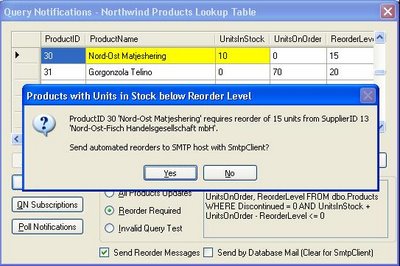
If you've configured Database Mail for the SQL Server 2005 instance or SMTP for SQL SErver 2005 or SQL Express, click Yes to send the message to the address you specified as the sender. Here's an example sent to the oakleaf test POP3 server:

Note: Please don't send messages to the above account requesting help with this project. The account is for testing only and all incoming messages are erased periodically.

Otherwise, click No to display this message box with the text of the unsent message:

Troubleshooting

If you encounter problems running the project, check SQL Server Books Online's "Troubleshooting Service Broker" topic. Check Event Viewer's Application Log for SQL Server/SQL Express errors. Search on "Service Broker" and the Error ID or Event ID value. Good sources of troubleshooting assistance are the SQL Service Broker forum and the microsoft.public.sqlserver newsgroups.

Technorati:

Thursday, April 06, 2006

Very Large Databases: Bricks, BitVault and BigTable

Microsoft Watch's Mary Jo Foley mentioned computing/data storage "bricks" in her 4/4/2006 "Microsoft Readies 'BitVault' Self-Healing Data Store" article.

This piece, which was based on a December 2005 Microsoft Research Technical Report (MSR-TR-2005-179), "BitVault: a Highly Reliable Distributed Data Retention Platform," and unnamed "sources close to the company," speculated that Microsoft "has moved BitVault into the product groups, intending to commercialize the technology" and "[t]he Clusters, File Systems and Storage team is now spearheading the BitVault project. ... Microsoft is hoping to be able to field a first-generation product based on BitVault within two years."

Update 4/2/2008: BitVault doesn't appear to have gotten off the ground "within two years" (almost to the day), but "smart bricks" have evolved to ISO intermodal containers as the unit of deployment of servers to data centers according to Mary Jo's Microsoft builds out its first containerized datacenter post of April 2, 2008. [Links to early Fawcette magazine articles and figures no longer are operational.]

The Technical Report, authored by Zheng Zhang, Qiao Lian, Shiding Lin, Wei Chen, Yu Chen and Chao Jin of Microsoft Research Asia, describes a peer-to-peer (P2P) architecture for very large content-addressable databases that store seldom-updated reference data. The BitVault is constructed from one to tens of thousands of "smart brick" building blocks. The paper defines a "smart brick" as a commodity "trimmed down PC with large disk(s)" that enables BitVault to be self-managing, self-organizing, and self-healing.

Jeremy Reimer's Ars Technica post of April 5, 2006, "Microsoft leverages P2P technology to create BitVault," briefly explains how BitVault employs P2P and distributed hashtable (DHT) technology. Structured P2P systems based on DHTs (P2P DHT) are a popular research topic. Click here for DHT links and here for P2P DHT links.

Related Papers from Microsoft Research Asia: "P2P Resource Pool and Its Application to Optimize Wide-Area Application Level Multicasting" (August 2004) describes the combination of P2P with DHT and a self-organzied metadata overlay (SOMO) to create the illusion of a single, large, dynamic resource pool. "SOMO: Self-Organized Metadata Overlay for Resource Management in P2P DHT" (February 2003) illustrates implementing arbitrary data structure in a structured P2P DHT with SOMO for resource management. "XRing: Achieving High-Performance Routing Adaptively in Structured P2P" (MSR-TR-2004-93, Septebmber 2004) and "Z-Ring: Fast Prefix Routing via a Low Maintenance Membership Protocol" discuss optimization of P2P routing for resource pools. "WiDS: an Integrated Toolkit for Distributed System Development" (June 2005) describes the development and test environment for BitVault.

Evolution of Microsoft Proposals for [Smart] Bricks

I first encountered the "brick" concept when covering the Paul Flessner/Pat Helland keynote at Tech*Ed 2002. Here's Pat's description of a service center (SC):

[A service center] is a unit of deployment. This is a thing that I would go and put a collection of Web services and their databases and all of the things it takes to support the Web services on the Internet and put that into the service center so it can be self-managing as much as possible and implement and support the Web services.

Pat went on to describe "bricks" as SC building blocks:

Now, a service center is implemented using bricks. A brick is just a system. It's got lots of cheap memory, lots of cheap disk, cheap and fast CPU, lots of cheap but fast networking. These bricks are going to plug into the service center. So you're going to plug it in and it hooks up and it finds what subnet it's on. It says, "Oh, here I am," and then the service center says, "Oh, you're here. I know what I can do with you. You've got all that storage. I'm going to make some more mirrored copies of my data onto you. I'm going some computation to you." All the human did was go whoomp and shove the darn thing in.

Research for my brief "Microsoft Adopts Medieval Web Services Architecture" article turned up several early references by Microsoft Research's Jim Gray to "bricks" for implementing very large database (VLDB) systems. The first reference to storage bricks that I found was on slide 31, "Everyone scales out. What's the Brick?," in Jim Gray's September 2000 "Building Multi-Petabyte Online Databases" presentation to NASA Goddard. A previous talk at the UC San Diego Supercomputer Center in October 1999 mentioned "CyberBricks" but not in the context of storage bricks.

Gray's "Two Commodity Scaleable Servers:a Billion Transactions per Day and the Terra-Server" white paper and "Scalable Terminology: Farms, Clones, Partitions, and Packs: RACS and RAPS" technical report (December 1999) describe CyberBricks as the "fundamental building block" of large Web sites. His "Storage Bricks Have Arrived" presentation at the 2002 File and Storage Technologies (FAST) conference cemented storage bricks as the implementation of choice for scaleable SQL Server databases.

Note: Jim Gray is well known for his contributions to VLDB research. Many of his 129 citations in the Database (DBLP) Bibliography Server target the design and performance of VLDBs. About half the citations (64 so far) have occurred during his tenure as a Microsoft Research Senior Researcher (from 1995) and Distinguished Engineer (from 2000).

About a year after the Flessner/Helland Tech*Ed 2002 and Gray FAST 2002 presentations, David Campbell, who was then Microsoft's product unit manager for the SQL Server Dabase Engine delivered "Database of the Future: A Preview of Yukon and Other Technical Advancements" as a keynote address for VSLive! San Francisco 2003. My "Build Data Service Centers With Bricks" article for Fawcette Technical Publication's Windows Server System Magazine (May 2003 Tech*Ed issue) summarized Campbell's presentation.
Campbell outlined Microsoft's database architecture du jour as multiple data service centers (SCs) created from groups of autonomous computing cells (ACCs) built from commodity server bricks as shown here:

Campbell envisioned each brick as an independent, replaceable computing unit running an instance of SQL Server 2005 with built-in data storage. Plugging a new brick into an ACC causes the SC to allocate bricks to services dynamically. Management ACCs and SCs communicate with SOAP Web service or Service Broker messages, instead of conventional remote procedure call (RPC) protocols. As noted in my article, Campbell asserted that:
The key to resiliency and scalability is moving reference data, such as product catalogs and customer information, to ACCs that have databases partitioned out to bricks. Product catalog data and customer information is relatively nonvolatile, and the temporary outage of a single brick affects only a percentage (one divided by the total number of bricks) of site visitors. Adding a brick to mirror each partition solves potential outage problems.
The article went on describe how the SC/ACC might improve system resiliency and scalability:

Microsoft's example of a service center is a high-traffic e-commerce site in which relatively static reference data (product and customer information) and shopping-cart state is delivered by partitioned databases in individual autonomous computing cells (ACCs). The Order Processing System is a conventional, shared nothing database cluster, not an ACC. Brown text identifies the elements that David Campbell's original PowerPoint slide didn't include.

Mary Jo Foley also covered the keynote in her 2/13/2003 "Yukon, Ho!" Microsoft Watch article. According to Mary Jo, Campbell said "Microsoft is building Yukon around these [SC, ACC, and brick] concepts."

A later Microsoft Research Technical Report MSR-TR-2004-107 by Jim Gray, et al. (October 2004), "TerraServer Bricks – A High Availability Cluster Alternative," describes the replacement of an active/passive cluster connected to an 18 terabyte Storage Area Network (SAN) with a duplexed set of "white-box" PCs containing arrays of large, low-cost, Serial ATA (SATA) disks. Gray calls the replacement system "TerraServer Bricks." Web Bricks have two 2.4-GHz Xeon hyperthreaded CPUs, 2GB RAM and two 80-GB SATA drives, and have a hardware cost of $2,100. Storage Bricks, which have a hardware cost of $10,300 and run SQL Server 2000, have the same CPUs, 4 GB RAM and 16 250-GB SATA drives.

Note: Microsoft Research's "Empirical Measurements of Disk Failure Rate and Error Rates" (MSR-TR-2005-166, December 2005) study indicates that SATA "uncorrectable read errors are not yet a dominant system-fault source—they happen but are rare compared with other problems. "

VLDB Implementation/Deployment Issues

Dare Obasanjo's "Greg Linden on SQL Databases and Internet-Scale Applications" post quotes Greg Linden:

What I want is a robust, high performance virtual relational database that runs transparently over a cluster, nodes dropping in an out of service at will, read-write replication and data migration all done automatically. I want to be able to install a database on a server cloud and use it like it was all running on one machine.

Adam Bosworth, who managed the intial development of Microsoft Access, went on to found CrossGain (together with Tod Neilsen, Access marketing honcho), sold CrossGain to BEA and became BEA's chief architect and senior vice president, and now is VP Engineering at Google, lists these three features that database users want but database vendors don't suppply: Dynamic schema, dynamic partitioning of data across large dynamic numbers of machines, and modern [Googlesque] indexing. Adam wants the the Open Source community to "[g]ive us systems that scale linearly, are flexible and dynamically reconfigurable and load balanced and easy to use." Adam does mean give, not sell.

It seems to me that BitVault's smart bricks with appropriate deployment and management applications would fulfill Greg's and all but Adam's economic desires for reference data, which now constitutes more than half of the data stored by North American firms.

It's been more than six years since Jim Gray proposed CyberBricks and storage bricks for VLDBs but to the best of my knowledge, only Microsoft Resarch appears to be scaling out production databases (TerraServer) with bricks today. Microsoft still hasn't solved one of the major economic issues of storage bricks: licensing costs of Windows Server 2003 SP-1 R2 for each CPU compared with a no-cost Unix or Linux distribution. If Microsoft intends to productize BitVault successfully, a stripped-down, it seems to me that a lower-cost version of Windows Storage Server 2003 R2 is needed.

Grid data storage is a competing architecture that's gaining popularity in Europe but is just getting off the ground in North America. The EU DataGrid project's "objective is to build the next generation computing infrastructure providing intensive computation and analysis of shared large-scale databases, from hundreds of TeraBytes to PetaBytes, across widely distributed scientific communities." The EU DataGrid project was merged into the EU EGEE (Enabling Grids for E-sciencE) in 2004. EGEE is now in its second development phase. Oracle and IBM both promote grid architecture for their databases.

BitVault's P2P architecture seems to me to be a viable challenger to grid data storage for read-mostly (archival) databases. I haven't seen an official grid-computing or grid-storage story from Microsoft.

Note: The Microsoft Research eScience Workshop 2005 (October 2005) presented sessions by "early adopters using Microsoft Windows, Microsoft .NET, Microsoft SQL Server, and Web services" for scientific computing. Many of the sessions dealt with .NET and grid computing/data storage.

Really Big Smart Bricks and Databases

The ultimate brick is a Google data center in a shipping container, as postulated by PBS's Robert X. Cringely (Mark Stephens) in his 11/17/2005 column, "Google-Mart: Sam Walton Taught Google More About How to Dominate the Internet Than Microsoft Ever Did." According to Stephens, whose bona fides were questioned several years ago:

We're talking about 5,000 Opteron processors and 3.5 petabytes of disk storage that can be dropped-off overnight by a tractor trailer rig [...] at Internet peering points. ... With the advent of widespread GoogleBase (again a bit-schlepping app that can be used in a thousand ways -- most of them not even envisioned by Google) there's suddenly a new kind of marketplace for data with everything a transaction in the most literal sense as Google takes over the role of trusted third-party info-escrow agent for all world business.

As Cringely mentioned in his subsequent (11/24/2005) column, The Internet Archive proposed a similar—but considerably smaller—implementation called the "petabox" which contained 800 low-cost PCs running Linux and 1 PB of data storage in a configuration that could be deployed in an 8- by 8- by 20-foot shipping container. Capricorn Technologies' commercial TB-80 PetaBox implemerntation stores 80 TB in a 19-inch rack, so 12 TB-80s combine to create an actual petabox. In mid-2004, the Internet Archive had a 80-TB rack running in San Francisco and a 100-TB rack operational in Amsterdam.

Clearly, large distributed file systems and databases must run on very big smart bricks or hardware of similar scale. Google probably probably runs the world's largest distributed file system. Google's "The Google File System" paper by Sanjay Ghemawat, Howard Gobioff, and Shun-Tak Leung (October 2003) describes the then-largest GFS cluster as having more than 1,000 nodes and 300+ TB of storage. A GFS cluster has a single master and multiple chunkservers, and runs on commodity Linux boxes. A 64-bit GUID identifies each fixed-size (64-MB) file chunk. According to the paper, "For reliability, each chunk is replicated on multiple chunkservers. By default, we store three replicas, though users can designate different replication levels for different regions of the file namespace." The master contains system metadata and manages system-wide operations.

According to an abstract from a October 2005 presentation by Google's Jeff Dean at the University of Washington, "BigTable is a system for storing and managing very large amounts of structured data. The system is designed to manage several petabytes of data distributed across thousands of machines, with very high update and read request rates coming from thousands of simultaneous clients." A brief summary of Jeff's talk by Andrew Hitchcock is available here. (The Google Operating System Site is a good source of information on the latest Google Web apps.)

BigTable runs under the GFS. It's not clear if Google Base is a BigTable app but, in my opinion, the timing of Jeff's presentation and the start of the Google Base beta program is too close to be coincidental.

Don't Expect BitVault to RTM in the Near Future

On April 6, 2006, Paul Flessner presented a broad-brush overview of SQL Server's future to an audience of database users and computer press reporters in San Francisco. The primary item of (limited) interest was the rechirstening of SQL Server Mobile Edition as SQL Server Everywhere Edition, which Microsoft intends to RTM by the end of 2006. Mary Jo Foley reported in her "Microsoft Outlines (Vaguely) Its Database Road Ahead" article of the same date that Flessner "did acknowledge that Microsoft is looking at how to support 'content-addressable storage,' and that it had a project named BitVault that falls into this category. But he declined to say more."

Let's hope that BitVault and smart bricks get more attention from Microsoft executives and program/project management than first-generation data bricks received.

Technorati:

Other links in process (primarily related to autonomous and autonomic computing):

Gartner: "Microsoft's DSI Strategy: Clearer Vision, but End State Is Years Away From Fulfillment"

Pat Helland's "Autonomous Computing" presentation at the University of Washington

"Hurry up and wait" by Tom Yeager "IBM Manifesto on Autonomic Computing"

Microsoft Readies Autonomic Computing Plan" by Mary Jo Foley: Press Release: "Q&A: Microsoft to Unveil Vision for End-to-End Enterprise Management Solutions"

Microsoft white paper: "Automated Deployment Services Technical Overview"

Sunday, March 19, 2006

Dabble DB: The New Look in Web Databases

In his widely circulated "Internet Services Disruption" memo, Microsoft Chief Technical Officer Ray Ozzie asked—but didn't answer—the following questions:

  1. How can we utilize our extant products and our knowledge of the broad historical adoption of forms-based applications to jump-start an effort that could dramatically surpass offerings from Quickbase to Salesforce.com?
  2. How could we build it to scale to hundreds of millions of users at an unimaginably low cost that would change the game?
  3. How could we re-shape our client-side software offerings such as Access and Groove, and our server offerings such as SharePoint, to grow and thrive in the presence of such a service?
  4. Could these rapid solutions encourage a new ISV ecosystem and business model?

Note: For more about Ray Ozzie's memo and its Access- and SharePoint-related content, see the "Ray Ozzie's 'Internet Service Disruption' Memo and Microsoft Access" post.

Update 4/19/2006: David Kirkpatrick's "Microsoft's new brain" article for Fortune (April 18, 2006) has this deck: "Brutal competition. A stock going nowhere. Microsoft is in crisis, so Bill Gates has unleashed his new hire, software genius Ray Ozzie, to remake the company - and conquer the Web." The article describes in depth a June 2005 meeting of the top 15 Microsoft executives run by recently hired Ray Ozzie. The article claims that "Put simply, Ozzie's assignment is to Webify everything: To intertwine Microsoft's entire product line - software for consumers, software for businesses, Xboxes, all of it - with the vast and ever-growing power of the Net. 'Everything we do should have a presence on the Web,' Ozzie says."

SmallThought Systems Inc.'s Dabble DB Web-based data management solution appears to answer most of Ray's questions. What's more, Dabble DB won the Under the Radar: Why Web 2.0 Matters conference's Best In Show award in the "I'd Pay for That" category, as well as the Panelists' Choice and People's Choice awards for the "Make It Easy" category. Under the Radar's venue is Microsoft's Mountain View (Calif.) Campus and Microsoft is one of the show's six Partners and Sponsors.

Dabble DB is intended to be the Web-based replacement for ad hoc spreadsheet applications (a.k.a. hacks) that should have used the database model from the git-go. Typical Dabble DB solutions are databases for sales contacts, students and grades, billable time, customer service issues, employee vacation and sick-leave time, event planning, and similar tracking applications. Access 2007 emphasizes user-created tracking application by including templates for many similar solutions. Dabble DB's developers consider Access, FileMaker and QuickBase to be their product's primary competitors.

CrunchNotes' Michael Arrington said on March 11, 2006: "Dabble DB is a service that allows non technical people to set up and use a database, and includes import and export functions to [E]xcel. This is a powerful application, and bridges the gap between Excel and Access or FileMaker."

Dabble DB has just emerged from the beta stage, but a seven-minute QuickTime screen capture—created for the Under the Radar conference—provides an insight into the product's capabilities without requiring registration. If you'd like more details, you can watch a 40-minute QuickTime presentation delivered to the Vancouver (BC) Lisp Users Group. (Dabble DB is written in SmallTalk and uses the Seaside Web applications framework.) Dabble DB's Avi Bryant, the author of Seaside and on the right in this Flickr photo from the conference, promises a two-way Atom API implementation after the public beta starts.

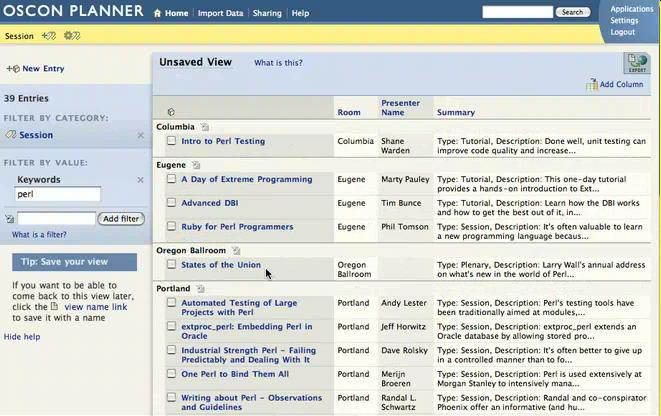
Here's a sample Dabble DB UI for a filtered view of the schedule grouped by the presentation's room for an early O'Reilly OSCON conference (click image for full-size capture):


Brian Benzinger gave Dabble DB a thumbs-up Solution Watch review in early December 2005, and TechCrunch's Nik Cubrilovic wrote a glowing "Dabble DB: Online App Building For Everyone" review on March 11, 2006. Zeke Sneaker, a Vermont-based creative director, looks forward to substituting Dabble DB for Access, Filemaker, and/or SharePoint.

Dabble DB's Web-Based Competitors [Updated 3/25/2006] Intuit, Inc.'s QuickBase was the first of the online collaborative database management applications and appears to have the largest user base. Over the years, QuickBase morphed from a consumer or small-office/home-office (SOHO) solution priced at US$14.95 per month for up to 15 databases to a department- or enterprise-level service that starts at a minimum of US$249 per month for up to 10 users, 5 MB storage for data, and 100 MB for attachements. Another indication that QuickBase has abandoned the consumer, SOHO, and small to medium-size business (SMB) market is the new emphasis on employing developers and consultants to create solutions with the QuickBase HTTP API. Intuit's Wikipedia entry calls QuickBase a "Web-based corporate workgroup productivity solution."

Serran Technologies, Inc.'s eUnify DB began life in early 2006 as a lower-cost QuickBase competitor targeted to the SMB market. eUnifyDB offers a 14-day free trial and starts at $69.95 per month for up to 5 users with 10 MB database and 1 GB file attachment storage. The Small Business Technology News site gave eUnify DB a brief but favorable review in January 2006.

Caspio, Inc. offers a basic forms-based database solution, Caspio Express DB, that captures data from existing online HTML, Flash, PDF, PDA, and WML forms. Express DB costs $16.95 per month for an unlimited number of forms, plus $0.02 per form submission. The Caspio Bridge Online feature lets you or consultants design and program custom "DataPages." Solution(s) with a total of one to five DataPages cost $39.95 per month, which includes 35 MB storage (in a Microsfoft SQL Server database) and 500 MB data transfer. Tiered pricing tops out at $799.95 per month for 100 DataPages, 600 MB storage and 10 GB data transfer. Caspio Bridge, which has been available since 2001, uses DHTML to create forms and wizards modeled on Microsoft Access. PC Magazine gave Caspio Bridge a favorable review (3 out of five stars) in October 2001.

AMULET Development Corp.'s eCriteria is a low-cost, no-frills Web database publishing system. eCriteria's Standard service (2.5 MB data storage) costs $4.95 per month. The Premium (5 MB, SSL and no banner ads) service is $19.95 per month; Enterprise (10 MB, enhanced security) accounts cost $39.95 per month. eCriteria commenced operation in 2000. eWeek magazine's Michael Caton gave eCriteria a favorable review in February 2004.

Oracle Corp.'s HTML DB site offers Oracle Application Express Studio (formerly HTML DB Studio) for creating forms-based database applications. Oracle offers free HTML DB accounts and a variety of sample solution templates, but creating HTML DB solutions isn't for the faint of heart (i.e., ordinary database users). Applications created on the HTML DB site are for "demonstration purposes only." Developer.com offers a two-part tutorial called "Building Web Applications with Oracle HTML DB."

Google's GoogleBase arrived with much fanfare in mid-November 2005, but the hue and cry quickly subsided when beta participants began testing this free flat-file database. See "Google Base and Atom 0.3 Bulk Uploads," "Google Base and Bulk Uploads with Microsoft Access," "Problems Uploading a Google Base Custom Item Type from a TSV File," and "Google Base and Blogger Items Missing from Google Search" OakLeaf blog entries as examples of issues with the early beta version.

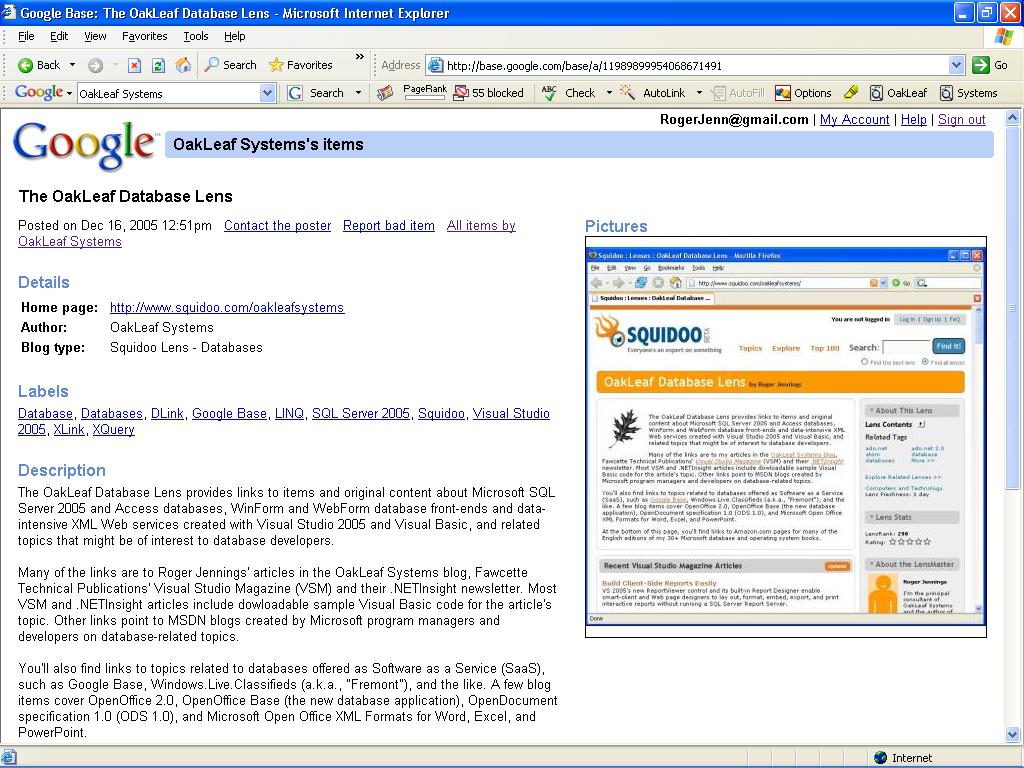
Google says "GoogleBase provides data structure and distribution for a wide range of content and information[. A] subset of items are for sale." GoogleBase's attribute-centric database is better suited for describing items than tracking solutions. GoogleBase items are accessible only through proprietary GoogleBase forms, and you can't design custom forms to display your records. (There's no public API for GoogleBase.) Many types of GoogleBase records—such as items for sale—expire (disappear) in 30 days. Here's a typical example of a GoogleBase form displaying a permanent record with an image (click image for full-size capture):


Click here to open a GoogleBase search results page of OakLeaf blogs and entries.

Advent.Net's Zoho Creator is yet another Web-based tracking application generator that emerged from private to public beta status in early March 2006. Zoho Creator is one of seven Zoho Web applications, which include Zoho Writer, Zoho Virtual Office, Zoho CRM, Zoho Sheet (private beta), and Zoho Planner. These applications are free for a limilted number of users or during their beta cycle. You can listen to or read a transcript of a "Robin Good" interview of Zoho.com's CEO, Sridhar Vembu, to learn more about the Zoho suite. In the meantime, you can find brief Zoho Creator reviews at Shadows in Motion and ITRedux. Zoho Creator has a minimalist feature set; for example, you can't import existing data. A Zoho representative demonstrated the suite at Under the Radar's "Make It Easy 2.0" session. Search Adam Kalsey's and Ajaxian's session notes for "Zoho." Unlike Dabble DB, the notes indicate that Michael Arrington was unimpressed with Zoho and its products.

Toby Segaran's Lazybase is a simple flat-file web-based list creation and management system. You can create a new database, add tables to it, and then add or edit rows. An interesting feature is a JavaScript generator that lets you embed a read-only view of the data on your own Web page. [Updated April 25, 2006].

Note: Xlinesoft's ASPRunnerProfessional generates ASP (not ASP.NET) pages that run from your Web site and database. While this application doesn't qualify as a Web-based data management system, its presentation techniques—especially for lookup fields and parent-child records—are worth reviewing.

Preliminary Conclusion [Updated 2/25/2006] Microsoft's Dare Obasanjo, a program manager on the MSN Contacts & Storage team and XML guru extraordinaire, observed in a March 17, 2006 Carnage4Life blog post, "[T]he writing is on the wall that the era of desktop software is coming to an end. I suspect that the folks driving our technical direction like Ray Ozzie and Bill Gates have already accepted this, which is why almost everytime [you] see them giving speeches on our future direction, you hear the magic buzzword services."

As if to prove Dare's point, Bill Gates said in his March 20, 2006 keynote address to the Mix06 conference: "So it's a world of software running on devices, but connecting up to software running on servers, what we often talk about as services. ... It's a variety of business models, new exploration, it's great to see the experimentation, as obviously moving in new levels, transaction fees, subscriptions, one-time payments, all of those make sense, and the platform will facilitate that, give you things to connect up to no matter what your model is."

Here's a corroborating excerpt from Michael Arrington's CrunchNotes from his lunch with Bill Gates on Mix06's first day: "I asked a few questions, specifically about what Microsoft’s plans are around an online version of Office. Bill responded at length without really giving an answer. He did say that he thought people were too infatuated with the thought of an online version of Office, but that they were really focused on the idea of cloud storage for [O]ffice files. This fits right in with their strategies around Office Live, of course." And, obviously, with Google's internal development and acquisition strategies.

Finally (for now), Bill Gates told ZDNet interviewer Martin Lamonica at Mix06: "There was a major demarcation when Ray (Ozzie) put out his memo last year, really saying the primary applications model will have everyone delivering through the Web, monitored through the Web, updating through the Web. And many of these services like storage or authentication that you think of as Active Directory or SharePoint on premise, we've got to get those out (so people can) simply connect up to them. We're making great progress on that." [Check out what more Bill Gates had to say about Ray Ozzie and online applications on page 2 of the interview.]

The arrival of an adequate online, AJAXified, Office-compatible productvity suite is inevitable. It's only a matter of time before someone will assemble the right mix of features, reliability, performance, price, and security to deliver online word processor, spreadsheet, presentation, and database applications that will satisfy 50% or more of today's Microsoft Office Professional users. I bet that Dabble DB could easily handle more than half the current crop of Access 97 to 2003 applications created for individual and business use. Self-service Web-based data management solutions is a crowded application category.

QuickBase is well-established, but its minimum price of admission is substantially higher than that of current and potential competition. Dabble DB appears to lead the pack in ease of use for simple projects. Dabble DB provides a feature that Access developers have requested since version 2.0—an Outlook-style monthly calendar form—as does Zoho Creator. Here's the Dabble DB version (click image for full-size capture):


The SmallThought folks must keep Dabble DB's entry barrier low enough to whet the interest of casual users (possibly $0.00). On the other hand, volume pricing must be sufficiently high to deliver a viable business plan that satisfies the stability concerns of enterprise-grade customers and the greed of venture capitalists. Whether "I'd pay for that" isn't the issue; the real question is: "You want me to pay how much for that?"

[Update 3/24/2006]
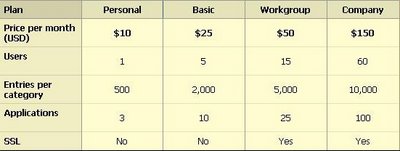
Dabble DB went live with the production version on March 24, 2006, and SmallThought, Inc. announced the following tiered pricing for the service:


SmallThought offers all comers a free 30-day trial of the Basic plan.
An application, which corresponds to a database or workbook, may have any number of categories, which are the equivalent of a table or worksheet. Entries equate to table rows, so you'd expect the Company pricing tier to provide 20,000—not 10,000—entries per category. Preliminary tests with categories having 100 to 2,000 entries indicate that performance might be an issue for categories with several thousand entires.

Stay tuned for a future Dabble DB review with categories created from tables of Microsoft Access's Northwind sample database.

Technorati:

Thursday, March 16, 2006

SQL Server 2005 SP1 CTP Available for Download

Microsoft posted on 3/16/2006 download instructions for the first public Community Technical Preview (CTP) of Service Pack 1 (SP1) for SQL Server 2005 and SQL Server Express. The most important updates included in SP1 March CTP are promotion of database mirroring to production status for SQL Server 2005, and the addition of SQL Server Reporting Services (SSRS) plus full-text search features to SQL Express. These new capabilities will make SQL Server Express more attractive to potential users than its primary "free" and "open source" competitors—Oracle 10g Express Edition, IBM DB2 Express-C, MySQL 5.0, and PostgreSQL 8.1.

SP1 fixes the 19 bugs listed in Microsoft Knowledge Base article KB 913090, "A list of the bugs that have been fixed in SQL Server 2005 Service Pack 1 - Community Technology Preview (CTP) March 2006." This article links to the individual KB articles that describe each bug. These fixes apply to all SQL Server 2005 editions, including SQL Express.

Brian Weckler's 2/16/2006 Direct Reports blog post notes that Report Builder gains the capability to add static images (for logos, backgrounds, et al.) and has a new Data Extension and Query Designer for SAP NetWeaver BI's InfoCubes and queries. (The .NET Framework 2.0's ReportViewer controls for Windows and Web forms have always supported static images.)

This post, updated 3/21/2006, summarizes the results of my initial SP1 March CTP test-drive with both SQL Server 2005 Standard Edition and SQL Server Express on separate partitions of a Dell PowerEdge 400SC server running Windows Server 2003 SP1 and Windows XP SP2, respectively (not virtual machines). The Microsoft SQL Server 2005 on Microsoft Windows Vista and 'Microsoft Windows Server Longhorn' page (posted March 6, 2006) states: "All editions of SQL Server 2005 Service Pack 1 (SP1) are supported on the February 2006 CTP release of Windows Vista and Windows Server 'Longhorn.' Note: The "Microsoft SQL Server 2005 Service Pack 1 Community Technology Preview" page is dated March 14, 2006, but wasn't accessible until 3/16/2006. Knowledge Base article 913090 was missing from the Microsoft site until 3/20/2006. Paul Flessner, Microsoft senior vice president of Server Applications, championed substitution of frequent, public CTPs to supplement periodic, restricted SQL Server beta 2005 releases. According to Microsoft Watch's Mary Jo Foley, "If Paul Flessner and his SQL Server team have their way, traditional beta releases may soon be a thing of the past." SP1 March CTP for SQL Server 2005 Individual self-extracting executable files are available from the Download Details page for SQL Server 2005's three platform versions: 32-bit X86 (251 MB), 64-bit X64 (302 MB), and 64-bit IA64 (351 MB). You can use each SQLServer2005SP1-KB913090-{x32/x64/ia64}-ENU.exe file to update Developer, Workgroup, Standard, and Enterprise editions. You can specify the components to which you apply the SP-1 March CTP in this installation dialog:

A few features must be updated, and Database, Analysis, and Reporting Services must be upgraded as a group. You can't roll back the SP1 installation.

Applying the full SP1 March CTP takes about 30 minutes on a moderately fast server. You'll probably need to reboot the server to complete the update. Another dialog displays SP1 installation progress:

You can read a semi-detailed installation log at the end of the update process.

SP1 March CTP for SQL Server Books Online

SP1 March CTP includes a prerelease version of an "April 2006 update" to SQL Server Books Online (BOL, 120 MB), which isn't guaranteed to include information about the modifications and additions made by SP1. Installation of the update takes about five minutes and "Removing backup files" consumes about 10 minutes.

Note: If you're using SQL Express and haven't installed the full version of SQL Server Books Online, download the December 2005 BOL update before updating BOL with the March CTP.

I wasn't able to find a topic that describes SP1 modifications and additions to BOL, but a search with "SQL Server 2005 Service Pack 1" returns 11 topics, most of which apply to SQL Server Reporting Services (SSRS).

Status of Database Mirroring

A Microsoft representative confirmed by e-mail that the SP1 release version will elevate database mirroring to production-grade, supported status. Thus, you can disregard the following note that each Books Online subtopic of the 'database mirroring [SQL Server]' index topic repeats and which the SP1 March CTP doesn't remove or update:

Important: Microsoft supportpolicies do not apply to the database mirroring feature in SQL Server 2005. Database mirroring is currently disabled by default, but may be enabled for evaluation purposes only by using trace flag 1400 as a startup parameter. (For more information about trace flags, see Trace Flags (Transact-SQL).) Database mirroring should not be used in production environments, and Microsoft support services will not support databases or applications that use database mirroring. Database mirroring documentation is included in SQL Server 2005 for evaluation purposes only, and the Documentation Policy for SQL Server 2005 Support and Upgrade does not apply to the database mirroring documentation.

Ilya Bukshteyn, Microsoft’s director of product management for SQL Server, is quoted by several source as saying, "SP1 includes full database mirroring to offer real-time data backups." If that's the case, why wasn't BOL's 'database mirroring [SQL Server], about database mirroring' topic updated to reflect the change of status?

SP1 March CTP for SQL Server Express The Download Details: SQL Server 2005 SP1 Express Edition and Tools CTP page provides brief descriptions and links for downloading SP1 March CTP for SQL Server Express. Unlike SP1 for SQL Server 2005 Developer through Enterprise editions, to which you apply the service pack, you must replace your SQL Server Express instance with one of the following two new versions:

Microsoft SQL Server 2005 Express Edition Service Pack 1 CTP March 2006 (SQLEXPR.EXE, 54 MB). This version replaces your existing SQL Server Express instance (usually SQLEXPRESS).

Microsoft SQL Server 2005 Express Edition with Advanced Services CTP March 2006 (SQLEXPR_ADV.EXE, 235 MB). This version your existing SQL Server Express instance and adds support for SQL Server full-text catalogs (full-text search) and Reporting Services with Report Server. You can view reports created from data on a local SQL Server Express instance only. (You must install Business Intelligence Development Studio [BIDS] from the SQL Server Express Toolkit download to design reports.) SP1 March CTP also installs an updated version of SQL Server Management Studio Express (SSMSE).

Both preceding downloads install SQL Server Express March CTP with SP1 if you didn't install the RTM version.

Running the SQL Server Express with Advanced Services March CTP Setup Program

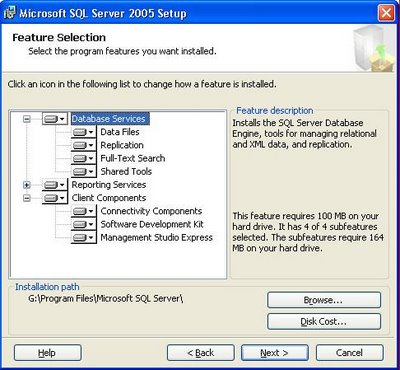
Executing SQLEXPR_ADV.EXE launches the Express version of the SQL Server 2005 setup program. In most cases, you'll want to install all Advanced Services, as shown here:

The SQL Express instance I attempted to update was installed on a Windows XP partition on which SQL Server 2005 Standard Edition and SQL Express were installed. Standard Edition was removed before starting the upgrade. I encountered an undocumented error during Database Engine installation that opened the following message box:

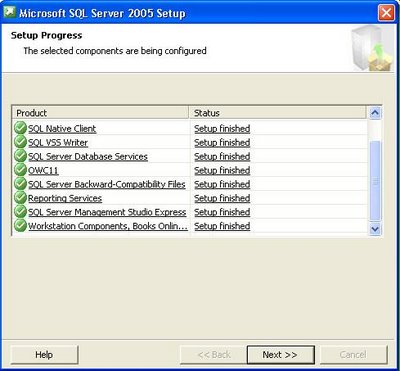
It was impossible to recover from this error, so I deleted the SQL Server Express instance and re-started the installation with mixed-mode authentication, which ran to completion, as shown here:

I then used SSMSE to reattach the original SQLEXPRESS instance's .mdf and .ldf files to the new SQLEXPRESS instance:

The SQL Server Configuration untility gains FullText Search and Reporting Services nodes:

The following downloads are available for SQL Server Express with Advanced Services and "vanilla" SQL Server Express:

Microsoft SQL Server 2005 Management Studio Express - CTP March 2006 (SQLServer2005_SSMSEE.msi, 39 MB). This download installs an updated version of SSMSE and is intended for users of SQL Server Express that's been updated to SP1 (without Advanced Services).

Microsoft SQL Server 2005 Express Edition Toolkit CTP March 2006 (SQLEXPR_TOOLKIT.EXE, 213 MB). The toolkit installs SSMSE, BIDS, client connectivity components, and SDKs. You need to install only BIDS from the Toolkit if you installed or upgraded SQL Server Express with Advanced Services.

Installing Business Intelligence Development Studio

Executing SQLEXPR_TOOLKIT.EXE launches the same setup app with a different list of installation options:

Features you select for installation that duplicate previously installed items, such as the Software Development Kit, are skipped during the installation process.

Expected SP1 RTM Date

According to Microsoft's Ilya Bukshteyn, RTM for SQL Server 2005 SP1 is scheduled for April 2006, which doesn't leave much time for the community to test the preview.

Technorati: